| Author |
Message |
AnalogRocks
Forum Moderator

Joined: 08 Mar 2006
Posts: 26706
Location: Toronto, Ontario, Canada
TV/Projector: Sony 1252Q, AMPRO 4000G
|
| Posted: Mon Mar 09, 2009 1:45 am Post subject: |
|
|
All those have component output.
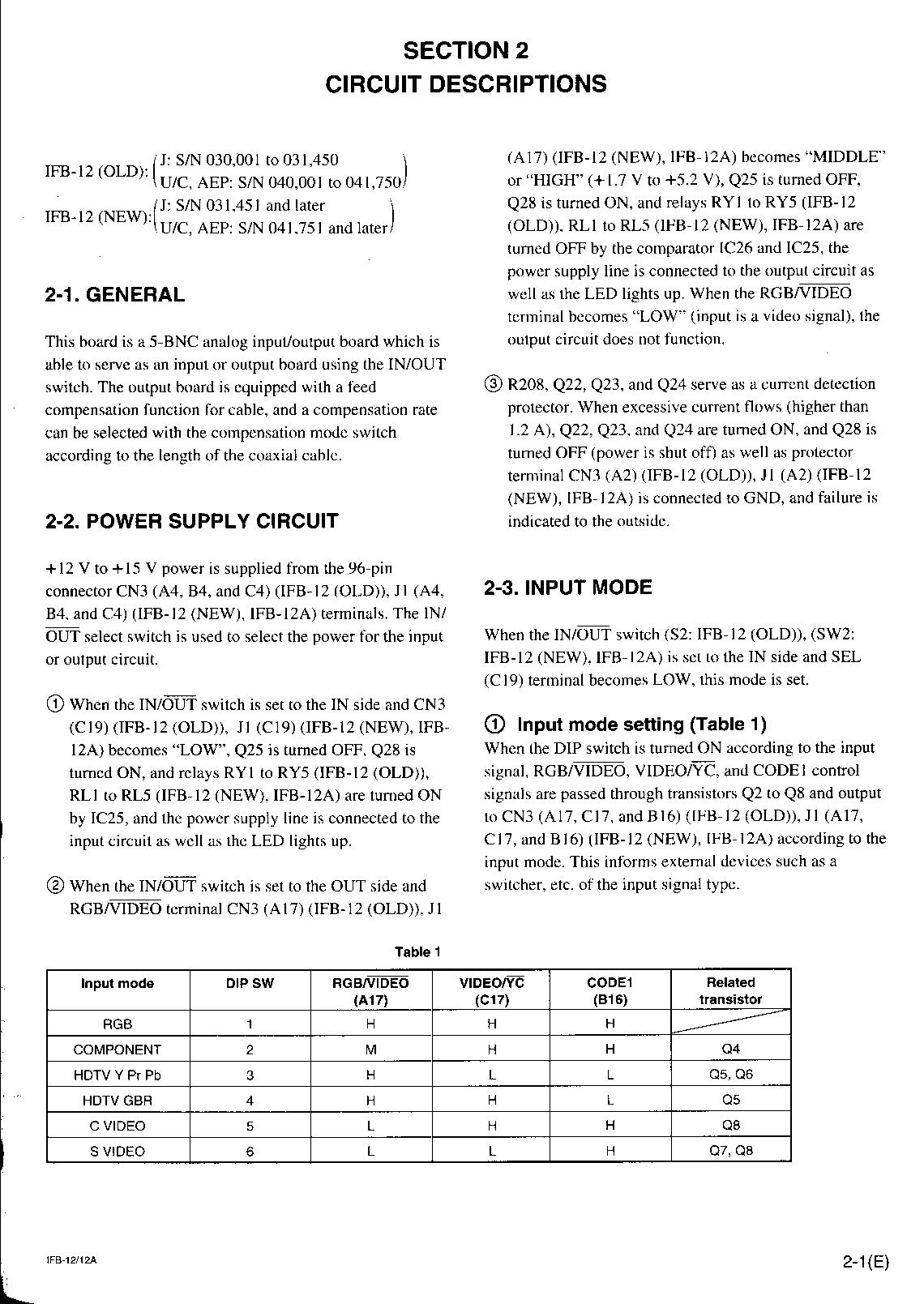
Anyone have the IFB12a manual handy so we can see how to set the jumpers?
_________________
Tech support for nothing
CRT.
HD done right!
|
|
| Back to top |
|
 |
boingo
Joined: 01 Mar 2009
Posts: 60
|
| Posted: Mon Mar 09, 2009 11:29 am Post subject: |
|
|
Is this the right manual ?
| Description: |
|
| Filesize: |
332.17 KB |
| Viewed: |
5451 Time(s) |
|
|
|
| Back to top |
|
|
boingo
Joined: 01 Mar 2009
Posts: 60
|
| Posted: Mon Mar 09, 2009 11:33 am Post subject: |
|
|
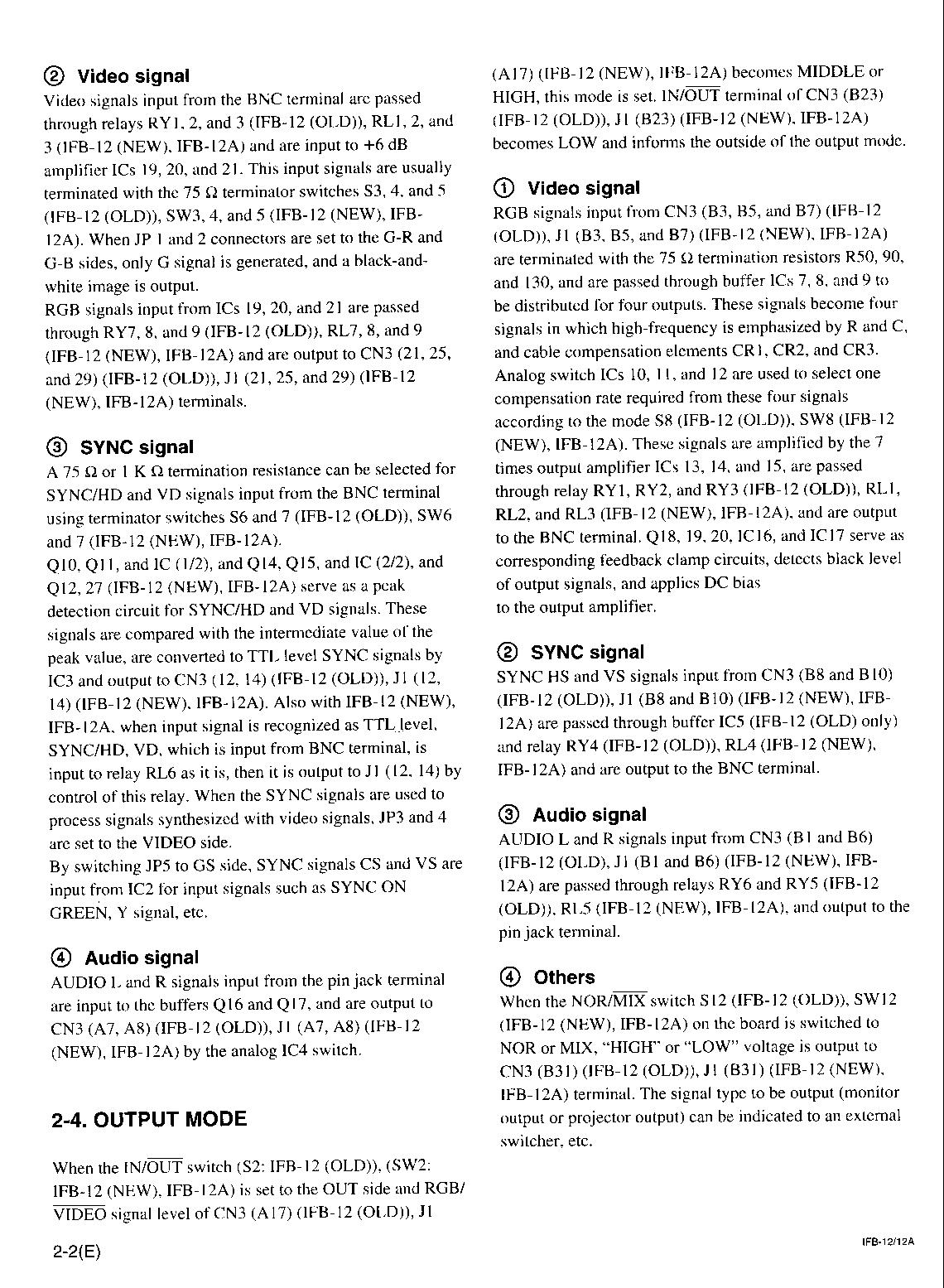
part 2
| Description: |
|
| Filesize: |
428.76 KB |
| Viewed: |
5444 Time(s) |
|
|
|
| Back to top |
|
|
boingo
Joined: 01 Mar 2009
Posts: 60
|
| Posted: Tue Mar 10, 2009 8:33 am Post subject: |
|
|
Im wondering if the internal software/menu's of input type looks after the input signal and not the DIP switches...anyone know ?
Cheers
|
|
| Back to top |
|
|
ecrabb
Forum Moderator

Joined: 13 Mar 2006
Posts: 15909
Location: Utah
TV/Projector: JVC RS40, Epson 5010
|
| Posted: Tue Mar 10, 2009 3:28 pm Post subject: |
|
|
I could be wrong, but I think the newer projector chassis like the G70, G90, and presumably your newer digital could be configured via the projector's firmware (internal menus). I think you only needed to use the DIP switches on older machines and switchers.
Forget about RGBHV for the moment; none of your sources has it, and you don't need it. Have you simply tried connecting your HD source via HD component (your set-top box) and and SD component source (your DVD player) and using the menus to configure the input appropriately to display it? You should be good to go.
SC
|
|
| Back to top |
|
|
boingo
Joined: 01 Mar 2009
Posts: 60
|
| Posted: Tue Mar 10, 2009 9:18 pm Post subject: |
|
|
Hi SC
Yeah I should have mentioned..I tried before connecting component DVD but no show..I selected the input type via the menu..only get composite to work so far....scratches head
|
|
| Back to top |
|
|
AnalogRocks
Forum Moderator
Joined: 08 Mar 2006
Posts: 26706
Location: Toronto, Ontario, Canada
TV/Projector: Sony 1252Q, AMPRO 4000G
|
| Posted: Tue Mar 10, 2009 10:20 pm Post subject: |
|
|
Wow those manual pages are written in tesk-a-neese aren't they?!
_________________
Tech support for nothing
CRT.
HD done right!
|
|
| Back to top |
|
|
ecrabb
Forum Moderator
Joined: 13 Mar 2006
Posts: 15909
Location: Utah
TV/Projector: JVC RS40, Epson 5010
|
| Posted: Tue Mar 10, 2009 10:53 pm Post subject: |
|
|
Yeah, those pages make my head hurt. I'll look at the paper manual for my IFB-12 this evening and see if I can come up with a switch configuration that should work.
SC
|
|
| Back to top |
|
|
boingo
Joined: 01 Mar 2009
Posts: 60
|
| Posted: Wed Mar 11, 2009 9:44 am Post subject: |
|
|
Guys,
Those IFB12 Manuals difficult to read....
Yeah.. I was thinking it was just me !
Thanks SC
Your help is Most appreciated 
|
|
| Back to top |
|
|
boingo
Joined: 01 Mar 2009
Posts: 60
|
| Posted: Sat Jun 12, 2010 1:25 pm Post subject: |
|
|
Hello All
Im Still using this OLD SONY VPLX200 LCD Projector !.... its still going strong after cleaning and calibration
Got a question...the Sony VPLX2000 is very similar as we know to the SONY CRT G70/G90 etc (same input cards as in previous posts..similar physical chassis)......
The Problem:
I just realised after using this for ages that its not accepting DVD Progressive Scan (via component input) ...only DVD interlaced..I had thought I was watching P.SCAN from my DVD player but no...LOL....I pressed P.SCAN lost the display and instead had an error display saying 'Check Input Signal'
There is no setting in the internal menus for the component input to change to P.SCAN on the projector...So how do you guys watch P.SCAN on your G70/G90 etc ...any particular settings (DIP switches or ?)
Thanks as always
|
|
| Back to top |
|
|
ecrabb
Forum Moderator
Joined: 13 Mar 2006
Posts: 15909
Location: Utah
TV/Projector: JVC RS40, Epson 5010
|
| Posted: Sat Jun 12, 2010 3:09 pm Post subject: |
|
|
Boingo,
480p is no problem on a CRT projector, but then neither is practically any other resolution (within reason). CRT projectors are multiscan devices and will handle a huge variety of resolution/refresh combinations. Your digital is entirely different, though... Because it's a fixed-pixel device, it uses a scaler to format all incoming video signals to match it precisely to the panel's resolution. I looked up the brochure for your projector, and I couldn't find a reference to 480p in the signal compatibility table. My quick read is by no means the definitive answer, but the projector probably isn't displaying 480p because the internal scaler doesn't know what to do with it. The brochure for your machine is copyright 1998, and I think progressive scan DVD players started showing up around 1999 or so.
If you want to keep the projector, what you might do is see if you can find an older used scaler for cheap, to scale the 480p signal to something the X2000 will handle on the RGBHV (computer) input, like 1024x768 with black bars. Something like a DVDO iScan HD or HD+ would do that. If you're patient, you might be able to get one pretty cheap on fleabay.
SC
|
|
| Back to top |
|
|
CIR Engineering

Joined: 25 Aug 2008
Posts: 4269
Location: Chicago USA & Berlin Germany
|
| Posted: Sat Jun 12, 2010 6:00 pm Post subject: |
|
|
Do you know what the NATIVE resolution of this projector is? That would be a first step in getting input signals to work and look best.
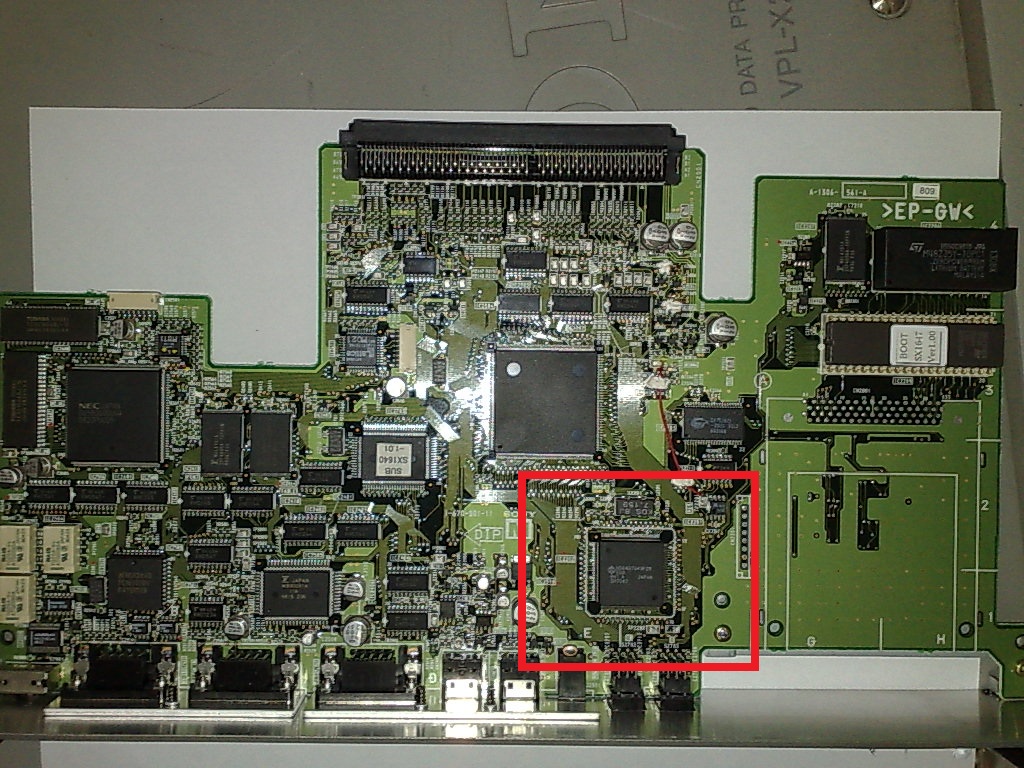
Could you please post a close up clear shot of the IC circled in red below? We don't want the parts from your projector, but if we can find a way to get more of these projectors, or the part from Sony, we may be able to save some G90 CRT projectors.

Thanks
craigr
| Description: |
|
| Filesize: |
337.42 KB |
| Viewed: |
6993 Time(s) |
|
_________________
JETI 1501-HiRes 2nm Spectroradiometer
JETI 1211 Spectroradiometer
Photo Research PR-650 Spectroradiometer
Klein K10-A Colorimeter
Murideo Fresco SIX-G HDMI 2.x Multimedia Generator
Murideo Fresco SIX-A HDMI 2.x Analyzer
Light Illusion ColourSpace XPT Color Calibration Software
Light Illusion LightSpace XPT Pro Version 10.x Color Calibration Software
OMARDRIS JVC Software Patch to use K10-A and Jeti with JVC OEM AutoCal Software!
Sencore CR7000 CRT Tube Analyzer / Rejuvenater
Authorized Dealer for Lumagen & just about everything worth buying 
www.CIR-Engineering.com - craigr@cir-engineering.com
Phone: 865-405-6892
|
|
| Back to top |
|
|
boingo
Joined: 01 Mar 2009
Posts: 60
|
| Posted: Sun Jun 13, 2010 1:59 am Post subject: |
|
|
Hi SC
See I knew the CRT's were better  thanks SC...I was kinda deluding myself that this issue wasnt because it was to old. thanks SC...I was kinda deluding myself that this issue wasnt because it was to old.
ThE X2000 came out in 1999 but must have missed (just) the Progressive Scan.
Its a good ol Projector..so might have a peak around ebay....
It expalins why I was not been able to get it to work with another DVD player (that was native P.SCAN ) originally...just did not twig at the time.
Thanks for your helpful post
Cheers
| ecrabb wrote: | Boingo,
480p is no problem on a CRT projector, but then neither is practically any other resolution (within reason). CRT projectors are multiscan devices and will handle a huge variety of resolution/refresh combinations. Your digital is entirely different, though... Because it's a fixed-pixel device, it uses a scaler to format all incoming video signals to match it precisely to the panel's resolution. I looked up the brochure for your projector, and I couldn't find a reference to 480p in the signal compatibility table. My quick read is by no means the definitive answer, but the projector probably isn't displaying 480p because the internal scaler doesn't know what to do with it. The brochure for your machine is copyright 1998, and I think progressive scan DVD players started showing up around 1999 or so.
If you want to keep the projector, what you might do is see if you can find an older used scaler for cheap, to scale the 480p signal to something the X2000 will handle on the RGBHV (computer) input, like 1024x768 with black bars. Something like a DVDO iScan HD or HD+ would do that. If you're patient, you might be able to get one pretty cheap on fleabay.
SC |
|
|
| Back to top |
|
|
boingo
Joined: 01 Mar 2009
Posts: 60
|
| Posted: Sun Jun 13, 2010 2:02 am Post subject: |
|
|
Hi Craigr
Native Res is 1024x768
The Projector is in situ at present...but check back often..I will try and get a better shot.
Cheers
| CIR Engineering wrote: | Do you know what the NATIVE resolution of this projector is? That would be a first step in getting input signals to work and look best.
Could you please post a close up clear shot of the IC circled in red below? We don't want the parts from your projector, but if we can find a way to get more of these projectors, or the part from Sony, we may be able to save some G90 CRT projectors.
Thanks
craigr |
|
|
| Back to top |
|
|
boingo
Joined: 01 Mar 2009
Posts: 60
|
|
| Back to top |
|
|
CasetheCorvetteman

Joined: 09 Nov 2008
Posts: 6326
Location: Australia
|
| Posted: Sun Jun 13, 2010 9:42 am Post subject: |
|
|
Why would you lose surround sound?
My laptop is a 01 model ASUS, and it has surround, but if yours does not, why dont you just build yourself a real basic computer with a decent sound card that has 7.1 output? You wont need much power, and it wont cost you much.
|
|
| Back to top |
|
|
boingo
Joined: 01 Mar 2009
Posts: 60
|
| Posted: Sun Jun 13, 2010 10:17 am Post subject: |
|
|
For Craigr
Close up of that IC you wanted
| Description: |
|

Download |
| Filename: |
CLOSE--IC.jpg |
| Filesize: |
404.1 KB |
| Downloaded: |
391 Time(s) |
Last edited by boingo on Sun Jun 13, 2010 10:32 am; edited 1 time in total
|
|
| Back to top |
|
|
boingo
Joined: 01 Mar 2009
Posts: 60
|
| Posted: Sun Jun 13, 2010 10:23 am Post subject: |
|
|
Case
You are right... just more work....just finished theatre room so will have to do more to make it work with laptops surround sound ...its all possible
EDIT: Just realised that I would not immediately be able to use the Laptop VGA as the Sony 2000 projector does not have a VGA input....I think you can get a VGA to RGBHV cable for the job
| CasetheCorvetteman wrote: | Why would you lose surround sound?
My laptop is a 01 model ASUS, and it has surround, but if yours does not, why dont you just build yourself a real basic computer with a decent sound card that has 7.1 output? You wont need much power, and it wont cost you much. |
Last edited by boingo on Sun Jun 13, 2010 11:01 am; edited 1 time in total
|
|
| Back to top |
|
|
boingo
Joined: 01 Mar 2009
Posts: 60
|
| Posted: Sun Jun 13, 2010 10:29 am Post subject: |
|
|
Just for Reference/Information --- here is a pic of the interface cards on the back of the SONY VPLX2000 see attachment
| Description: |
| INTERFACES BACK OF SONY VPL 2000 |
|
Download |
| Filename: |
INTERFACES-2000.jpg |
| Filesize: |
367.37 KB |
| Downloaded: |
356 Time(s) |
|
|
| Back to top |
|
|
CasetheCorvetteman
Joined: 09 Nov 2008
Posts: 6326
Location: Australia
|
| Posted: Sun Jun 13, 2010 12:56 pm Post subject: |
|
|
|
Yeah mate, get a cable that goes from the 15 pin RGBHV found on most computers to the 5 BNC connections found on most projectors that take an RGBHV signal. Its the same signal, just that one has 5 plugs and the other has one plug.
|
|
| Back to top |
|
|
|
|




