| Author |
Message |
akajester

Joined: 09 Jul 2008
Posts: 934
Location: Wisconsin
|
| Posted: Tue Jan 12, 2010 4:48 am Post subject: |
|
|
|
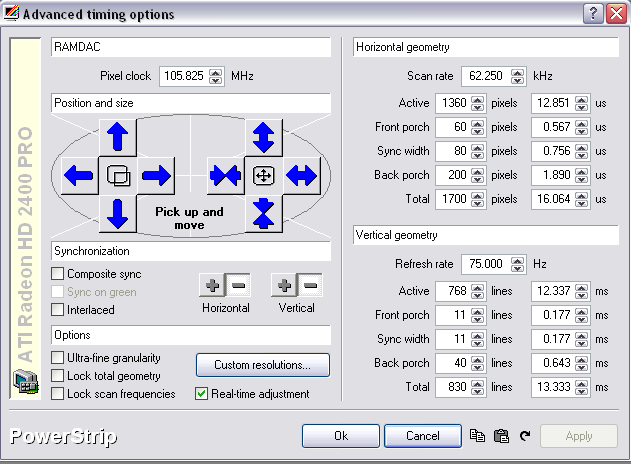
I tried to make shortcuts with ati ccc but they didn't work. I ended up using powerstrip. If you right click the save to clipboard button it'll create a shortcut on the desktop to powerstrip with the custom timings. worked like a charm!
|
|
| Back to top |
|
 |
Ile

Joined: 09 Mar 2006
Posts: 1491
Location: Jyväskylä, Finland
|
| Posted: Sun Jan 17, 2010 11:33 pm Post subject: |
|
|
Made little chances to my 1080i96 timings in previous page, reduced vertical timings and now I got exactly 47.952 dialed in.

Played also with my 1360x768/75 PAL timings (DVD/DTV) and get rid of both V/H banding.
| Description: |
|
| Filesize: |
32.18 KB |
| Viewed: |
9157 Time(s) |
|
|
|
| Back to top |
|
|
akajester
Joined: 09 Jul 2008
Posts: 934
Location: Wisconsin
|
| Posted: Mon Jan 18, 2010 3:32 am Post subject: |
|
|
|
Thanks Ile, I'll check this out.
|
|
| Back to top |
|
|
akajester
Joined: 09 Jul 2008
Posts: 934
Location: Wisconsin
|
| Posted: Mon Jan 18, 2010 3:45 pm Post subject: |
|
|
Ile the 1080i worked great. I've had some problems with the newer ati ccc, I'm going to swap it out with an nvidia card I just bought, to see if it's friendlier in the htpc.
EDIT: Swapped in the nvidia and with the latest drivers couldn't for the life of me get it to do interlaced. It kept trying to test the settings then failing and going back to the previous settings. I ended up swapping back in the ati, at least I know how to get that to work.
|
|
| Back to top |
|
|
Elaine Benes
Joined: 25 Apr 2006
Posts: 1416
|
| Posted: Thu Apr 15, 2010 10:02 am Post subject: |
|
|
|
Hay anyone updated this to work with the newest ATI 5xxx series cards ? Powerstrip doesn't work with them...
|
|
| Back to top |
|
|
Ile
Joined: 09 Mar 2006
Posts: 1491
Location: Jyväskylä, Finland
|
| Posted: Thu Apr 15, 2010 11:37 am Post subject: |
|
|
| Elaine Benes wrote: | | Hay anyone updated this to work with the newest ATI 5xxx series cards ? Powerstrip doesn't work with them... |
Ati took same policy with 5xxx that Nvidia did with their newest cards, they don't provide enough info for Entech.
It took two years to get powerstrip work with Nvidia 8xxx without information.
Alternative solution
http://www.bredbild.se/edid/
Sounds easy. 
Have fun or swap to ati 4xxx.
|
|
| Back to top |
|
|
VideoGrabber
Joined: 09 Apr 2006
Posts: 933
Location: Michigan
|
| Posted: Thu Apr 15, 2010 2:43 pm Post subject: |
|
|
It seems strange that both Nvidia and ATI would withhold information from Entech (who's been supporting their cards for a long time). Especially when having Powerstrip may make the difference between being able to use a card or not. Seems to me like a good way to lose sales.
_________________
- Tim
|
|
| Back to top |
|
|
Elaine Benes
Joined: 25 Apr 2006
Posts: 1416
|
| Posted: Fri Apr 16, 2010 12:23 am Post subject: |
|
|
[quote="Ile"] | Elaine Benes wrote: |
Sounds easy. :D
|
Hahaha, yeah, it *sounds* easy enough...I'm going to likely just suffer along without any custom resolutions until someone MUCH MUCH smarter than me bangs out a little app to automatically translate desired custom res's and write them to your edid...
|
|
| Back to top |
|
|
Mark_A_W
Joined: 15 Mar 2006
Posts: 3068
Location: Sunny Melbourne Australia
|
| Posted: Fri Apr 16, 2010 12:37 am Post subject: |
|
|
|
Get an Nvidia card. I'm running one in my TV HTPC and it just works. The only trick is interlaced res entries use half values for vertical res (so 540 instead of 1080).
|
|
| Back to top |
|
|
David_Web
Joined: 02 May 2007
Posts: 418
Location: Sweden
|
| Posted: Fri Apr 16, 2010 9:24 am Post subject: |
|
|
Found this:
1. Download and install the latest MonInfo from here http://www.entechtaiwan.com/files/moninfo.exe
2. Select your EDID from the list of "Display IDs"
3. Go to the File menu and select Edit
4. Paste your native/preferred timing modeline into the box
5. Click Apply, then Exit
6. Review the decoding to make sure it is what you wanted
7. Go to the File menu and select "Create INF..."
8. Close MonInfo and install the INF you created as a monitor "driver"
I have not tested it but it "seems" easier than the link above.
Would this trick work with XP as well?
_________________
SNR of people are ridiculously low.
|
|
| Back to top |
|
|
akajester
Joined: 09 Jul 2008
Posts: 934
Location: Wisconsin
|
| Posted: Sun Jun 13, 2010 11:18 pm Post subject: |
|
|
|
So, I resetup my htpc and used the last set of timings that Ile posted here which I was using before. Everything is working pretty good. However, I still notice a slight stutter on pans in movies. One thing that stands out is that the timings are for 96hz, but the barco "sees" it as 94hz. Is that just the barco misreporting? or are my settings possibly off which is causing slight judder in my bluray rips? The stuttering was occuring before I resetup my htpc too. Thanks!
|
|
| Back to top |
|
|
Ile
Joined: 09 Mar 2006
Posts: 1491
Location: Jyväskylä, Finland
|
| Posted: Mon Jun 14, 2010 7:40 am Post subject: |
|
|
| akajester wrote: | | So, I resetup my htpc and used the last set of timings that Ile posted here which I was using before. Everything is working pretty good. However, I still notice a slight stutter on pans in movies. One thing that stands out is that the timings are for 96hz, but the barco "sees" it as 94hz. Is that just the barco misreporting? or are my settings possibly off which is causing slight judder in my bluray rips? The stuttering was occuring before I resetup my htpc too. Thanks! |
Barco always sees refresh rates bit off, so I guess it's something wrong with your htpc.
Disabling deinterlacing from playback software helped in my low power pc.
Do you use reclock?
|
|
| Back to top |
|
|
akajester
Joined: 09 Jul 2008
Posts: 934
Location: Wisconsin
|
| Posted: Mon Jun 14, 2010 12:21 pm Post subject: |
|
|
I've never been able to get reclock to work right. Perhaps I should give it another try. I'll check deinterlacing. I'm using powerdvd 10 codec. Also the ATI CCC has some enabled settings I was wondering about. I think one was pulldown detection and possibly a "smooth playback" option. Also have aero enabled in Windows 7, but I've heard both arguments for having that enabled.
thanks,
|
|
| Back to top |
|
|
akajester
Joined: 09 Jul 2008
Posts: 934
Location: Wisconsin
|
| Posted: Tue Jun 15, 2010 12:01 am Post subject: |
|
|
Ile, I tried all combinations of settings in the ati CCC (deinterlacing and pulldown detection off and on). I also turned off hardware acceleration in powerdvd codec and tried turning off aero glass in windows 7. Still stuttering. I'll try reclock. Any other suggestions?
thanks!
dale
|
|
| Back to top |
|
|
akajester
Joined: 09 Jul 2008
Posts: 934
Location: Wisconsin
|
| Posted: Tue Jun 15, 2010 2:33 pm Post subject: |
|
|
Ile, I tried Reclock last night and any time I turn on the OSD during video playback the htpc would BSOD. bummer! So, not sure what to try next. Thanks,
Dale
|
|
| Back to top |
|
|
Ile
Joined: 09 Mar 2006
Posts: 1491
Location: Jyväskylä, Finland
|
| Posted: Wed Jun 16, 2010 9:52 am Post subject: |
|
|
What is your player software? There could also be deinterlacing settings, least PDVD have.
Don't have any experience from Windows 7 and neither from reclock.
I got good result with old P4 3.2 GHz, XP, Ati HD3600 (or something) with hardware acceleration and PDVD8 (deinterlacing disabled).
|
|
| Back to top |
|
|
akajester
Joined: 09 Jul 2008
Posts: 934
Location: Wisconsin
|
| Posted: Thu Jun 17, 2010 2:47 am Post subject: |
|
|
|
Ile, I use powerdvd codec in Media Player. I checked the codec options and for deinterlacing it has Auto, Bob, and Weave. no option to disable. Unless they have some sort of registry hack to turn it off completely. Both Bob and Weave seemed to work a little better than Auto, but still not right.
|
|
| Back to top |
|
|
akajester
Joined: 09 Jul 2008
Posts: 934
Location: Wisconsin
|
| Posted: Thu Jun 17, 2010 12:42 pm Post subject: |
|
|
I tried all combination of dxva with auto, bob, weave, etc. I even added the ATI HD registry tweak reg file. When I turn off dxva and choose weave it looks different, but not right. With default settings and with forced Bob it seems like I'm getting some kind of 2-2-3 pattern where it looks right for a few then off for one. When I do weave it looks to me like those are meshed together and the picture gets blurry but the motion is smooth. I'm at a loss. I just don't know enough about this to get it working right. Maybe PowerDvd isn't the way to go.
Thanks,
Dale
|
|
| Back to top |
|
|
Mark_A_W
Joined: 15 Mar 2006
Posts: 3068
Location: Sunny Melbourne Australia
|
| Posted: Thu Jun 17, 2010 12:46 pm Post subject: |
|
|
God no Powerdvd sucks.
What are you watching that needs deinterlacing?
Bluray rips are progressive.
|
|
| Back to top |
|
|
akajester
Joined: 09 Jul 2008
Posts: 934
Location: Wisconsin
|
| Posted: Thu Jun 17, 2010 1:28 pm Post subject: |
|
|
Mark, I'm trying to turn off deinterlacing but it seems to be not possible with powerdvd codec. I had problems with MPCHC and FFDSHOW so switched to powerdvd which took care of the issues but caused others. Also tried coreavc but it was really bad. Any suggestions?
Thanks, Dale
|
|
| Back to top |
|
|
|
|





