| Author |
Message |
perisoft

Joined: 29 Aug 2007
Posts: 2920
Location: Ithaca, NY
|
| Posted: Sun Feb 08, 2009 12:37 pm Post subject: BG808s 96i timings? |
|
|
I've got my HTPC back up and running - with bluray!$$1# - so now I'm working on setups again. But I can't get *any* interlaced resolutions to work.
I'm running an ATI HD4850 with powerstrip, but whenever I select an interlaced mode (no matter which it is, it seems), I get the top half of the image, stretched way out. I've tried +/- polarity, composite sync, anything I can think of. I *was* running interlaced with this PJ, so it's not the machine.
Any ideas? Has anyone got 96i timings for a bg808s?
Thanks!
_________________

|
|
| Back to top |
|
 |
Corleone88
Joined: 09 Dec 2006
Posts: 474
Location: France
|
| Posted: Sun Feb 08, 2009 5:46 pm Post subject: |
|
|
|
Do you have the same problem with 72Hz ?
|
|
| Back to top |
|
|
perisoft
Joined: 29 Aug 2007
Posts: 2920
Location: Ithaca, NY
|
| Posted: Sun Feb 08, 2009 6:04 pm Post subject: |
|
|
| Corleone88 wrote: | | Do you have the same problem with 72Hz ? |
Progressive resolutions all work fine; interlaced are all broken. I've tried probably dozens of combinations. It's quite odd. And the refresh the Barco is reporting doesn't seem to have much to do with the refresh I pick in PowerStrip...
_________________
|
|
| Back to top |
|
|
Corleone88
Joined: 09 Dec 2006
Posts: 474
Location: France
|
| Posted: Sun Feb 08, 2009 6:19 pm Post subject: |
|
|
My experience with my BG808 and powerstrip in interlaced mode is : when you set 24Hz, the Barco understands 48Hz, so if you set 96Hz, the Barco will understand 192Hz which is probably why you have a weird picture  . .
I tset up mine to 36Hz (=72Hz for Barco).
By the way, why do you try 96Hz, is 72Hz not high enough for you?
|
|
| Back to top |
|
|
perisoft
Joined: 29 Aug 2007
Posts: 2920
Location: Ithaca, NY
|
| Posted: Sun Feb 08, 2009 9:53 pm Post subject: |
|
|
That's what's happening indeed. But still I just get the top half(ish) of the image. Grr.
_________________
|
|
| Back to top |
|
|
akajester

Joined: 09 Jul 2008
Posts: 934
Location: Wisconsin
|
| Posted: Sun Jan 10, 2010 3:11 pm Post subject: |
|
|
Perisoft, did you ever get this figured out? I had originally setup my bg808s with 1080p @ 72hz, but when I slide it around in powerstrip the refresh gets adjusted too. What I end up with motion judder with BR's.
I wanted to try 1080i @ 96hz and ended up with only the top half of the htpc image on the screen. I think this is the same thing you mentioned above.
Thanks!
-akajester
|
|
| Back to top |
|
|
Ile

Joined: 09 Mar 2006
Posts: 1491
Location: Jyväskylä, Finland
|
| Posted: Sun Jan 10, 2010 4:53 pm Post subject: |
|
|
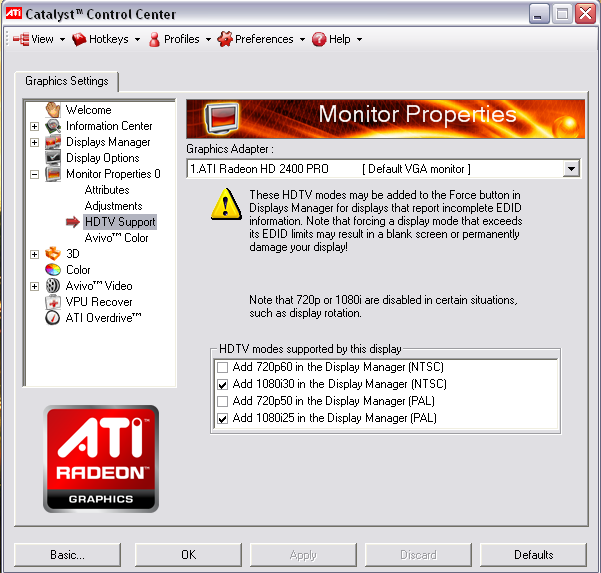
Enabling interlaced resolutions from Catalyst and selecting 1080i30 worked for me.
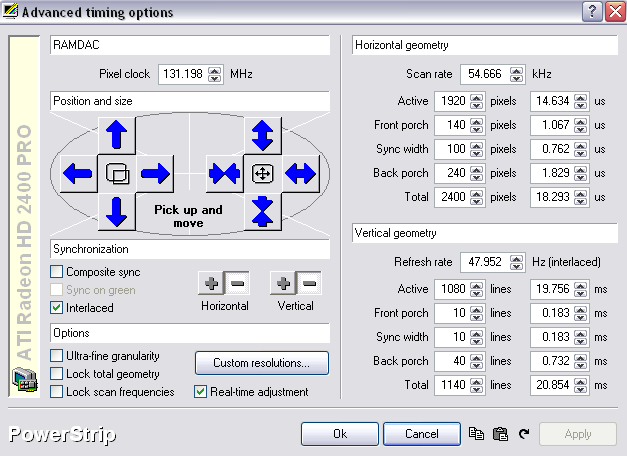
Then you can create 1080i96 resolution in Powerstrip. Vertical refresh should be 47.952 Hz.
Now you can turn deinterlace off from your player software, that could make playback smoother. Least it seem to help in my pc.
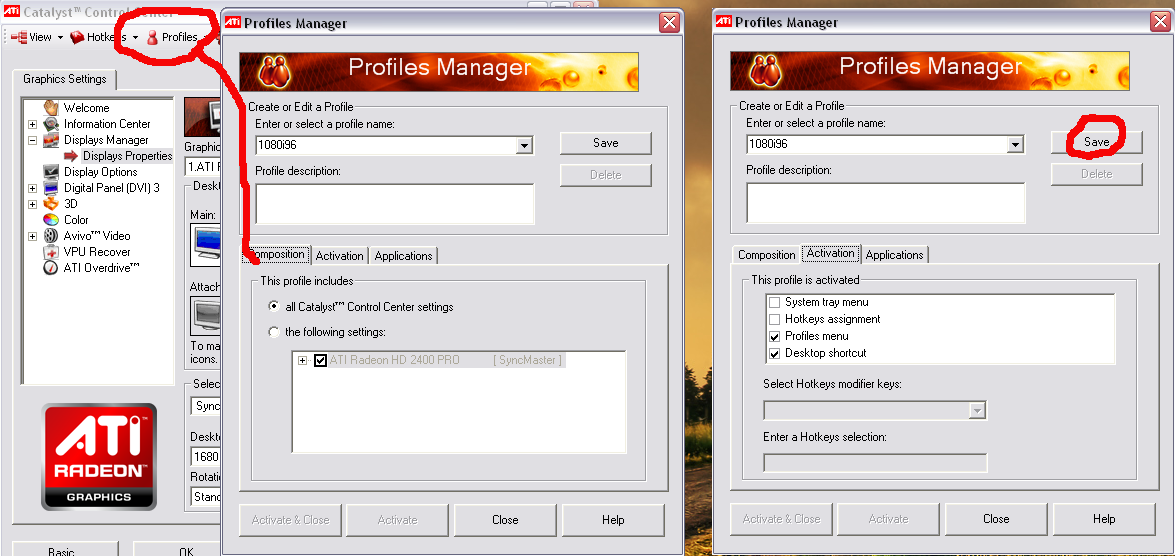
If you like to make desktop shortcuts for powerstrip resolutions, those can be made using Catalyst profiles, check my last attachment.
| Description: |
|
| Filesize: |
32.09 KB |
| Viewed: |
12914 Time(s) |
|
| Description: |
|
| Filesize: |
75.96 KB |
| Viewed: |
12913 Time(s) |
|
| Description: |
|
| Filesize: |
110.89 KB |
| Viewed: |
10162 Time(s) |
|
Last edited by Ile on Sun Jan 17, 2010 11:19 pm; edited 1 time in total
|
|
| Back to top |
|
|
akajester
Joined: 09 Jul 2008
Posts: 934
Location: Wisconsin
|
| Posted: Sun Jan 10, 2010 10:10 pm Post subject: |
|
|
Ile, what version of ccc are you using? I don't see these options with 9.12 and windows 7.
thanks!
|
|
| Back to top |
|
|
akajester
Joined: 09 Jul 2008
Posts: 934
Location: Wisconsin
|
| Posted: Sun Jan 10, 2010 10:35 pm Post subject: |
|
|
|
I can get interlaced to work but only the top half of screen is visible on the pj. any suggestions?
|
|
| Back to top |
|
|
Elaine Benes
Joined: 25 Apr 2006
Posts: 1416
|
| Posted: Sun Jan 10, 2010 11:31 pm Post subject: |
|
|
Its absolutely NOT the projector that is limiting your use of 1080i 96Hz refresh. I'm using it now with my 808s but from an Intel graphics chipset. Personally, I've NEVER, EVER gotten Powerstrip to work properly, but the handy little Intel custom res app works PERFECTLY...
Best of luck figuring this out, its an ATI problem...
|
|
| Back to top |
|
|
akajester
Joined: 09 Jul 2008
Posts: 934
Location: Wisconsin
|
| Posted: Mon Jan 11, 2010 1:05 am Post subject: |
|
|
|
I remember the screen that Ile shows when I was using winxp, but it's not there in win7. argh!
|
|
| Back to top |
|
|
Mark_A_W
Joined: 15 Mar 2006
Posts: 3068
Location: Sunny Melbourne Australia
|
| Posted: Mon Jan 11, 2010 1:28 am Post subject: |
|
|
| akajester wrote: | | I can get interlaced to work but only the top half of screen is visible on the pj. any suggestions? |
You have to put the card in "interlaced" mode by selecting 1080i 30hz (or 1920x1080 with a refresh rate of 30i or 29i) FIRST, using CCC or Windows display settings.
Then use Powerstrip to load the custom timing.
This is my timing:
PowerStrip timing parameters:
1920x1080=1920,112,128,115,1080,46,7,30,126874,542
Generic timing details for 1920x1080:
HFP=112 HSW=128 HBP=115 kHz=56 VFP=46 VSW=7 VBP=30 Hz=48
VESA detailed timing:
PClk=126.87 H.Active=1920 H.Blank=355 H.Offset=96 HSW=128 V.Active=1080 V.Blank=83 V.Offset=46 VSW=7
Linux modeline parameters:
"1920x1080" 126.874 1920 2032 2160 2275 1080 1126 1133 1163 interlace -hsync -vsync
Which is very slightly different to Kai's original, and maybe a tiny bit different to the one in the image above.
Last edited by Mark_A_W on Mon Jan 11, 2010 8:47 am; edited 1 time in total
|
|
| Back to top |
|
|
akajester
Joined: 09 Jul 2008
Posts: 934
Location: Wisconsin
|
| Posted: Mon Jan 11, 2010 4:28 am Post subject: |
|
|
Mark, your timings worked! I first had to set the ati CCC to 30i, then apply the powerstrip settings.
I did notice a little judder at first. The hz was one click below 48.xxx, so I bumped it up one click to just over 48 and that seemed to make a difference. OMG, I haven't seen smooth motion like this ever from an htpc! If I look closely I can see the scanlines, but to be honest the picture seems more natural and easier on the eyes.
Only problem i've noticed now is hdtv looks awful. I'm guessing because I've now optimized for 24 frame sources instead of 30 frame right?
thanks!
|
|
| Back to top |
|
|
Mark_A_W
Joined: 15 Mar 2006
Posts: 3068
Location: Sunny Melbourne Australia
|
| Posted: Mon Jan 11, 2010 4:44 am Post subject: |
|
|
Glad it worked.
Umm...it's supposed to be just under 48hz. It's actually meant to be 47.952 in powerstrip (which is 95.904hz interlaced).
And yes, for HDTV video sources you need to use 59.94hz, which is 29.97 in Powerstrip...or the bog standard 1080i timing.
|
|
| Back to top |
|
|
Ile
Joined: 09 Mar 2006
Posts: 1491
Location: Jyväskylä, Finland
|
| Posted: Mon Jan 11, 2010 9:25 am Post subject: |
|
|
| akajester wrote: | | Only problem i've noticed now is hdtv looks awful. I'm guessing because I've now optimized for 24 frame sources instead of 30 frame right? |
Make other res for hdtv with 29.97Hz refresh and create two desktop shortcuts to chance between those two. (see my previous posts 3. attachment)
If BG808s show raster ringing in left edge with Marks timings, try those I posted. That's why porches are about 150 pixel wider.
|
|
| Back to top |
|
|
Mark_A_W
Joined: 15 Mar 2006
Posts: 3068
Location: Sunny Melbourne Australia
|
| Posted: Mon Jan 11, 2010 12:39 pm Post subject: |
|
|
I get raster ringing too on my XG, I might try yours.
The tradeoff is less detail in the middle...
|
|
| Back to top |
|
|
akajester
Joined: 09 Jul 2008
Posts: 934
Location: Wisconsin
|
| Posted: Mon Jan 11, 2010 1:07 pm Post subject: |
|
|
Thanks guys! I'll report back with the results. now that I got it into interlaced mode I'll try Ile's settings too.
-akajester
|
|
| Back to top |
|
|
Ile
Joined: 09 Mar 2006
Posts: 1491
Location: Jyväskylä, Finland
|
| Posted: Mon Jan 11, 2010 2:13 pm Post subject: |
|
|
| Mark_A_W wrote: | I get raster ringing too on my XG, I might try yours.
The tradeoff is less detail in the middle... |
I remember that there was no big difference in sharpness between those two, when I was testing different timings.
Or jail bars was distracting so much that I wanted to forget that difference. 
|
|
| Back to top |
|
|
yonexsp
Joined: 25 Apr 2006
Posts: 311
|
| Posted: Mon Jan 11, 2010 8:45 pm Post subject: |
|
|
| Mark_A_W wrote: | I get raster ringing too on my XG, I might try yours.
The tradeoff is less detail in the middle... |
Hi Mark,
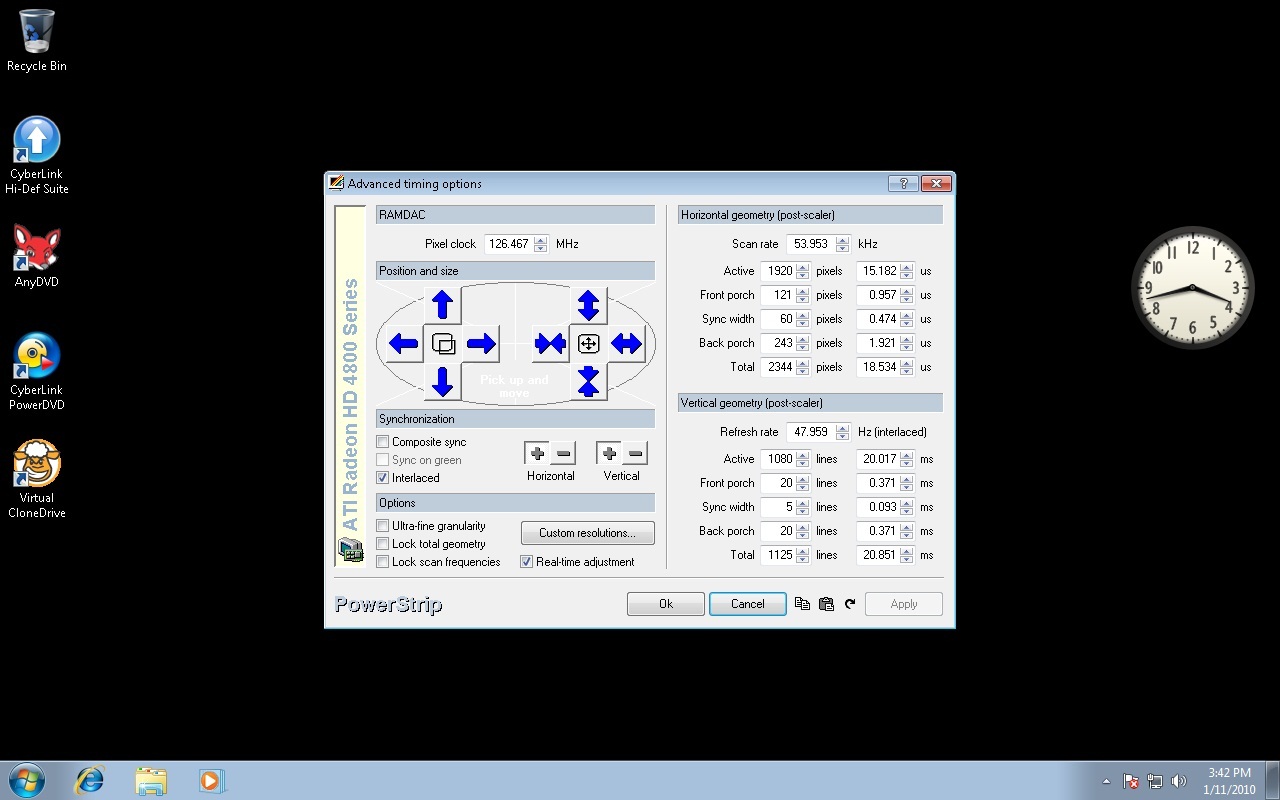
These are the settings I use for 1080@96 on my XG with no ringing, and Absolute Maximum raster usage. Any ringing i had disappeared with Windows 7 Vs Vista.
This gives you as big an image as possible on an XG.
Ken./
| Description: |
|
| Filesize: |
156.53 KB |
| Viewed: |
10194 Time(s) |
|
|
|
| Back to top |
|
|
akajester
Joined: 09 Jul 2008
Posts: 934
Location: Wisconsin
|
| Posted: Tue Jan 12, 2010 1:33 am Post subject: |
|
|
|
Ile, those settings worked great, thanks. I even made a shortcut on the desktop too! now I just need to make a another res for hdtv.
|
|
| Back to top |
|
|
|
|




