|
As this forum is rarely used anymore, we've locked it. Feel free to browse and read. Questions? Please reach out to us directly. Cheers! |

|
 |
|
|
| Author |
Message |
ecrabb
Forum Moderator

Joined: 13 Mar 2006
Posts: 15909
Location: Utah
TV/Projector: JVC RS40, Epson 5010
|
| Posted: Thu Jan 29, 2009 4:11 am Post subject: |
|
|
Dude, you definitely suck. Nice machine, ya bastage. You got yourself a hell of a kick-ass machine there for 2 g's.
Start looking for a red C-element, too for redder (less orange) reds. Put that on the to-do list for when/if you decide to replace the green - which won't look bad at all as long as you stay within the wear (don't worry about maximizing rasters!).
Congratulations!
SC
|
|
| Back to top |
|
 |
schmoe
Joined: 30 Mar 2008
Posts: 374
Location: Seattle, WA
|
| Posted: Thu Jan 29, 2009 4:15 am Post subject: |
|
|
Thanks. I will wear the SUCK badge with honor and try not to disgrace it. 
Hey, and a special thanks to you, ecrabb, for all the help you gave me on the other thread regarding my room layout.
|
|
| Back to top |
|
|
schmoe
Joined: 30 Mar 2008
Posts: 374
Location: Seattle, WA
|
| Posted: Sun Feb 01, 2009 9:42 pm Post subject: |
|
|
It alive, IT'S ALIVE!!!
I hung some BOC from the ceiling (temporary), did a quick table-top setup (also temporary) and dropped in a couple BluRays. It works! And it looks pretty good for a not-so-thorough setup.

The image above is at 1080p60 using HDFury2 and my BD player (Btw, my camera really sucks. The picture looks better than this). The screen size is 99" wide. It turns out I'm not going to be able to hit the suggested TD (actually, it depends on which version of the TD formula I use) so I won't be fully maximizing raster. I have very little wiggle room for projector placement, and if I bring the screen closer, it'll be too far into the room. Oh well, as it stands my quick setup is projecting beyond the burn area put on by the previous owner, and it's noticeable in bright scenes, so I have to bring the image in a bit anyway. Just kind of a bummer.
BTW, that ACON is one *handy* little accessory. I went into the service menu and did a full reset, and of course everything was out of whack at that point, and I was dreading having to converge the whole mess. The ACON isn't perfect, but it certainly does most of the heavy lifting, getting you 85% of the way there. Can't imagine owning a pj withone one.
|
|
| Back to top |
|
|
Nashou66

Joined: 12 Jan 2007
Posts: 16171
Location: West Seneca NY
|
| Posted: Sun Feb 01, 2009 9:58 pm Post subject: |
|
|
If they were new tubes, then id worry about maximizing the raster but since you are going to stay in the wear area set up your throw distance for that. If you ever retube then you may have to rethink the whole set up. But it looks good for a down and dirty set up. Glad to see you figured out the Marquee on your first attempt. The built in Guide for set up really makes things easy.
Good luck with your new toy !
Athanasios
_________________
Don't blame your underwear for your crooked ass~ unknown Greek philosopher
"Republicans believe every day is the Fourth of July, but the Democrats believe every day is April 15." --- President Reagan
One Smart Dog!!!
Marquee High Performance Bellows now shipping!!
Marquee Modifications and Performance Enhancement
Marquee C-element and Bellow removal
|
|
| Back to top |
|
|
ecrabb
Forum Moderator
Joined: 13 Mar 2006
Posts: 15909
Location: Utah
TV/Projector: JVC RS40, Epson 5010
|
| Posted: Sun Feb 01, 2009 10:21 pm Post subject: |
|
|
Wow, first weekend home with your new machine and you have a nice watchable image on a bed sheet, already. Kudos!
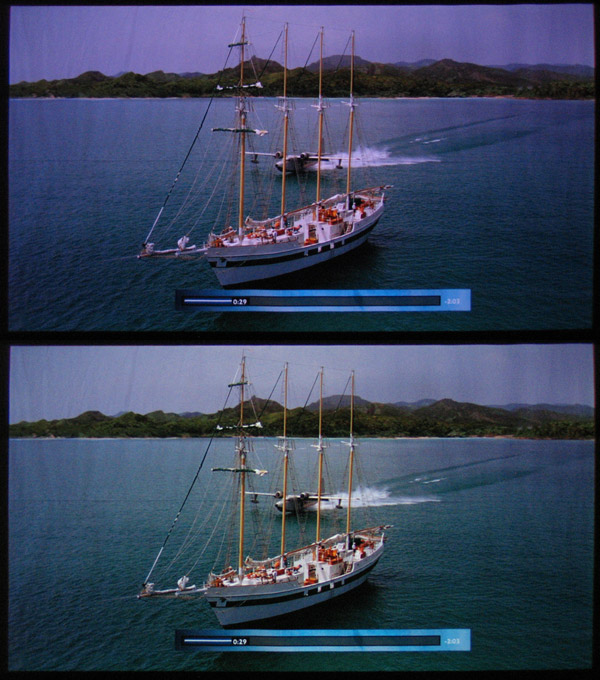
It could just be the camera, but it looks like you could use quite a bit more green (or less magenta - as in less blue and red), but other than that - NICE work!
Here's your image, and one I adjusted in Photoshop to have less red and blue... Notice how the whites on the boat are more white instead of pink.
SC
| Description: |
|
| Filesize: |
123.28 KB |
| Viewed: |
8034 Time(s) |
|
|
|
| Back to top |
|
|
schmoe
Joined: 30 Mar 2008
Posts: 374
Location: Seattle, WA
|
| Posted: Sun Feb 01, 2009 10:46 pm Post subject: |
|
|
| ecrabb wrote: | | Wow, first weekend home with your new machine and you have a nice watchable image on a bed sheet, already. Kudos! |
Thanks. It's a testament to the helpfulness of the guided setup on the Marquee as well as the info found on this site.
| ecrabb wrote: | | It could just be the camera, but it looks like you could use quite a bit more green (or less magenta - as in less blue and red), but other than that - NICE work! |
It's very possible my colors are off. I'm no where near the point where I'm ready to do grayscale calibration, and I don't know how good these pj's are "out of the box". Come to think of it, I haven't noticed any settings in the menu for adjusting cuts/drives on the individual primaries. Where is this located on the Marquees?
Also, my camera is old and sucky. It's a Canon PowerShot A95, 5MP. I'm sure there's a proper way to set the camera to take screen shots but I just used "auto".
|
|
| Back to top |
|
|
AnalogRocks
Forum Moderator

Joined: 08 Mar 2006
Posts: 26706
Location: Toronto, Ontario, Canada
TV/Projector: Sony 1252Q, AMPRO 4000G
|
| Posted: Mon Feb 02, 2009 5:16 am Post subject: |
|
|
On the Canon G2 ( 4mp ) I use for my screen shots I use TV ( time value ) to shoot my TV ( RPTV ), try a multiple of your refresh rate. Depending on the scene I use 4 seconds, 2 seconds 1 second, 1/10th. 1/30th etc... Play around with it.
_________________
Tech support for nothing
CRT.
HD done right!
|
|
| Back to top |
|
|
schmoe
Joined: 30 Mar 2008
Posts: 374
Location: Seattle, WA
|
| Posted: Tue Feb 03, 2009 6:23 am Post subject: |
|
|
Hey folks, quick question just so I'm clear: in order to get a proper 16:9 screen I had to reduce v-size to 0, no more room to shrink but it was about right anyway. I've read a bit about the "anamorphic squeeze mod" - is this what it's supposed to do, give me more room to shrink the v-size even more?
My quick setup produced a screen size (99") that is slightly bigger then what I'll likely end up with (96"), so I'll need room to shrink it further (unless there's another way to do that).
Thanks.
|
|
| Back to top |
|
|
ChrisWiggles
Opinionated SOB
Joined: 12 Mar 2006
Posts: 2529
Location: Seattle
|
| Posted: Thu Feb 05, 2009 9:55 pm Post subject: |
|
|
| schmoe wrote: | Oh, well that was easy. It's in the first picture of the open case: 38-P15298-98. According to etechvideo that makes it an Ultra. Sweet!  |
sh*t. Really? Well, seller error in your favor!
I was always under the assumption the Ultras were produced after Vidikron had stopped selling CRTs.
|
|
| Back to top |
|
|
ChrisWiggles
Opinionated SOB
Joined: 12 Mar 2006
Posts: 2529
Location: Seattle
|
| Posted: Thu Feb 05, 2009 9:59 pm Post subject: |
|
|
| schmoe wrote: | | ecrabb wrote: | | Wow, first weekend home with your new machine and you have a nice watchable image on a bed sheet, already. Kudos! |
Thanks. It's a testament to the helpfulness of the guided setup on the Marquee as well as the info found on this site.
| ecrabb wrote: | | It could just be the camera, but it looks like you could use quite a bit more green (or less magenta - as in less blue and red), but other than that - NICE work! |
It's very possible my colors are off. I'm no where near the point where I'm ready to do grayscale calibration, and I don't know how good these pj's are "out of the box". Come to think of it, I haven't noticed any settings in the menu for adjusting cuts/drives on the individual primaries. Where is this located on the Marquees? |
I did a by-eye greyscale on this guy, so it's not going to be very close, and I think even viewing it, it felt off to me so you'll probably want to tweak it a little bit, but it shouldn't be too bad. Never bother with the standard color temperatures, you can go ahead and try one out and you'll cringe, particularly since it's not new!
Use Tim's guide, and the G2 and drive controls are in the service menu, menu option #9.
| Quote: |
Also, my camera is old and sucky. It's a Canon PowerShot A95, 5MP. I'm sure there's a proper way to set the camera to take screen shots but I just used "auto". |
You really cannot judge greyscale at all with a camera.
|
|
| Back to top |
|
|
schmoe
Joined: 30 Mar 2008
Posts: 374
Location: Seattle, WA
|
| Posted: Thu Feb 05, 2009 11:24 pm Post subject: |
|
|
| ChrisWiggles wrote: | sh*t. Really? Well, seller error in your favor!
I was always under the assumption the Ultras were produced after Vidikron had stopped selling CRTs. |
I'll sell it back to you for $3k. 
Actually, no, I wouldn't. This puppy is stayin' here.
|
|
| Back to top |
|
|
schmoe
Joined: 30 Mar 2008
Posts: 374
Location: Seattle, WA
|
| Posted: Thu Feb 05, 2009 11:26 pm Post subject: |
|
|
| schmoe wrote: | Hey folks, quick question just so I'm clear: in order to get a proper 16:9 screen I had to reduce v-size to 0, no more room to shrink but it was about right anyway. I've read a bit about the "anamorphic squeeze mod" - is this what it's supposed to do, give me more room to shrink the v-size even more?
My quick setup produced a screen size (99") that is slightly bigger then what I'll likely end up with (96"), so I'll need room to shrink it further (unless there's another way to do that).
Thanks. |
Bump. Still lookin' for an answer to this. Gracias.
|
|
| Back to top |
|
|
AnalogRocks
Forum Moderator
Joined: 08 Mar 2006
Posts: 26706
Location: Toronto, Ontario, Canada
TV/Projector: Sony 1252Q, AMPRO 4000G
|
| Posted: Thu Feb 05, 2009 11:27 pm Post subject: |
|
|
Hooked on the CRT line. Just don't start colecting or you'll be a sinker.
_________________
Tech support for nothing
CRT.
HD done right!
|
|
| Back to top |
|
|
Nashou66
Joined: 12 Jan 2007
Posts: 16171
Location: West Seneca NY
|
| Posted: Thu Feb 05, 2009 11:43 pm Post subject: |
|
|
| schmoe wrote: | Hey folks, quick question just so I'm clear: in order to get a proper 16:9 screen I had to reduce v-size to 0, no more room to shrink but it was about right anyway. I've read a bit about the "anamorphic squeeze mod" - is this what it's supposed to do, give me more room to shrink the v-size even more?
My quick setup produced a screen size (99") that is slightly bigger then what I'll likely end up with (96"), so I'll need room to shrink it further (unless there's another way to do that).
Thanks. |
The anamorphic squeeze mod was changing Resistors on the VDM to allow for more adjustment up/down/and side to side. Most likely its done. They went from the factory 30Kohm metal film resistors to 56Kohm, now if you want to take advantage of Active area Scanning and run 800p so your not wasting PJ bandwidth on scanning the unused area in Blu ray movies that are in 2.40/2.35 aspect ratio you might need to increase those three resistors to 68Kohm. they are R704,R804,R904 on the VDM.
with this you'll be able to run 800p@72Hz for smooth pans and a great picture. but if its a 16x9 1080p movie then you can either run 1080p@48 or 60hz or try 1080i@72. it depends on the scaler you will be useing, the one you have might not accept 1080p@24 from your Blu ray player and that is what you should look for in the future from a VP.
Athanasios
_________________
Don't blame your underwear for your crooked ass~ unknown Greek philosopher
"Republicans believe every day is the Fourth of July, but the Democrats believe every day is April 15." --- President Reagan
One Smart Dog!!!
Marquee High Performance Bellows now shipping!!
Marquee Modifications and Performance Enhancement
Marquee C-element and Bellow removal
|
|
| Back to top |
|
|
schmoe
Joined: 30 Mar 2008
Posts: 374
Location: Seattle, WA
|
| Posted: Fri Feb 06, 2009 12:28 am Post subject: |
|
|
Why do you think the squeeze mod is most likely done? Because it's a late model marquee? I'll try to check when I get home (assuming that's easily do-able).
My VP is a DVDO Edge which unfortunately doesn't do custom outputs (I didn't know a crt pj was in my future at the time) but it does handle 24p inputs. I need to find someone who wants to swap for a VP50 or Lumagen perhaps.
|
|
| Back to top |
|
|
ChrisWiggles
Opinionated SOB
Joined: 12 Mar 2006
Posts: 2529
Location: Seattle
|
| Posted: Fri Feb 06, 2009 2:36 am Post subject: |
|
|
I was under the assumption the squeeze mod was done because Vidikron is an HT company, and they only sold these for high-end home theaters, not commercial use where 4:3 is prevalent.
. To do a 16:9 screen, normal for HT, you need the mod, so I'm assuming they did this. Additionally, I had no problem getting down to about 16:9 when I set it up, and it won't really get close to that without a mod done, so it appears to me to be modded. I didn't measure it though, so I'm not sure what the max squeeze is though. And I don't remember how far I was from the maximum squeeze when I set it up. It sounds like maybe it's not quite modded enough...?
|
|
| Back to top |
|
|
ChrisWiggles
Opinionated SOB
Joined: 12 Mar 2006
Posts: 2529
Location: Seattle
|
| Posted: Fri Feb 06, 2009 2:39 am Post subject: |
|
|
| schmoe wrote: | | ChrisWiggles wrote: | sh*t. Really? Well, seller error in your favor!
I was always under the assumption the Ultras were produced after Vidikron had stopped selling CRTs. |
I'll sell it back to you for $3k.
Actually, no, I wouldn't. This puppy is stayin' here. |
Don't tempt me! I got bills to pay!
It's a good deal either way, I needed that thing out of here
and god knows I didn't want to have to crate the thing up to ship it somewhere! 
Plus I got some chocolate brittle, that's worth a pretty penny! 
|
|
| Back to top |
|
|
schmoe
Joined: 30 Mar 2008
Posts: 374
Location: Seattle, WA
|
| Posted: Fri Feb 06, 2009 2:57 am Post subject: |
|
|
| ChrisWiggles wrote: | | Additionally, I had no problem getting down to about 16:9 when I set it up, and it won't really get close to that without a mod done, so it appears to me to be modded. I didn't measure it though, so I'm not sure what the max squeeze is though. And I don't remember how far I was from the maximum squeeze when I set it up. It sounds like maybe it's not quite modded enough...? |
IIRC, you had the vertical size all the way down to zero. When I reset the pj and walked through the setup, I ended up at v-size = 0.
So, what do I do then to bring the image within the existing burn area? Was I wrong in thinking it was via the v- and h-size controls?
|
|
| Back to top |
|
|
schmoe
Joined: 30 Mar 2008
Posts: 374
Location: Seattle, WA
|
| Posted: Fri Feb 06, 2009 2:58 am Post subject: |
|
|
| ChrisWiggles wrote: | | Plus I got some chocolate brittle, that's worth a pretty penny! |
There's always more of that if you like.
|
|
| Back to top |
|
|
Nashou66
Joined: 12 Jan 2007
Posts: 16171
Location: West Seneca NY
|
| Posted: Fri Feb 06, 2009 3:02 am Post subject: |
|
|
| schmoe wrote: | | ChrisWiggles wrote: | | Additionally, I had no problem getting down to about 16:9 when I set it up, and it won't really get close to that without a mod done, so it appears to me to be modded. I didn't measure it though, so I'm not sure what the max squeeze is though. And I don't remember how far I was from the maximum squeeze when I set it up. It sounds like maybe it's not quite modded enough...? |
IIRC, you had the vertical size all the way down to zero. When I reset the pj and walked through the setup, I ended up at v-size = 0.
So, what do I do then to bring the image within the existing burn area? Was I wrong in thinking it was via the v- and h-size controls? |
Oh i see what you trying to say, the wear pattern on the sides makes the image look off geometricly if you try to stay in those bounds, and you do not have enough V size adjustment to compensate while keeping the L/R edges inside the wear area? is this Correct?
Athanasios
_________________
Don't blame your underwear for your crooked ass~ unknown Greek philosopher
"Republicans believe every day is the Fourth of July, but the Democrats believe every day is April 15." --- President Reagan
One Smart Dog!!!
Marquee High Performance Bellows now shipping!!
Marquee Modifications and Performance Enhancement
Marquee C-element and Bellow removal
|
|
| Back to top |
|
|
|
|
|
|
|
You cannot post new topics in this forum
You cannot reply to topics in this forum
You cannot edit your posts in this forum
You cannot delete your posts in this forum
You cannot vote in polls in this forum
You cannot attach files in this forum
You can download files in this forum
|
Forum powered by phpBB © phpBB Group
|
|




