| Author |
Message |
benareeno
Joined: 22 Mar 2006
Posts: 1614
Location: ottawa, canada
|
| Posted: Fri Jan 09, 2009 5:55 pm Post subject: 1080i @96Hz vs 1080p @48Hz |
|
|
How much of a bandwidth difference are we talking about here??
I ran 1080i 96Hz (47.928 in powerstrip) and the image is just brilliant! With such a high refresh rate...how different is this res vs 1080P @48Hz? Not that I'd even want to run it because there's no way it would look any better than what I'm running now.
|
|
| Back to top |
|
 |
Nashou66

Joined: 12 Jan 2007
Posts: 16171
Location: West Seneca NY
|
|
| Back to top |
|
|
Mark_A_W
Joined: 15 Mar 2006
Posts: 3068
Location: Sunny Melbourne Australia
|
| Posted: Fri Jan 09, 2009 8:53 pm Post subject: Re: 1080i @96Hz vs 1080p @48Hz |
|
|
| benareeno wrote: | How much of a bandwidth difference are we talking about here??
I ran 1080i 96Hz (47.928 in powerstrip) and the image is just brilliant! With such a high refresh rate...how different is this res vs 1080P @48Hz? Not that I'd even want to run it because there's no way it would look any better than what I'm running now. |
Same bandwidth. Same Scanrate. (Same smoothness too.) No flicker.
The only difference is the interlacing, eliminating the flicker.
|
|
| Back to top |
|
|
benareeno
Joined: 22 Mar 2006
Posts: 1614
Location: ottawa, canada
|
| Posted: Fri Jan 09, 2009 9:24 pm Post subject: |
|
|
Would this bandwidth be ok with a Barco808s?? I think I'll remove the unused scanlines for a 2.35:1 constant height setup....perhaps that will get the bandwidth requirement quite a bit lower.
I was watching last night on an lcd monitor...a HP (which is nice for an lcd)...then I switched to the CRT and was running this res and it was magical! Smooth as silk too...
|
|
| Back to top |
|
|
Mark_A_W
Joined: 15 Mar 2006
Posts: 3068
Location: Sunny Melbourne Australia
|
| Posted: Sat Jan 10, 2009 6:20 am Post subject: |
|
|
You mean 1920x800i at 95.904hz? It would be perfect.
I actually found 1920x802 gave me 1:1 to the movie when zoomed in, but everyone else uses 800.
|
|
| Back to top |
|
|
benareeno
Joined: 22 Mar 2006
Posts: 1614
Location: ottawa, canada
|
| Posted: Sat Jan 10, 2009 6:57 am Post subject: |
|
|
|
I'm gonna give 'er a whirl...
|
|
| Back to top |
|
|
WanMan

Joined: 19 Mar 2006
Posts: 10270
|
| Posted: Sat Jan 10, 2009 3:35 pm Post subject: |
|
|
Curious ... for a movie formatted in, say, 2.37 on a Blu-ray disk that is 1.78 the black bars are expected. How do the black bars contribute, if not at all, to the usable scan rate needed where determining the upper boundary of your setup means?
Keep in mind I am a CRT user, not a nerd. 
_________________
Trust no one. Absolutely no one. Advice of the board.
|
|
| Back to top |
|
|
benareeno
Joined: 22 Mar 2006
Posts: 1614
Location: ottawa, canada
|
| Posted: Sat Jan 10, 2009 5:00 pm Post subject: |
|
|
|
If the black bars are there...the raster is still scanning that area of unused picture...powerstrip will allow that to be removed. It will ease the load on the projector.
|
|
| Back to top |
|
|
Nashou66
Joined: 12 Jan 2007
Posts: 16171
Location: West Seneca NY
|
| Posted: Sat Jan 10, 2009 5:18 pm Post subject: |
|
|
| benareeno wrote: | Would this bandwidth be ok with a Barco808s?? I think I'll remove the unused scanlines for a 2.35:1 constant height setup....perhaps that will get the bandwidth requirement quite a bit lower.
I was watching last night on an lcd monitor...a HP (which is nice for an lcd)...then I switched to the CRT and was running this res and it was magical! Smooth as silk too... |
If you ONLY plan to watch Scope movies Id go with CIH but if you also want 1.78 it really be a total waste of phosphor, like 25% used. A CIW with masking(if your very picky) the top and bottom is more appropriate for CRT's.
800px1920 at 72 should look very nice.
Athanasios
_________________
Don't blame your underwear for your crooked ass~ unknown Greek philosopher
"Republicans believe every day is the Fourth of July, but the Democrats believe every day is April 15." --- President Reagan
One Smart Dog!!!
Marquee High Performance Bellows now shipping!!
Marquee Modifications and Performance Enhancement
Marquee C-element and Bellow removal
|
|
| Back to top |
|
|
benareeno
Joined: 22 Mar 2006
Posts: 1614
Location: ottawa, canada
|
| Posted: Sat Jan 10, 2009 5:33 pm Post subject: |
|
|
just because a movie is 1.85 doesn't mean you must watch all of it..quite often cropping such a movie is a non-issue...and in many cases, cropping will make it look exactly like it did in the theater.
Perhaps a 2.1:1 screen would be the best compromise....
It always bugs me when the most grand of movie presentations (2.35:1) have the smallest pic on the screen. I had to address this...so I did. Remember a 1.85 movie cropped into a 2.35 frame is usually quite acceptable.
|
|
| Back to top |
|
|
Nashou66
Joined: 12 Jan 2007
Posts: 16171
Location: West Seneca NY
|
| Posted: Sat Jan 10, 2009 9:07 pm Post subject: |
|
|
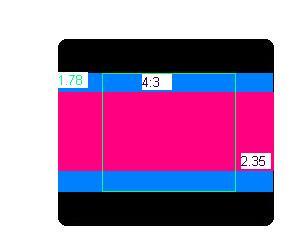
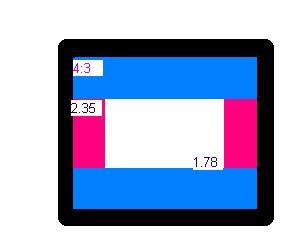
Here is a quick diagram of the aspect ratios on the tube face for CIH and CIW:
As you can see here in Constant image hight the 1.78 is hardly using any phosphor.

Here, in Constant Image width, 1.78 is Using much much more, although with both 2.35 is exactly the same, and 1.85 is very close to 1.78 so i did not add it in.
I also drew the image filling in the whole tube face (wrong) but you get the idea.

Athanasios
| Description: |
|
| Filesize: |
6.7 KB |
| Viewed: |
13983 Time(s) |
|
| Description: |
|
| Filesize: |
7.13 KB |
| Viewed: |
13983 Time(s) |
|
_________________
Don't blame your underwear for your crooked ass~ unknown Greek philosopher
"Republicans believe every day is the Fourth of July, but the Democrats believe every day is April 15." --- President Reagan
One Smart Dog!!!
Marquee High Performance Bellows now shipping!!
Marquee Modifications and Performance Enhancement
Marquee C-element and Bellow removal
|
|
| Back to top |
|
|
MikeEby

Joined: 24 Jun 2007
Posts: 5237
Location: Osceola, Indiana
|
| Posted: Sun Jan 11, 2009 4:41 am Post subject: |
|
|
| benareeno wrote: | just because a movie is 1.85 doesn't mean you must watch all of it..quite often cropping such a movie is a non-issue...and in many cases, cropping will make it look exactly like it did in the theater.
Perhaps a 2.1:1 screen would be the best compromise....
It always bugs me when the most grand of movie presentations (2.35:1) have the smallest pic on the screen. I had to address this...so I did. Remember a 1.85 movie cropped into a 2.35 frame is usually quite acceptable. |
You might want to get your flame suit on.
Mike
_________________
Doing HD since the last century!
|
|
| Back to top |
|
|
AnalogRocks
Forum Moderator

Joined: 08 Mar 2006
Posts: 26706
Location: Toronto, Ontario, Canada
TV/Projector: Sony 1252Q, AMPRO 4000G
|
| Posted: Sun Jan 11, 2009 4:58 am Post subject: |
|
|
| MikeEby wrote: | | benareeno wrote: | just because a movie is 1.85 doesn't mean you must watch all of it..quite often cropping such a movie is a non-issue...and in many cases, cropping will make it look exactly like it did in the theater.
Perhaps a 2.1:1 screen would be the best compromise....
It always bugs me when the most grand of movie presentations (2.35:1) have the smallest pic on the screen. I had to address this...so I did. Remember a 1.85 movie cropped into a 2.35 frame is usually quite acceptable. |
You might want to get your flame suit on.
Mike |
I'll abstain if you will 
_________________
Tech support for nothing
CRT.
HD done right!
|
|
| Back to top |
|
|
benareeno
Joined: 22 Mar 2006
Posts: 1614
Location: ottawa, canada
|
| Posted: Sun Jan 11, 2009 6:24 am Post subject: |
|
|
a lot more acceptable than having 2.35 as the smaller picture...very un-cinematic (is that a word?).
Anyhow...as usual...it's all opinion.
|
|
| Back to top |
|
|
Nashou66
Joined: 12 Jan 2007
Posts: 16171
Location: West Seneca NY
|
| Posted: Sun Jan 11, 2009 3:43 pm Post subject: |
|
|
| benareeno wrote: | a lot more acceptable than having 2.35 as the smaller picture...very un-cinematic (is that a word?).
Anyhow...as usual...it's all opinion. |
How can 2.35 be smaller using CIW? Are you looking at the diagrams?
And its not Opinion its FACT its not smaller!!!!!
Say you have a 10 foot wide screen now at 2.35 aspect, get a 16x9 aspect at the the same 10 feet wide.
2.35 will be the same size!!!!! and you can have your 16x9 3 times as alarge than in a CIH Look at these pics!!!!
Pretend its the screen not the tube face.
Constant image hight
2.35 is red, 1.78 is white, look how small the 1.78 ends up being.
Constant Image width.
here 2.35 is red again, same size as in your current 2.35 set up
but now look at the 1.78 its HUGE compared to your set up now!!!!
If your not blending a CRT then its a no brainer, alway use a 1.78 screen
and if you want 2.35 a certain width then base your decision on how wide
you want 2.35 but then choose a 16.x(1.78) screen and mask the top and bottom if you
like for 2.35 movies, not even 4:3 wont look that small on the CIW set as they would in CIH.
Your just not getting it I think.
Athanasios
_________________
Don't blame your underwear for your crooked ass~ unknown Greek philosopher
"Republicans believe every day is the Fourth of July, but the Democrats believe every day is April 15." --- President Reagan
One Smart Dog!!!
Marquee High Performance Bellows now shipping!!
Marquee Modifications and Performance Enhancement
Marquee C-element and Bellow removal
|
|
| Back to top |
|
|
WanMan
Joined: 19 Mar 2006
Posts: 10270
|
| Posted: Sun Jan 11, 2009 4:09 pm Post subject: |
|
|
I guess the bigger question is that for a fixed amount of projector video bandwidth and with the focus of projected content coming from Blu-ray, is a CIH setup best, or CIW setup? If you need a specific projector then let's use the NEC XL135LC (1351). The intended screen size would be 110-126" torus (undecided size as of yet).
_________________
Trust no one. Absolutely no one. Advice of the board.
|
|
| Back to top |
|
|
benareeno
Joined: 22 Mar 2006
Posts: 1614
Location: ottawa, canada
|
| Posted: Sun Jan 11, 2009 7:51 pm Post subject: |
|
|
The FACT is...that your 16:9 pic is overall bigger...and the other FACT is that I don't like it that way. Does that satisfy you?
If you like it a different way, then enjoy...I don't care what you like. I like 2:35 movies to be the biggest thing I watch.
|
|
| Back to top |
|
|
Chuchuf
Joined: 11 Mar 2006
Posts: 548
|
| Posted: Tue Jan 27, 2009 2:23 pm Post subject: |
|
|
Really the question comes down to what do you watch more of......movies or HDTV.
Terry
|
|
| Back to top |
|
|
Gino

Joined: 22 Apr 2006
Posts: 1363
Location: Trinity Beach, AUSTRALIA
|
| Posted: Wed Jan 28, 2009 10:14 am Post subject: |
|
|
| Nashou66 wrote: | | benareeno wrote: | a lot more acceptable than having 2.35 as the smaller picture...very un-cinematic (is that a word?).
Anyhow...as usual...it's all opinion. |
How can 2.35 be smaller using CIW? Are you looking at the diagrams?
And its not Opinion its FACT its not smaller!!!!!
Your just not getting it I think. |
Athanasios, I think you are getting mixed up here. Yes, on the tube face 2.35 uses the same whether you do CIW or CIH, but he is talking about what he sees on the screen. 2.35 is bigger than 1.78 on a CIH screen, where as 1.78 is bigger than 2.35 on a CIW setup.
_________________
( B ) ( G ) ( R ) Blendzilla Down Under ( R ) ( G ) ( B ) - Tubes of Fury
|
|
| Back to top |
|
|
Nashou66
Joined: 12 Jan 2007
Posts: 16171
Location: West Seneca NY
|
| Posted: Wed Jan 28, 2009 1:07 pm Post subject: |
|
|
| Gino wrote: | | Nashou66 wrote: | | benareeno wrote: | a lot more acceptable than having 2.35 as the smaller picture...very un-cinematic (is that a word?).
Anyhow...as usual...it's all opinion. |
How can 2.35 be smaller using CIW? Are you looking at the diagrams?
And its not Opinion its FACT its not smaller!!!!!
Your just not getting it I think. |
Athanasios, I think you are getting mixed up here. Yes, on the tube face 2.35 uses the same whether you do CIW or CIH, but he is talking about what he sees on the screen. 2.35 is bigger than 1.78 on a CIH screen, where as 1.78 is bigger than 2.35 on a CIW setup. |
Yes I realize that, but they are the same width, I guess i took that bigger was width only and in that regard they are the same but in over all size, no, then 16x9 would be larger over all and if he wants only 2.35 to be larger than the way he has it is best for him I agree.
Athanasios
_________________
Don't blame your underwear for your crooked ass~ unknown Greek philosopher
"Republicans believe every day is the Fourth of July, but the Democrats believe every day is April 15." --- President Reagan
One Smart Dog!!!
Marquee High Performance Bellows now shipping!!
Marquee Modifications and Performance Enhancement
Marquee C-element and Bellow removal
|
|
| Back to top |
|
|
|
|





