| Author |
Message |
Erndor
Joined: 24 Dec 2008
Posts: 6
|
| Posted: Wed Dec 24, 2008 3:22 pm Post subject: NEED HELP W/ HDMI DVD TO MITSUBISHI HD 1080i COMPONENT TV!! |
|
|
I am writing from California, USA. I have the Following Equipment:
2001 MITSUBISHI DIAMOND SERIES HD-1080i, Component & 15 Pin DSUB HD input.
2007 DIRECTV HR21-700, 1080P HD DVR with HDMI OUT & COMPONENT OUT
2008 SONY BDP-S350 BLU-RAY DVD with HDMI OUT.
I DESPERATELY NEED TO COMBINE AND CONVERT THE HDMI INTO MY COMPONENT MITSUBISHI 1080I TV.
CAN ANYONE PLEASE HELP ME DETERMINE THE EXACT HARDWARE AND CABLES TO ACCOMPLISH THIS?
I JUST CAN'T AFFORD A NEW HDMI TV. I AM THINKING THE FURYBOX2 IS A GOOD START.
BLESS ALL OF YOU FOR ANY HELP.
HAPPY HOLIDAYS,
ERNDOR (ERNIE)
ernie22@sbcglobal.net
_________________
Question/Answer:
Last edited by Erndor on Wed Dec 24, 2008 4:01 pm; edited 1 time in total
|
|
| Back to top |
|
 |
WanMan

Joined: 19 Mar 2006
Posts: 10270
|
| Posted: Wed Dec 24, 2008 3:46 pm Post subject: |
|
|
What model HD DVR? I have a couple of HR21 units and HD is offered in both analog Component and digital HDMI.
_________________
Trust no one. Absolutely no one. Advice of the board.
|
|
| Back to top |
|
|
Erndor
Joined: 24 Dec 2008
Posts: 6
|
| Posted: Wed Dec 24, 2008 3:52 pm Post subject: |
|
|
IT IS A DIRECTV HR21-700 (DIGITAL)
THANKS,
ERNDOR (ERNIE)
_________________
Question/Answer:
|
|
| Back to top |
|
|
WanMan
Joined: 19 Mar 2006
Posts: 10270
|
| Posted: Wed Dec 24, 2008 4:04 pm Post subject: |
|
|
Well, I have a Diamond WS-65907 from 2000 and it didn't have any digital inputs to begin with. Not sure if this is the case with your Mits. I do know the back panel on my Mits 65907 had analog inputs and the input on the right-side of the back panel was labeled DTV. This input can be configured via the menu for RGBhv or Component for 1080i input. If your TV is like mine you have two options:
Option #1: Use the HDMI outputs of the Blu-ray and DirecTV HD DVR to feed into an HDMI switcher ($40 on www.monoprice.com), and then use the HDMI output to feed into an HDfury to transcode the signal from digital to analog and present you with an RGBhv signal. Then use the DTV input on the Mits configured for RGBhv.
Option #2: Use the Component analog outputs on both the Blu-ray and DirecTV HD DVR to feed into a Component switcher, and then feed that into the Mits DTV input configured for Component video.
Unfortunately, I do not think any of the Mitsubishi products catalogs are available on their website.
_________________
Trust no one. Absolutely no one. Advice of the board.
|
|
| Back to top |
|
|
Erndor
Joined: 24 Dec 2008
Posts: 6
|
| Posted: Wed Dec 24, 2008 4:16 pm Post subject: |
|
|
WANMAN,
I THINK YOU ARE PARTIALLY CORRECT. ACCORDING TO MY MITSUBISHI MANUAL THE 907 IS ANALOG. THE WS-55905 HAS ANALOG AND COMPONENT DIGITAL IN. THE MANUAL SAYS IT IS 480I, 480P, 960I AND 1080I. COMPONENT CONNECTIONS ARE AS FOLLOWS;
Y= 1.0V, Cr=700M Vp-p and Cb=700m Vp-p. I do not use the RGB or H and V Inputs from the HR21-700. With these specs it is EIA-770.3
I hope this helps in solving my problem. I do have my manual so I could email the TV back Inputs if need be. It would just me some a hour or so.
My understanding is that with the Fury2 you can get digital. Is that true?
Thanks again,
Erndor (Ernie)
_________________
Question/Answer:
|
|
| Back to top |
|
|
WanMan
Joined: 19 Mar 2006
Posts: 10270
|
| Posted: Wed Dec 24, 2008 4:43 pm Post subject: |
|
|
Any way yuo can take a candid snapshot of the rear panel?
_________________
Trust no one. Absolutely no one. Advice of the board.
|
|
| Back to top |
|
|
Erndor
Joined: 24 Dec 2008
Posts: 6
|
| Posted: Wed Dec 24, 2008 4:46 pm Post subject: |
|
|
WanMan,
First, I want to thank you for your time.
Give me about 1-2 hours and I will email something to you if thats ok.
Ernie
_________________
Question/Answer:
|
|
| Back to top |
|
|
macgyver655
Joined: 22 Aug 2007
Posts: 8508
|
| Posted: Wed Dec 24, 2008 4:53 pm Post subject: |
|
|
|
Your SONY BDP-S350 will output 480i/p, 720p and 1080i on the component output. If your mitsubishi maual says your model (I didnt see where you said exactly what model you have) will except 1080i then it should on at least 1 of your component inputs. If you hookup the sony and set it for 1080i and your tv has a picture, then just hit the tv info button and it should show on the screen as receiving 1080i. How many component inputs does your model tv have?
|
|
| Back to top |
|
|
macgyver655
Joined: 22 Aug 2007
Posts: 8508
|
| Posted: Wed Dec 24, 2008 5:15 pm Post subject: |
|
|
|
Your manual on the HR21 states that its maxium output is 1080i so this shouldn't be an issue either. Just need to know your Mitsu model number.
|
|
| Back to top |
|
|
Erndor
Joined: 24 Dec 2008
Posts: 6
|
| Posted: Wed Dec 24, 2008 5:38 pm Post subject: Picture Specs |
|
|
WanMan,
I have 4 picture specs for your review. I do not know how to add them to the website.
Can you send me your email address to me and I will send them straight to you?
Thanks,
Erndor (Ernie)
ernie22@sbcglobal.net
_________________
Question/Answer:
|
|
| Back to top |
|
|
Erndor
Joined: 24 Dec 2008
Posts: 6
|
| Posted: Wed Dec 24, 2008 6:09 pm Post subject: SPECS |
|
|
WanMan,
Were you able to get my last response on sending you you the pictures of Spec for TV and HR21-700?
Thanks,
Erndor (Ernie)
_________________
Question/Answer:
|
|
| Back to top |
|
|
WanMan
Joined: 19 Mar 2006
Posts: 10270
|
| Posted: Wed Dec 24, 2008 7:02 pm Post subject: |
|
|
Sorry, I am actually working today.  Had to put out a couple of fires. Had to put out a couple of fires.
I just noticed I had to update my email address for this website. Adelphia cable ceased to be and Comcast bought them and forced everyone to change the email address domains.
"kartXXXman0@comXXXcast.net" Just remove the XXX's.
_________________
Trust no one. Absolutely no one. Advice of the board.
|
|
| Back to top |
|
|
WanMan
Joined: 19 Mar 2006
Posts: 10270
|
| Posted: Wed Dec 24, 2008 7:55 pm Post subject: |
|
|
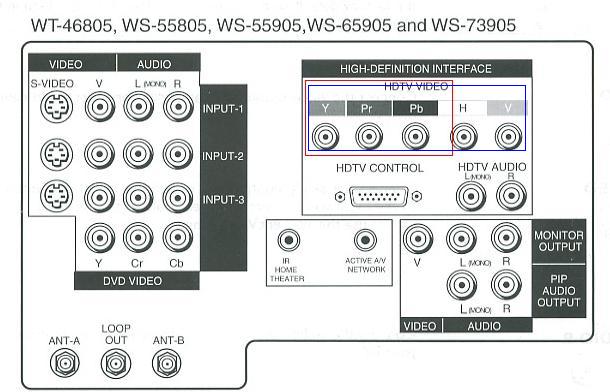
Ok, from the perspective of the Mits back panel the High-Definition input is the same regardless which model you have from that manual/sheet. I created a RED rectangle that high-lights the RCA-style connectors for using Component video. I also created a BLUE rectangle for the connectors for using RGBhv video. Both Component and RGBhv are analog video transports.
The HDTV Control input isn't DVI or HDMI, and I have to wonder if it is Firewire. Firewire is not a supported consumer video transport by the CEA (Commercial Electronics Association). The cheapest way to view both HD sources (Blu-ray replayer and HD DVR) is to use their Component Video outs.
Using Component video cables, connect the Sony Blu-ray player and DirecTV HD DVR to a Component Video Switch and use a third component video cable from the switch to the Y+Pr+Pb connectors highlighted by the RED rectangle.
Now, pickup the Mits menu, go into Setup, and then Input Assignments and look for an input (mine says DTV, but yours may be HD) and set it to YPrPb. When done, exit the setup and select the DTV ((or HD).
If you wish to go the digital route it will be more expensive, but I can guide you through the physical setup.
| Description: |
|
| Filesize: |
47.5 KB |
| Viewed: |
23048 Time(s) |
|
_________________
Trust no one. Absolutely no one. Advice of the board.
|
|
| Back to top |
|
|
kal
Forum Administrator

Joined: 06 Mar 2006
Posts: 18114
Location: Ottawa, Canada
TV/Projector: JVC DLA-NZ7
|
| Posted: Wed Dec 24, 2008 9:48 pm Post subject: |
|
|
Hi Ernie,
The HDfury2 is definitely a good solution for this. Many Mitsubishi owners are very happy with their HDfury2's feeding Blu-ray and other HDMI sources into their RPTV's.
There are limitations to using component:
- Blu-ray, HD DVD, and DVD players (as well as the Xbox360 and PS3) will not upscale standard DVDs to 1080p over analog outputs. They are limited to 480p output only. To avoid this limitation digital HDMI must be used.
- If the Image Constraint Token (copy protection) is enabled on Blu-ray or HD DVD discs reduces resolution from 1080p to 540p (1/5th the resolution) over analog outputs. To avoid this limitation digital HDMI must be used.
- And most importantly: The image quality is significantly worse over analog outputs. To avoid this limitation digital HDMI must be used.
You would need the HDfury2 Basic kit which comes with a component cable and power supply (everything you need). Pick any RGB cable (I would recommend BLUE) as you will not be using it in your setup as but it may be useful in the future and the BLUE is the most popular.
You can also get the 3x1 HDMI switch to switch between the two HDMI devices on the HDfury2 order page here: www.curtpalme.com/HDfury2.shtm
Hook it up like this:
HDMI sources -> HDMI cables -> 3x1 Smart HDMI switch -> HDMI cable -> HDfury2 -> component cable -> Mits TV
Simple!
Kal
_________________

Support our site by using our affiliate links. We thank you!
My basement/HT/bar/brewery build 2.0
|
|
| Back to top |
|
|
WanMan
Joined: 19 Mar 2006
Posts: 10270
|
| Posted: Thu Dec 25, 2008 8:22 pm Post subject: |
|
|
Kal, good information. I had not considered it as I use HDMI on everything but the Xbox 360, but I don't play movies on my 360. I don't own the HDfury2, but I own the original unit and its been good to me (fingers crossed, knocking on wood).
_________________
Trust no one. Absolutely no one. Advice of the board.
|
|
| Back to top |
|
|
|
|




