| Author |
Message |
tyler477
Joined: 02 Dec 2008
Posts: 11
|
| Posted: Tue Dec 02, 2008 7:55 am Post subject: Pulsar TVP 2000 Prodigy XL need help calibrating! VIDEO! |
|
|
hey guys, I'm having a flickering image issue, and i need help calibrating this thing.... I messed with all of the calibration knobs and now i'm totally lost.... paid 30 bucks for it, would like to get it working again!
here is what it's doing for the flickering thing;
http://video.google.com/videoplay?docid=-1942441378077024878&hl=en
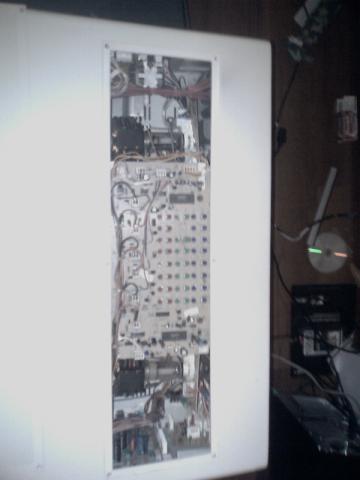
here is a pic of the calibration screws i turned and now its all funky; the PCB board says pioneer, maybe someone has a manual? i really want to use this for a garage theater!
ty
| Description: |
|
| Filesize: |
16.57 KB |
| Viewed: |
5245 Time(s) |
|
|
|
| Back to top |
|
 |
tyler477
Joined: 02 Dec 2008
Posts: 11
|
| Posted: Tue Dec 02, 2008 9:29 am Post subject: |
|
|
ok, i was messing with the screws and got it looking decent, but it isn't perfect yet.... and the flickering is still happening.
It did have a brief stint where the flickering totally stopped, and i thought it was fixed, but then the menu would not come on, when i restarted the crt the flickering started again and the menu was engaging again also, so i believe the flickering is being caused by the menu pcb somehow..... i wonder if there is a way to disengage the menu column.... is it safe to clean these pcb's with naphtha? i really want to get this thing working...!
|
|
| Back to top |
|
|
Heywood Jablome

Joined: 12 Mar 2006
Posts: 1548
|
| Posted: Tue Dec 02, 2008 12:58 pm Post subject: |
|
|
As a general rule for ANY CRT projection set, you want to set electronic controls to their effective mid-position, then adjust those controls that have the largest impact first followed by finer controls... For example, start with green keystone, then match the R&B keystone to the green. Then linearity, bow, and other controls, finally ending with gross and fine ('zone' or 'point') convergence (if equipped.)
This way you'll be taxing the electronics the least, thereby generating less heat, improving stability, etc.
_________________
"Those countries which lag behind in industry, in the application of mechanics and technical chemistry, in the careful selection and utilization of natural products, where the respect for such activities does not permeate all classes of society, will unfailingly decline in prosperity. They will sink faster when neighbor states, with an energetic exchange between science and industry, go forward with renewed vitality."
-- Baron Alexander von Humboldt: 1769-1859
|
|
| Back to top |
|
|
Curt Palme
CRT Tech
Joined: 08 Mar 2006
Posts: 24396
Location: Langley, BC
TV/Projector: All of them!
|
| Posted: Tue Dec 02, 2008 1:51 pm Post subject: |
|
|
This is a Zenith PRO 840, reworked into a smaller package. I've had ONE of those here, sold it, it ran for over 5 years in a bar.
I am at this point throwing out most of my PRO 840 parts. If you want to cover shipping, I'll send you one of almost everything in the set.
Download the setup manual from the Zenith 851 section on the main site, that will give you directions on how to set the projector up.
email me if you want some almost free parts. Also post your location in your profile so we know whereabouts you are.
|
|
| Back to top |
|
|
tyler477
Joined: 02 Dec 2008
Posts: 11
|
| Posted: Tue Dec 02, 2008 10:01 pm Post subject: |
|
|
| Heywood Jablome wrote: | As a general rule for ANY CRT projection set, you want to set electronic controls to their effective mid-position, then adjust those controls that have the largest impact first followed by finer controls... For example, start with green keystone, then match the R&B keystone to the green. Then linearity, bow, and other controls, finally ending with gross and fine ('zone' or 'point') convergence (if equipped.)
This way you'll be taxing the electronics the least, thereby generating less heat, improving stability, etc. |
Any idea why the picture is flickering? do you think the rgb lenses are burnt out? also it randmly just shuts off.
|
|
| Back to top |
|
|
jkruger

Joined: 24 Oct 2007
Posts: 2435
Location: Carlsbad, CA
|
| Posted: Tue Dec 02, 2008 10:55 pm Post subject: |
|
|
|
He's about a mile away from me. I'll take a look at it tonite.
|
|
| Back to top |
|
|
Curt Palme
CRT Tech
Joined: 08 Mar 2006
Posts: 24396
Location: Langley, BC
TV/Projector: All of them!
|
| Posted: Tue Dec 02, 2008 11:45 pm Post subject: |
|
|
|
Ah, the intermittent turnoff is the key/ MOst likely the set has a bad focus block, that's covered in the Zenith FAQ/tips section on the main site. I've got a couple left, Zenith discontinued them a long time ago., If the tubes are in good shape it's worth doing, if not, then I wouldn't spend the money on the focus block.
|
|
| Back to top |
|
|
tyler477
Joined: 02 Dec 2008
Posts: 11
|
| Posted: Wed Dec 03, 2008 3:45 am Post subject: |
|
|
[quote="Curt Palme"]This is a Zenith PRO 840, reworked into a smaller package. I've had ONE of those here, sold it, it ran for over 5 years in a bar.
I am at this point throwing out most of my PRO 840 parts. If you want to cover shipping, I'll send you one of almost everything in the set.
Download the setup manual from the Zenith 851 section on the main site, that will give you directions on how to set the projector up.
email me if you want some almost free parts. Also post your location in your profile so we know whereabouts you are.[/qhey curt, that would be great! My zip code is 92024 where would you be sending from?
So here is what happens with the flickering;
I turned it on and tried my best to calibrate it to the crosshairs.... did an OK job i think.... but i have to read that manual! (thanks).... then after about 1/2 hour of it sitting on the flickering stops, but the menu won't engage! as long as i leave it on it goes forever fine with no flickering! it is only when it first turned on, the menu re-enables itself and it's back to the flickering!
I think the cannons have some life left in e'm as once the flickering stops it is very bright , all three are working great.
Anyway, i would be glad to pay cash on delivery for those parts to cover postage if it's possible!
TY
|
|
| Back to top |
|
|
tyler477
Joined: 02 Dec 2008
Posts: 11
|
| Posted: Wed Dec 03, 2008 3:46 am Post subject: |
|
|
| Curt Palme wrote: | | Ah, the intermittent turnoff is the key/ MOst likely the set has a bad focus block, that's covered in the Zenith FAQ/tips section on the main site. I've got a couple left, Zenith discontinued them a long time ago., If the tubes are in good shape it's worth doing, if not, then I wouldn't spend the money on the focus block. |
how much is the focus block?
|
|
| Back to top |
|
|
tyler477
Joined: 02 Dec 2008
Posts: 11
|
| Posted: Wed Dec 03, 2008 3:51 am Post subject: |
|
|
|
also curt, some other guy here on these forums said this particular unit had 1500 horizontal lines??? this model has rgb/ s-video/ aux line inputs...
|
|
| Back to top |
|
|
tyler477
Joined: 02 Dec 2008
Posts: 11
|
| Posted: Wed Dec 03, 2008 4:02 am Post subject: |
|
|
|
acratch that, just tried to leave it on to stop the flickering and it just turned off by itself.... tried again to the same result.... I wonder what it could be???
|
|
| Back to top |
|
|
jkruger
Joined: 24 Oct 2007
Posts: 2435
Location: Carlsbad, CA
|
| Posted: Wed Dec 03, 2008 4:48 am Post subject: |
|
|
|
That set is only capable of 480i. If it's an easy fix you might use it for a while but once you get hooked on CRT's you will want a better picture.
|
|
| Back to top |
|
|
tyler477
Joined: 02 Dec 2008
Posts: 11
|
| Posted: Wed Dec 03, 2008 9:10 am Post subject: |
|
|
yeah i'm sure your right, i was going to use it for wii, which would be perfect because it is in 480 also, I have a 50" dlp 1080p samsung already for high def, i just want to go real BIG with this crt!!!  also for the price (30 bucks) It's about all i have to spend on something like this right now, so i'll make it work. I got it looking pretty nice as it is, I'm definitely impressed by crt's power! also for the price (30 bucks) It's about all i have to spend on something like this right now, so i'll make it work. I got it looking pretty nice as it is, I'm definitely impressed by crt's power!
Oh yeah, i looked up the company "pulsar video systems" and they are from san diego! i guess they are still down in la jolla, i might give them a ring and see what they have to say about it! 
|
|
| Back to top |
|
|
tyler477
Joined: 02 Dec 2008
Posts: 11
|
| Posted: Thu Dec 04, 2008 10:02 am Post subject: |
|
|
| jkruger wrote: | | He's about a mile away from me. I'll take a look at it tonite. |
you going to have time tomorrow? it is flickering alot now, and turns off.... i wonder if it is that focus block thing
|
|
| Back to top |
|
|
|
|




