| Author |
Message |
garyfritz

Joined: 08 Apr 2006
Posts: 12088
Location: Fort Collins, CO
|
| Posted: Thu Dec 04, 2008 6:15 pm Post subject: |
|
|
|
Brian, don't assume that Dell is usable. We just retired my kids game computer, a Dell Dimension 2400 from about that period. It was supposedly a 2.3GHz CPU (Celeron) but it must have a 3-bit L2 cache or something. It was an unusable dog. It was probably 5-8x slower than my 2.2GHz dual-core laptop, even running XP.
|
|
| Back to top |
|
 |
ecrabb
Forum Moderator

Joined: 13 Mar 2006
Posts: 15909
Location: Utah
TV/Projector: JVC RS40, Epson 5010
|
| Posted: Thu Dec 04, 2008 6:28 pm Post subject: |
|
|
| Person99 wrote: | | Hey, SC, you watched any of the HD available for the AppleTV yet? Everything I've read is that it is better than most cable/sat HD (not sure if it would exceed my FiOS though). |
I haven't. I need to give it a try. I'm in the same boat in that I'd like to dump the movie channels - we just don't watch it enough to justify the cost. Unfortunately, my Qwest DSL line is only 1.5mpbs, so downloading 1-gig+ files is pretty time-consuming. I guess I could leave them to download overnight, but then there's the storage and file management... Which is why I really need a separate large storage device with mirroring.
| garyfritz wrote: | | Brian, don't assume that Dell is usable. We just retired my kids game computer, a Dell Dimension 2400 from about that period. It was supposedly a 2.3GHz CPU (Celeron) but it must have a 3-bit L2 cache or something. It was an unusable dog. It was probably 5-8x slower than my 2.2GHz dual-core laptop, even running XP. |
Gary, a 2.3ghz Celeron should be an excellent general-use computer. Did you reinstall XP? If not, you need to. I've found that reinstalling XP every year or so is like making it a whole new computer again.
In the last few months, I've done re-installs on half a dozen 3-5 year-old Windows notebooks that were unusable DOGS when I started. After a restore or complete re-install, they were perfectly usable, decently fast machines again.
Are they "latest games/2.5 ghz Core 2 Duo" snappy? Of course not, but they're still fast enough and usable. Hell, I have a 5-year old P4/1.8 IBM ThinkPad that's my kick-around the house beater notebook that works perfectly for surfing, email, etc. Not that I'd want to run Photoshop on it...
SC
|
|
| Back to top |
|
|
Brian Hampton

Joined: 22 Apr 2006
Posts: 1173
|
| Posted: Thu Dec 04, 2008 7:22 pm Post subject: |
|
|
Gary,
Thanks for the advice.
The only PC here is a Dell from 2001 with dual Xeon. It works but it weighs more than my Honda Civic and the case kind of came apart and won't hold back togeather. Since getting a macbook almost 2 years ago I have almost fully forgot the PC. I did use it yesterday to record the Victoria Secret Fashion Show in HD though.
That PC uses a very old version of XP that can't be authenticated anymore (even though there is a code on the side and it was legit at some point on it's trip.. I wasn't the first or second person to have it.) (It was in a scap heap when I took it.) So... This newer PC can only be better. Just having a update-able version of XP will open up lots of software that doesn't work anymore with the older versions.
My HDTV card is a Fusion 5 and it works will with my Radeon LE but not so well with the Nvidia card I have that's newer and has DVI out. DVI out is critical to me because I want to run it into my AVR and not run more cables in the walls to the pj.
You're right though... could just be junk... In that case my wife can use it for Quicken. Seems that Quicken for mac is last gen and they stopped developing the current version for mac.
We'll see.....
EDIT- I'm not fully positive about the date of manufacture... The person giving it me can't remember. But I think it's 3Ghz and was one of the more powerful ones of it's day (since at the time she was married to a wealthy guy.) So... I bet it's not gimped... Dells can be like e-machines or alienware PCs... just depends on which model you want or how you configure them.
-Brian
|
|
| Back to top |
|
|
stefuel

Joined: 07 Mar 2006
Posts: 3353
Location: Green Harbor MA USA
|
| Posted: Fri Dec 05, 2008 12:06 am Post subject: |
|
|
"BEWARE: Thread Hijack in Process"
Where's the Sky Police when you need them...
_________________
Chip
A Barco is only a AmPro with training wheels
Card carrying member of the AVS chain gang.
|
|
| Back to top |
|
|
stefuel
Joined: 07 Mar 2006
Posts: 3353
Location: Green Harbor MA USA
|
| Posted: Fri Dec 05, 2008 12:13 am Post subject: |
|
|
| garyfritz wrote: | | VideoGrabber wrote: | Gary commented:
> HD movies run around 10GB per hour, or 2.7 MB per second. That's just over 22 Mbit/sec <
Are you referring to BD content? |
Yes. Chip's original post said "I want to buy a BD movie, copy it to my PC, etc."
Sure, crap broadcast "HD" will have a lower bitrate. |
Yes. All I'm interested in is putting my movie collection in a server of some type that can stream to my PS3. What ever I build or buy will serve no other function.
_________________
Chip
A Barco is only a AmPro with training wheels
Card carrying member of the AVS chain gang.
|
|
| Back to top |
|
|
garyfritz
Joined: 08 Apr 2006
Posts: 12088
Location: Fort Collins, CO
|
| Posted: Fri Dec 05, 2008 2:01 am Post subject: |
|
|
| ecrabb wrote: | | Gary, a 2.3ghz Celeron should be an excellent general-use computer. Did you reinstall XP? If not, you need to. I've found that reinstalling XP every year or so is like making it a whole new computer again. |
Yup, wiped the disk and re-installed XP fresh. It was still a dog. Much much slower than my 2.2GHz laptop with a year-old install of Vista. Could you use it? Sure, but it's fairly painful.
|
|
| Back to top |
|
|
WanMan

Joined: 19 Mar 2006
Posts: 10270
|
| Posted: Fri Dec 05, 2008 10:37 am Post subject: |
|
|
| ecrabb wrote: | | WanMan wrote: | | Um, considering I just bought 1TB SATA2 drives for $99/each, and someone pointed out a SATA I/O card for $20 bucks I think spending $300 seems unreasonable. |
$300 vs. $220? $80 seems unreasonable to you? For a much smaller, quieter device, with more features and better management, that doesn't require a computer to be on 24/7? Really?
The D-Link has a built-in FTP server, a UPnP server which almost certainly works better than WMP or MCE, gigabit ethernet, browser-based remote config/management, email notification, and even an iTunes music/media server (which would be great for me because my AppleTV and computers could connect to it - I could store all my music there without dedicating another copy of iTunes to the task).
There's simply a whole bunch of functionality (and well-integrated and designed functionality) in there that would take hours (stretching into days) of screwing around with on a PC to make it do everything this NAS device does - to say nothing of the huge difference in power consumption over say, a 2-year time frame.
Sorry, but the last thing I need is another damn big, noisy, update-needing, time-consuming Windows computer sitting there running 24/7 burning 250w or 300w all day every day just to serve some files for an hour or two every day. The NAS would be a superior (and well worth the extra few bucks) storage solution to a PC with a RAID drive set. I'm seriously considering an NAS device (or two), but have no interest in using an existing computer or dedicating another to do media server duty.
SC |
My Antec Sonata's are so quiet the two PCs I built using them for my wife get's comments that she cannot even tell when they are on--except for looking at the screens. I guess I was comparing my approach to that one-disk included solution.
_________________
Trust no one. Absolutely no one. Advice of the board.
|
|
| Back to top |
|
|
stefuel
Joined: 07 Mar 2006
Posts: 3353
Location: Green Harbor MA USA
|
| Posted: Fri Dec 05, 2008 12:23 pm Post subject: |
|
|
So I guess we're on the right track here thinking about a NAS. So that leaves me with a couple of questions which are no brainers for you more savy PC types.
1. How to get the BD movie files to the NAS. I guess that means I'll have to add a BD drive to this PC, convert to a file that the PS3 can use and save to the NAS???
2. I'm maxed out on connections to my router (4). Can I share ports? Add a second router or replace it with a bigger router?
I tried the wireless route and was unable to stream SD movies to the PS3 without constant pausing and buffering, only the hard wired ethernet connection would work.
I'm curious about the amount of time that would be required to go from a disk in hand to a PS3 usable file in the NAS??
_________________
Chip
A Barco is only a AmPro with training wheels
Card carrying member of the AVS chain gang.
|
|
| Back to top |
|
|
WanMan
Joined: 19 Mar 2006
Posts: 10270
|
| Posted: Fri Dec 05, 2008 12:54 pm Post subject: |
|
|
I do not know about some of you, but I just purchased a pair of Antec MX-1 USB2/eSATA external enclosures for $37/each. While my application is to upgrade my pair of DirecTV HR21 HD DVRs, these would be just as applicable to externally-expand PC storage which could be directly connected to something like a PS3.
_________________
Trust no one. Absolutely no one. Advice of the board.
|
|
| Back to top |
|
|
Clarence

Joined: 08 Mar 2006
Posts: 3827
Location: Smith Mtn Lake, VA
|
| Posted: Fri Dec 05, 2008 1:40 pm Post subject: |
|
|
Chip-
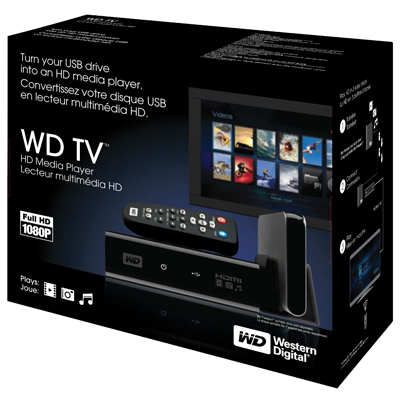
Have you considered something like this instead of PC streaming to PS3...
http://wdc.com/en/products/products.asp?driveid=572
Connect any USB hard drive and it outputs 1080P HDMI.
~$99-$129.
http://www.engadgethd.com/2008/11/04/wd-tv-hd-media-player-smacked-up-flipped-rubbed-down/
| engadget.com wrote: | Western Digital's WD TV HD Media Player kept a low profile before hitting shelves this month, but with only $99 separating MaddHat.com from a thorough teardown, the inevitable next step was taken. Besides snapshots inside and out -- and the ubiquitous iPhone size comparison photo -- a quick runthrough with a variety of MKV-packed videos revealed delightfully nerdy results. The 1080p h.264 decoding was smooth, although some odd sharpening on 720p files while in 1080p output mode, and less than optimal results with 1080i-encoded files were noted. 1080p24 support didn't make it into the box, same for .ISO direct support -- no worries though, as it wasn't enough to stop the .m2ts files in the Blu-ray backups from playing directly. Good for the price, but with stiff competition -- Popcorn Hour anyone? -- being "good enough" in this sector is getting harder, pics and details are beyond the read link.
|
http://www.pcmag.com/article2/0,2817,2335909,00.asp
http://www.trustedreviews.com/multimedia/review/2008/12/02/Western-Digital-WD-TV-HD-Media-Player/p1
http://www.amazon.com/Western-Digital-WD-Media-Player/dp/B001JZFQU4
| Description: |
|
| Filesize: |
77.43 KB |
| Viewed: |
11114 Time(s) |
|
|
|
| Back to top |
|
|
Brian Hampton
Joined: 22 Apr 2006
Posts: 1173
|
| Posted: Fri Dec 05, 2008 9:22 pm Post subject: |
|
|
Or ... If you have it on a USB drive.... Plug that into the PS3 and just press play.
??
I know the PS3 is a bit picky about formats but my HDTV recordings are easy to repackage so that the PS3 plays them. I cut the commertials and re-package the file at the same time with HDTV2Mpeg. (Not that I've done a lot of that ... I think I've done it twice total.)
-Brian
|
|
| Back to top |
|
|
WanMan
Joined: 19 Mar 2006
Posts: 10270
|
| Posted: Fri Dec 05, 2008 10:39 pm Post subject: |
|
|
Brian, my point is that the old computer can just as easy have USB on it as the PS, but the same cannot be said for SATA.
_________________
Trust no one. Absolutely no one. Advice of the board.
|
|
| Back to top |
|
|
VideoGrabber
Joined: 09 Apr 2006
Posts: 933
Location: Michigan
|
| Posted: Fri Dec 05, 2008 11:29 pm Post subject: |
|
|
One of the things I find annoying about devices like this is that WD lists (and all the reviewers simply parrot) all the formats that Arcsoft Media Converter can handle (on your PC), NOT the formats the device can handle natively. That's pretty silly, when there's a big difference in time between just plugging something in to play, versus preprocessing through a converter on your PC for hours first. In that sense, theoretically (with 3rd party transcoding software) ANY format is playable, after running it through a converter.
I thought it was ridiculous when WD failed to document the native formats, but irresponsible when the "reviewers" fail to do so as well.
_________________
- Tim
|
|
| Back to top |
|
|
Clarence
Joined: 08 Mar 2006
Posts: 3827
Location: Smith Mtn Lake, VA
|
| Posted: Sat Dec 06, 2008 2:58 am Post subject: |
|
|
|
The HD mfrs like WD must be excited to see people backing up 25Gb HD movies.
|
|
| Back to top |
|
|
AnalogRocks
Forum Moderator

Joined: 08 Mar 2006
Posts: 26706
Location: Toronto, Ontario, Canada
TV/Projector: Sony 1252Q, AMPRO 4000G
|
| Posted: Sat Dec 06, 2008 3:14 am Post subject: |
|
|
| garyfritz wrote: | | ecrabb wrote: | | Gary, a 2.3ghz Celeron should be an excellent general-use computer. Did you reinstall XP? If not, you need to. I've found that reinstalling XP every year or so is like making it a whole new computer again. |
Yup, wiped the disk and re-installed XP fresh. It was still a dog. Much much slower than my 2.2GHz laptop with a year-old install of Vista. Could you use it? Sure, but it's fairly painful. |
Awww c'mon dust off that 486 DX2 50MHz an start surfing. It's fun!
_________________
Tech support for nothing
CRT.
HD done right!
|
|
| Back to top |
|
|
stefuel
Joined: 07 Mar 2006
Posts: 3353
Location: Green Harbor MA USA
|
| Posted: Sat Dec 06, 2008 10:52 pm Post subject: |
|
|
Oooooo, what about this little gem Linksys LKS NAS200. CC is selling them for $99.00
_________________
Chip
A Barco is only a AmPro with training wheels
Card carrying member of the AVS chain gang.
|
|
| Back to top |
|
|
Clarence
Joined: 08 Mar 2006
Posts: 3827
Location: Smith Mtn Lake, VA
|
| Posted: Sun Dec 07, 2008 12:05 am Post subject: |
|
|
| stefuel wrote: | | Oooooo, what about this little gem Linksys LKS NAS200. CC is selling them for $99.00 |
http://www.pcmag.com/article2/0,2817,2207471,00.asp
"But though its price is nice, it's not nearly as easy to use as Windows Home Server, and its throughput is too slow for movies.
CONS: Slow performance, fixed disk array, not as easy to use as WHS"
|
|
| Back to top |
|
|
stefuel
Joined: 07 Mar 2006
Posts: 3353
Location: Green Harbor MA USA
|
| Posted: Wed Dec 10, 2008 1:37 am Post subject: |
|
|
Then of course there's that little gem at the other end of the price scale, the Sony HESV 1000. Just a tad pricey  but does seem to fit the bill. I'm still trying to figure out if it's a server or stand alone player or both. I guess I'd have to skip Starbucks for about a decade to pay for it. but does seem to fit the bill. I'm still trying to figure out if it's a server or stand alone player or both. I guess I'd have to skip Starbucks for about a decade to pay for it.
_________________
Chip
A Barco is only a AmPro with training wheels
Card carrying member of the AVS chain gang.
|
|
| Back to top |
|
|
greg_mitch
Joined: 03 May 2006
Posts: 5320
|
| Posted: Wed Dec 10, 2008 5:43 am Post subject: |
|
|
| WanMan wrote: | The 3450 chipset based video cards are like $30-80 on NewEgg, but the AnyDVD HD software is showing for about US$150, and that's with the promotional 20% discounting. Yikes.
But, I did order four 1TB drives this morning.  |
I see $81 now for anydvd hd. has the euro dropped that much since the start of this conversation?
|
|
| Back to top |
|
|
VideoGrabber
Joined: 09 Apr 2006
Posts: 933
Location: Michigan
|
| Posted: Wed Dec 10, 2008 7:31 am Post subject: |
|
|
I had written:
> I guess I got lucky with my ASUS 3450/256MB vidcard at $20, after a $10 rebate. Still, Chip should be able to pick one up a lot cheaper than he was thinking. <
That deal is back again at Newegg, with free shipping. Promo code EMCBCAKCF. At least in the US. 9% of buyers were unhappy with theirs (mostly HDMI audio compatibility issues). It expires Monday, Dec 15th.
~~~
Greg asked:
> I see $81 now for anydvd hd. has the euro dropped that much since the start of this conversation? <
Good question! I'm sure I just selected the subset relating to DVDs (i.e., you can't use AnyDVD-HD without the base AnyDVD), and probably included the (not required) AnyDVD Clone. But that's still a big drop.
I think the big news here is that purchasers BEFORE the end of the year get lifetime updates for free. Where, as of Jan 1st, there's an annual subscription fee. Something to consider.
Be aware that they're apparently VISA/MC (or PaySafe?) exclusively. I.e., no Discover, AMEX, or PayPal. 
_________________
- Tim
|
|
| Back to top |
|
|
|
|





