|
As this forum is rarely used anymore, we've locked it. Feel free to browse and read. Questions? Please reach out to us directly. Cheers! |

|
 |
|
|
| Author |
Message |
rbenkler
Joined: 25 Nov 2008
Posts: 17
Location: MN-USA
|
| Posted: Thu Nov 27, 2008 6:19 am Post subject: NEC75 Model XG-751 |
|
|
NEC Owners.....
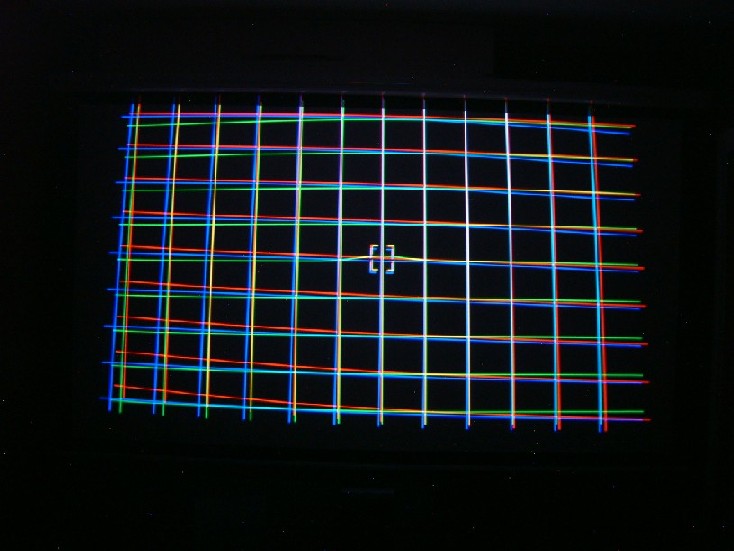
Being a newbie I have many questions, however, we are going thru working on refocus and adjustment tweeks. On the setup remote there is a button (PHASE) which I activated. An obtuse grid appeared much like a focus grid. The grids representing the colors were in areas perfectly in line (Phase) while much between them is not. Referring to the manuals I could not find any info. Can someone please explain and if these are to be in alignment (Phase), how do I do that?
Thanks!
|
|
| Back to top |
|
 |
kschmit2
Joined: 09 Mar 2006
Posts: 1141
Location: Heidelberg, Germany
|
| Posted: Thu Nov 27, 2008 9:26 am Post subject: |
|
|
Here are some previous posts about Phase (applies to NEC GP, PG Plus, PG Xtra and XG series only):
| Guy Kuo on Phase wrote: | On an NEC Phase does two things:
1. Aligns the internal pattern generator to match in current video signal's timing charcteristics. You achieve this by making the vertical lines of the pattern go left/right until the center vertical line is centered on the screen.
2. Aligns the convergence system timing to match the current video signal. You achieve this by moving the "blip" left/right until it is centered on the center vertical line of the test pattern.
|
| Doug Baisey on Phase and signal entries wrote: | If your having problems on tilt phase raise the brightness to max then look inside the tube face and see what it is doing to the raster / image on the outside corners. At times you may think you have it right but looking in the tube face it can be one or two clicks off.
Tilt phase (left right arrows) and cursor phase (top bottom arrows) isnt the same. Also you said 'dip' instead of 'hump' or as Mark calls it 'bump' but this should be higher on top looking at the screen, if its dipping down something isnt right in polarity. If you dont have a point board or if its not turned on you wont get the hump to align the point convergence to so bring it (cursor) to screen center then recheck tilt phase. If you do have a point board the highest part of the hump should be centered on the vertical line, use the up and down arrows to adjust then store-enter. To check this use a internal cross hatch then pull red up, it should pull up right at the cursor spot, not off to the side. Doug
One thing to mention:
On signal entries put video at the top even if you dont use it. The idea is to have a memory built with correct timings and amplitude. In a no signal condition it will usually go to video or pal and this will keep the raster and image safe. (May not be so with a expanded raster) I leave the next space blank then put in your RGB signal that you use the most. The multi sync of the projector will look at the top of the input list first then work its way down until it finds the right 'lock' for the signal. Leaving a space I find helps the projector to 'think'. |
| Doug Baisey on Phase and Geometry setup wrote: | The NEC's like others started life as a 4:3 multi-purpose display device for video, data and graphics. These on the most part used vesa standards for the common signal properties. The phase and shift are used for the various corrections that need to be made to work with these standards over a broad range. The test pattern generation is not perfect when using the freq's and formats that we run today or when manipulating lets say powerstrip or phase differences.
When using the projector for mainly HT or single purpose we set up for the specific freq's we do use so it will have some oddities that we work around. Signal timing and how we overcome side ringing and porches of the different signals is mainly done with the active signals you will be using and not the internal test patterns. Its give and take but usually the internal cross-hair will be off when centering for optimum use. You reach a compromise but also depends if you have a point card installed and active where cursor phase needs to align and make corrections at a given spot.
I would suggest using Avia for the test patterns or if you have a processor that will generate real time patterns you can use those like the ones in the Lumagens. Check the source and processor for being at default where no position corrections have been made first. HTPC's and porch settings also needs thought and blanking on the projector backed out of the way with H position set to mid point.
Do the signal entry then phase the signal. Use a cross hatch pattern for this first and looking in the tube face. When you hit phase it will go to the internal phase pattern but hit the test button then the end button and it will go to the active signal pattern but still in the phase function. This might take a few attempts. Make the tilt phase (left and right arrows) adjustment correction. If no point board is active you can center the cursor box at screen center using the top and bottom arrows. Store these settings. Correct linearity at all four sides and store. From there select the cross-hair pattern and see what you have to work with using position and other small corrections in phase. The final phase setting will affect edge focus so this will need some corrections.
When doing other signal entries this will need to be done for each signal line then use position to make corrections for that signal.
H position values will be different in most cases because of freq and each signals porches or properties.
The early PGs dont have the phase control the newer Plus and Extra models have. This should give you a general idea of how things work but once you actually do it a few time you will see more. The electronic astig is global for all signals so correct this once to make optimum then don't change. Doug
http://www.curtpalme.com/forum/viewtopic.php?p=94188#94188 |
| Mark_A_W on Phase wrote: | Phase is used to line up the test patterns and convergence/focus/astig/etc controls to the image.
Use the up and down keys to line the centre of the test pattern to the centre of your screen (measure your screen).
Use the left and right keys to move the pattern across until a bend appears in the pattern on one side. Note that number down. Then move it back the other way till the bend appears on the opposite side of the screen, note that number too. Try to get the amount of bend the same either side - it is very subjective, and you can't see one side while you do the other.
When you are happy that you have two numbers that give the same amount of "visible bend" either side, set the horizontal phase control to the number mid-way between them.
It sounds tricky, but its harder to explain than to do.
On a 9pg xtra you will also have a bump in the horizontal line. I think you may have to press crtl+phase to get this/move this. Line this up with the centre of the screen too. The aligns the point board to the image. I have a 6pg without point so I've never done this and the details may be wrong.
You are setting the phase of the internal waveforms to the image.
Persevere, it is a giant killer.
Mark
|
| Chuchuf on Phase wrote: | The idea with the phase adjustment is to get the hump in the middle of the vertical lines and not have any (or as little as possible) distortion on the horizontal lines as they aproach the edge of the screen. If you take and swing the controls you will see what I mean.
Terry
|
See attached image for a properly set up phase screen
Kai
| Description: |
|
| Filesize: |
73.07 KB |
| Viewed: |
3243 Time(s) |
|
|
|
| Back to top |
|
|
Mark_A_W
Joined: 15 Mar 2006
Posts: 3068
Location: Sunny Melbourne Australia
|
| Posted: Thu Nov 27, 2008 8:37 pm Post subject: |
|
|
|
On an XG, just get the green hump and crosshair in the middle of the screen. Ignore the other colours.
|
|
| Back to top |
|
|
|
|
|
|
|
You cannot post new topics in this forum
You cannot reply to topics in this forum
You cannot edit your posts in this forum
You cannot delete your posts in this forum
You cannot vote in polls in this forum
You cannot attach files in this forum
You can download files in this forum
|
Forum powered by phpBB © phpBB Group
|
|



