|
As this forum is rarely used anymore, we've locked it. Feel free to browse and read. Questions? Please reach out to us directly. Cheers! |
|
|
 |
|
|
| Author |
Message |
Tallaght
Joined: 06 Sep 2008
Posts: 3
|
| Posted: Sat Sep 06, 2008 4:55 am Post subject: Star Choice Canada - HDCP Help PLEASE! |
|
|
Hello from a newbie senior who knows very little here but needs help.
My sat provider here in Canada has just enabled HDCP here on it's Motorola DSR505 HD stbs.
Don't know if there are variations but the 505s here only have DVI and component output; no HDMI.
My tv is a Toshiba 34HF83 HDTV 34" analog tube set with non HDCP DVI input.
Currently I am using a DVI-DVI cable to connect tv to the stb with the digital-analog conversion being done by the tv.
Tried using component rgb cables with the D/A conversion being done by the DSR505 and got lousy results.
is there any way to rectify this headache, other than buying a new tv?
Been reading about the HD Fury and Moomie but really don't understand enough to see if these would help.
Thank you!
|
|
| Back to top |
|
 |
AnalogRocks
Forum Moderator

Joined: 08 Mar 2006
Posts: 26706
Location: Toronto, Ontario, Canada
TV/Projector: Sony 1252Q, AMPRO 4000G
|
| Posted: Sat Sep 06, 2008 11:59 am Post subject: |
|
|
Hello and welcome to the forum.
They can enable/disable the HDCP? That's interesting. I found a reference on this page that says:
Quote:
"The DSR505 includes as stated above, a plethora of outputs as illustrated to the left. However, one thing that neither the manual or online documentation states is that in order to use the DVI output you must have a HDCP compatible television or monitor."
But you had it working already correct??
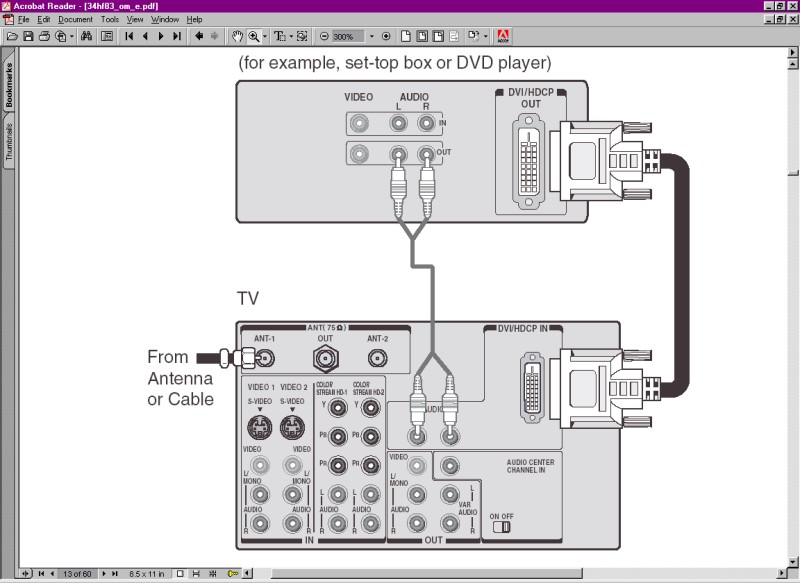
Strange in the manual it's listed as HDCP on the DVI input. (See fig.1 below.)
However in this forum they say it's not.
Quote:
"...i also want the DVI-HDCP input so i can use a 1080i DVD player someday... Are there any other models out there with this? (Yes, the Toshiba 34HF83 has DVI input, but it is NOT HDCP and will not accept the 1080i output from the Samsung DVD player, instead it pipes it out at 720so I've read)
The poster doesn't compley know what he is talking about. So take that with a grain of salt.
All the other web pages list it as HDCP compliant too.
Yes the HDFury2 would do what you need, your conetion to the TV would be component.
MotorolHD---DVItoHDMIcable--->HDFury-----Component_cables----->ToshibaTV
The Moome MUX-HD box would also do it and keep things digital.
Motorola------DVItoHDMIcable-----MUX-HD------DVItoDVIcable----ToshibaTV
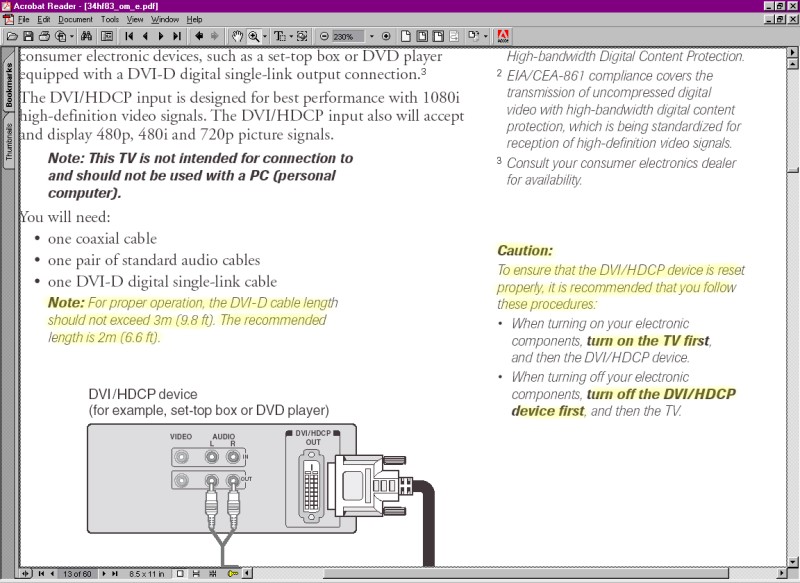
However I'm curious as to why the input's listed as HDCP yet doesn't work. How long is your DVI cable and what brand is it? In the manual it calls for a 2m (6.6foot ) cable as the recomended length. It may be a handshaking problem between the Motorona and the Toshiba. Follow the directions in fig.2 below.
Turn on the TV BEFORE the Motorola box. See if that will give you a picture.
| Description: |
|
| Filesize: |
81.35 KB |
| Viewed: |
16512 Time(s) |
|
| Description: |
|
| Filesize: |
115.46 KB |
| Viewed: |
16512 Time(s) |
|
_________________
Tech support for nothing
CRT.
HD done right!
|
|
| Back to top |
|
|
Tallaght
Joined: 06 Sep 2008
Posts: 3
|
| Posted: Thu Sep 11, 2008 12:50 am Post subject: I Think I May Have Goofed |
|
|
Thanks for all the help, Analog Rocks!
First, the DSR-505's DVI output can definitely have the HDCP turned on or off via sotware version "upgrades" - which is what Star Choice has done!
An examination of the "DSR-500 Series" user guide provided by Star Choice does not even have a DVI connector but has a TV pass-card slot instead. Star Choice instead provides a single page photocopy with the correct diagram for the DSR-505 connections.
A call to Toshiba Canada ascertained that both the 30HF83 and 34HF83 are HDCP compliant through their DVI inputs.
Further investigation of both the Toshiba manuals and the DSR-500 guide pointed to a glaring yet not so obvious solution.
The output (behind the hidden front panel) on the DSR-505 was set incorrectly. Looks like the choices are: pass-through, 480p, 720p, and 1080i. Switching to the 720p output enabled the HDCP handshake to activate.
Notably the Toshiba manual specifies that when the DVI input is being used then for the HDCP to function correctly the TV must be switched on before the DSR-500 and switched off after the DSR-500!
Now the last question is whether I can have the 505 connected to the TV by BOTH DVI and component in order to be able to select either HDCP HDTV signal or the pass-through; ie, are both DVI and component active simultaneously on the DSR-505?
Thank you again!
|
|
| Back to top |
|
|
energeezer
Joined: 08 Aug 2007
Posts: 67
|
| Posted: Fri Sep 12, 2008 8:26 pm Post subject: |
|
|
Well *C is known to be glitchy compared to Bell. it drives me nuts that *C hardware is double the price of Bell yet has half the ability. Compare *C flagshit PVR/receiver ,the DSR 530, against any of Bells recent PVR hardware and see for yourself. Half the ability and double the price.
I've been using *C HD for at least five years now. Started with the HDD200 (Box Car) then went to the DSR 500 and now the 505s and the 530. I'd love to switch to Bell but I'm stck at this time.
I have never had any issues with HDCP regardles of what cabling I've used and I do get HD over component if I connect that way. Re the resolution settings. You missed the most important and usefull one. "Native" In the "Native" setting the receiver will output 480i for non HD channels and 1080i for the HD stations. You should use this setting and let your TV switch setups between 480i and 1080i. in my experience the scaler inside the DSR which upsamples all 480i signals (if you have 1080i output selected) is substandard to all stand alone scalers and most display devices built in scaling.
One more thing. I am now only using the DVI output of my 530. I used to link the 530 using component and DVI to my scaler but I noticed that the 530 became much more glitchy and susceptible to dropouts and freeze ups when outputting both digital and analog. Another tip with the *C hardware. Keep it cool. If you let it heat up in a rack it will become much more unstable and you may be fooled into thinking its behavior is linked to output resolutions when actually its crashing.
I've had a ton for fun with *C hardware LOL.
I could go on for ages with other ideosyncracies of this equipment but all my experience is with the receiver feeding a scaler and projector using various inputs and outputs. In your case your setup is very simple.
|
|
| Back to top |
|
|
Tallaght
Joined: 06 Sep 2008
Posts: 3
|
| Posted: Mon Sep 15, 2008 3:03 pm Post subject: HDCP Finally Working! |
|
|
Thanks for the help ENERGEEZER!
I rewired everything over the weekend and now have the Toshiba 34HF83 working with the DSR-505 with BOTH DVI and RGB component inputs. You actually clued-me-in as to the possible problem/solution re HDCP. It seems that (in my case anyway!) the HDCP handshake only works properly when the DSR-505 is set to pass-through (0000) or native resolution. I suspect that any other setting on the DSR-505 inhibits the HDCP handshake over DVI. This is obviously great for HD but not so for SD on some channels.
Switching to component for some SD channels actually gives a better picture. The CBC channels can actually appear too dark compared with HD-DVI and using component helps offset this problem.
Here's hoping that a DSR-505 replacement puts this resolution setting control on the remote and not on a flimsy hidden switch!
When checking the DSR-505 settings I came across one I don't understand; "bd1". Any idea what this is for?
As to your comments re *Choice and Bell, I went with *Choice because of their simsubbing policy and because I wanted Buffalo rather than Boston. Now that Bell has dropped Euronews they are not even worth considering even for free!  
|
|
| Back to top |
|
|
|
|
|
|
|
You cannot post new topics in this forum
You cannot reply to topics in this forum
You cannot edit your posts in this forum
You cannot delete your posts in this forum
You cannot vote in polls in this forum
You cannot attach files in this forum
You can download files in this forum
|
Forum powered by phpBB © phpBB Group
|
|




