|
As this forum is rarely used anymore, we've locked it. Feel free to browse and read. Questions? Please reach out to us directly. Cheers! |

|
 |
|
|
| Author |
Message |
AnalogRocks
Forum Moderator

Joined: 08 Mar 2006
Posts: 26706
Location: Toronto, Ontario, Canada
TV/Projector: Sony 1252Q, AMPRO 4000G
|
| Posted: Sat Dec 22, 2007 1:32 am Post subject: |
|
|
I head that was BR+ and AnyDVD-HD had fixed that nonsense.
_________________
Tech support for nothing
CRT.
HD done right!
|
|
| Back to top |
|
 |
macgyver655
Joined: 22 Aug 2007
Posts: 8508
|
| Posted: Sat Dec 22, 2007 2:02 am Post subject: |
|
|
Did a little reading and found this so far.
I have a minor problem that's been bugging me...
I'm currently running the 8500GT (driver 158.18 in Vista Ultimate) and using PowerDVD 7.3 Ultra to play Bluray and HD-DVD rips off the hard disk. I don't have a drive installed in my HTPC, I simply rip the movie to my storage server from a box in another room (so that I don't have to hear it..  ) )
The hardware accel for H264 works beautifully.. ~50-60% without accel, ~12% with accel. No problems there.
The problem arises when I have hardware accel checked while playing VC-1. While I realize that this card won't accelerate VC-1 content, I assumed that it would just "do nothing".... instead, the movie loads up fine and I can view the menu and any extras on the disk. However, almost immediately after initiating the movie, I get a BSOD. Unchecking the accel box before I play the movie solves the issue and I can view it fine.
Is this a driver limitation, or am I missing something? It's kind of annoying to have to remember to check and uncheck the hardware accel option depending upon the type of content that I'm playing.
The rest of my specs, if it matters:
Intel C2D E4400
Gigabyte GA-965P-DS3 MB
2x Kingston 1GB DDR2 800
WD Caviar 160GB SATA300
response:
Assuming your hardware is all OK (power supply? gpu temp?), it has to be the drivers. Might be worth doing a root and branch driver uninstall - uninstall, reboot to safe mode, drivercleaner, registry search, delete nvidia files etc, then reboot and reinstall. For ref, I use 158.24 without any problems (158.43 has some oddities with live DVB so I went back).
response:
--------------------------------------------------------------------------------
So this is an issue, right? You are supposed to just check the hardware accel box and then "forgot it", letting the drivers decide if the accel should happen or not.. right?
Quote:
--------------------------------------------------------------------------------
Originally Posted by arfster
Assuming your hardware is all OK (power supply? gpu temp?), it has to be the drivers. Might be worth doing a root and branch driver uninstall - uninstall, reboot to safe mode, drivercleaner, registry search, delete nvidia files etc, then reboot and reinstall. For ref, I use 158.24 without any problems (158.43 has some oddities with live DVB so I went back).
--------------------------------------------------------------------------------
The PSU is 380W.. that should be more than enough for my rig, no?
As for GPU, it is passively cooled (I've seen it anywhere between 53 and 62 degrees celsius), but I can play 2+ hours worth of H264 content (accel on or off) without any frameloss or stutter. I'd like to think that heat isn't the issue when it comes to not being able to play a single second of VC-1 with hardware accel checked... but I've been wrong before.
Quote:
--------------------------------------------------------------------------------
Originally Posted by RichB
I am running a similar system without problems with 2911 PowerDVD and 160.03 for Vista 32. You can find them at guru3d.com.
--------------------------------------------------------------------------------
Thanks.. I assume you mean the ForceWare drivers found on that site?
response:
Yeah, it should just work. If it doesn't want to accelerate, it should drop back to software mode and play on. If there's a filter connect error, it should just fail to play. A BSOD always means something more fundamental is screwed - on the software side, it can only be the drivers (unless you've had a virus recently that's screwed with some major part of the OS?).
On the hardware side, it might be worth trying the card in another machine to test if all is OK with it.
It's interesting that it's VC1 though, and not the (much more demanding) h264. Nvidia of late have been having some stability problems with hardware acceleration of that, only affecting some machines, but still. I've never heard of it BSODing though, usually it just does the green-garbled weirdness thing, or simply crashes the app. Possibly there's some odd interaction issue between the drivers and your motherboard, since certainly the 8500+VC1 works fine with hardware acceleration for most people afaik.
Your PSU should be plenty - I've got a 330W running a C2D overclocked to 3ghz, with 3 hard drives, DVB card and bucketloads of USB junk, and never had a problem.
response:
Interesting..
On the BSOD, my drivers are always mentioned as the culprit (nvidia-something-something.sys), so I'm going to assume the problem lies there.
It just seemed to me like the card was being forced to do something that it couldn't do, accelerate VC-1. There were no problems whatsoever with H264.
At least I assume it was VC-1.. The issue in question was happening during attempted playback of the Children of Men HD-DVD (with and without AnyDVD running).
|
|
| Back to top |
|
|
AnalogRocks
Forum Moderator
Joined: 08 Mar 2006
Posts: 26706
Location: Toronto, Ontario, Canada
TV/Projector: Sony 1252Q, AMPRO 4000G
|
| Posted: Sat Dec 22, 2007 7:54 am Post subject: |
|
|
Interesting. Thanks Mac, I was trying to play "AMerican Werewolf in London" when mine crashed.
_________________
Tech support for nothing
CRT.
HD done right!
|
|
| Back to top |
|
|
WanMan

Joined: 19 Mar 2006
Posts: 10270
|
| Posted: Sat Dec 22, 2007 10:39 am Post subject: |
|
|
AR, what movie(s) were you attempting to play when the BSOD hit? I was playing Casino Royale, and up until the middle of the airport fight sequence did it bomb out. In Batman Begins I never had a problem. Also, are you using the included software or standalone software. I had not thought to try AnyDVD HD, but then again that probably isn't free either.
_________________
Trust no one. Absolutely no one. Advice of the board.
|
|
| Back to top |
|
|
AnalogRocks
Forum Moderator
Joined: 08 Mar 2006
Posts: 26706
Location: Toronto, Ontario, Canada
TV/Projector: Sony 1252Q, AMPRO 4000G
|
| Posted: Sat Dec 22, 2007 9:41 pm Post subject: |
|
|
Nope it's not free but what is? I was trying to play American Werewolf in London, I was using PowerDVD Ultra that was already installed and registered. I didn't even open the included disk.
_________________
Tech support for nothing
CRT.
HD done right!
|
|
| Back to top |
|
|
AnalogRocks
Forum Moderator
Joined: 08 Mar 2006
Posts: 26706
Location: Toronto, Ontario, Canada
TV/Projector: Sony 1252Q, AMPRO 4000G
|
| Posted: Fri Dec 28, 2007 1:27 am Post subject: |
|
|
Little update. If I boot with a disk in the LG drive the computer gets stuck in a re-boot loop.
I've just unplugged it for now and gone back to the Xbox HD DVD drive.
I think there may be a controler issue with my onboard SATA controller, just like the Plextor SATA DVD drive had a problem.
I'm looking for a SATA to USB 2.0 interface. That may 'fix' this issue. I'd add a PCI controller card but I have no more slots.
_________________
Tech support for nothing
CRT.
HD done right!
|
|
| Back to top |
|
|
AnalogRocks
Forum Moderator
Joined: 08 Mar 2006
Posts: 26706
Location: Toronto, Ontario, Canada
TV/Projector: Sony 1252Q, AMPRO 4000G
|
| Posted: Sat Dec 29, 2007 10:46 am Post subject: |
|
|
I got mine working tongiht. I had to try two different adaptors. The first was an internal SATA to IDE bridge. That didn't work then I got an external IDE/SATA to USB 2 cable and it worked. I watched my first BR movie. Ice Age at 1080P/72 on the G520 monitor. Man that's a nice picture. 
Now I have to hack the USB cable and make it plug into the motherboard internally.
I can honestly say SATA sucks for optical drives. I'm not at all impressed with their cables either. To flimsey and easy to pull off the drives when you're working in the case. Especially a mini ATX style.
_________________
Tech support for nothing
CRT.
HD done right!
|
|
| Back to top |
|
|
WanMan
Joined: 19 Mar 2006
Posts: 10270
|
| Posted: Sat Dec 29, 2007 3:24 pm Post subject: |
|
|
AR, can you honest say SATA sucks for optical drives vs the SATA controller manufacturer?
_________________
Trust no one. Absolutely no one. Advice of the board.
|
|
| Back to top |
|
|
AnalogRocks
Forum Moderator
Joined: 08 Mar 2006
Posts: 26706
Location: Toronto, Ontario, Canada
TV/Projector: Sony 1252Q, AMPRO 4000G
|
| Posted: Sat Dec 29, 2007 4:45 pm Post subject: |
|
|
Well I suppose that's one wat to look at it but here's the way I see it; I have NEVER had an optical drive problem with IDE. I have NEVER had to goto a manufactures web site to see if my drive is compatable with a given chipset. If they are going to come out with a new standard then make it just that - a standard. The IDE drives were made to be compatable with the hard drive specifications, hell even CF cards were made to be compatable - pin for pin - with the IDE specifications.
Plextor's tech support said to me last year when I was trying to get my SATA DVD burner up and running "It's clearly listed on our web site that the Nforce 430 chipset won't work with our SATA based burners. The way SATA DVD's handle the information is different than the hard drives."
Ok, call me naive, but why the hell would I even CHECK the web site? Should I have done more exhaustive research? Pardon the hell out of me for guessing, without thinking, that the new interface specification thrust upon the public would be finalized and actually work. OUT OF THE BOX WITH NO HASSLES.
I'm not new to building PC's, I've been at it since the 386 -16Mhz days. I've seen ISA, VESA-LB ,PCI an AGP go away in favour of new interface standards. I've had an occasional hicup with two cards not wanting to play nice in the slot's they're in but I repeat. I have NEVER had to think about the optical drives. All the way from the 2X CD-ROM drive connected to the soundblaster Pro ( the REAL sound blaster not an emulation ) On up through the first CD burners 2X on IDE and SCSI then all the way through to the ATA133 interface with the double conductor ribbon cables. Into the 52X CD burners and on through the 18X DVD burners. You plug them into the IDE and they work, out of the box, plug and play. The only issue I ever remember having was putting a high speed hard drive and an optical drive on the same channel. Simple enough to fix, just plug it into the other port and we were off and burning.
I blame the industry. Why should I have to jump through hoops and spend countless hours just to plug in a DVD ROM drive and have it work without crashing the system? Why was my final work around to change the SATA speck to another interface? I have taken a high speed piece of equipment and slowed it down to a crawl interface-a-dly speaking. The whole point of a faster inter face is just that. SPEED.
I've got a Hemi Charger with Chevette wheels on it now 
Something has to change in the computer industry. Is it too much to ask to have things work properly out of the box?
So Wanman, YES I can wholeheartedly say SATA sucks balls for optical drives.
_________________
Tech support for nothing
CRT.
HD done right!
Last edited by AnalogRocks on Thu Jan 10, 2008 10:41 pm; edited 1 time in total
|
|
| Back to top |
|
|
WanMan
Joined: 19 Mar 2006
Posts: 10270
|
| Posted: Sat Dec 29, 2007 9:08 pm Post subject: |
|
|
AR, your response seems to take a defense to something I've suggested. All I meant was that some manufacturers of controllers are a lot better than others. Nothing I said is about your abilities or expertise.
I do not know if Via made the SATA controller or not, but I've seen good and bad SATA controllers and this was with hard drives. Based on this I would foolishly suggest that SATA is somewhat crappy for everything, but then again I am not foolish to go there. BTW, isn't there a SATA controller in the adapter you are using to input into USB? 
_________________
Trust no one. Absolutely no one. Advice of the board.
|
|
| Back to top |
|
|
AnalogRocks
Forum Moderator
Joined: 08 Mar 2006
Posts: 26706
Location: Toronto, Ontario, Canada
TV/Projector: Sony 1252Q, AMPRO 4000G
|
| Posted: Sat Dec 29, 2007 9:21 pm Post subject: |
|
|
| WanMan wrote: | AR, your response seems to take a defense to something I've suggested. All I meant was that some manufacturers of controllers are a lot better than others. Nothing I said is about your abilities or expertise.
I do not know if Via made the SATA controller or not, but I've seen good and bad SATA controllers and this was with hard drives. Based on this I would foolishly suggest that SATA is somewhat crappy for everything, but then again I am not foolish to go there. BTW, isn't there a SATA controller in the adapter you are using to input into USB? |
Not offense taken. I was up 'till 5:25am making this damn thing go. I fell asleep in the chair with my head craned sidways and awaoke with a stiff neck. Made me damn crankey. I wrote the above response minutes after I woke up ( forum junkey anyone?)
I do see your point. Many manufactures make controllers some are probably better than other's but in the olden days 10 years or more ago I used the cheapest motherboards I could find with what ever controller they had on there. No problems.
I didn't think you were doubting my abilities. I was just in my crankey rant phase. Plus I didn't get to the bar last night for hot wings or else I wouldn't have been on the forum first thing in the morning. If you see my meaning.
The controller on this motherboard is an Nvidia 430. You'd figure they would make a decent product.
And you got me on the SATA controller in the SATA/USB2 cable. lol There is a controler there and for once it works as advertised.
_________________
Tech support for nothing
CRT.
HD done right!
|
|
| Back to top |
|
|
AnalogRocks
Forum Moderator
Joined: 08 Mar 2006
Posts: 26706
Location: Toronto, Ontario, Canada
TV/Projector: Sony 1252Q, AMPRO 4000G
|
| Posted: Mon Jan 07, 2008 3:32 pm Post subject: |
|
|
Having video issues now. Guess even Nvidia doens't want to play nice with me. See the details here:
https://www.curtpalme.com/forum_archived/viewtopic.php@t=8321.html
| Analog Rocks wrote: |
I did all the gama tweaks in the Nvidia control panel. The video looks good. It's aboot the same brightnes as the desktop. I was even able to swap movies (HD-DVD/Bluray) three times while demoing it and they played back normally. The 4th caused a black screen and a computer hang. Had to reboot. So there's something not right there.
Seem's it got pissed off when I swaped the VGA cable from the Sony G520P monitor over to the input on the Sony 1271 switcher. Make's me wonder if PowerDVD envoked some form of DRM when it saw the G520P disconnect. Or is it the Nvidia card getting pissed off at having the monitor disconected?
FWIW the only way I could get it to play nice with the Sony switcher was to plug the VGA into the switcher and reboot the computer. Any time I tried to start on the monitor and swap off to the switcher it would go black screen on me. And no it wasn't the screen saver |
_________________
Tech support for nothing
CRT.
HD done right!
|
|
| Back to top |
|
|
AnalogRocks
Forum Moderator
Joined: 08 Mar 2006
Posts: 26706
Location: Toronto, Ontario, Canada
TV/Projector: Sony 1252Q, AMPRO 4000G
|
|
| Back to top |
|
|
AnalogRocks
Forum Moderator
Joined: 08 Mar 2006
Posts: 26706
Location: Toronto, Ontario, Canada
TV/Projector: Sony 1252Q, AMPRO 4000G
|
| Posted: Mon Jan 07, 2008 3:45 pm Post subject: |
|
|
On another note, has anyone gotten the custom resolutions on the GF8600 cards to work? Every time I try to setup my 1080i settings it goes back to an awefull default with wrong porch timmings.
In the Nvida control pannel when you press the test button it always says resolution test failed. I'm not use to seeing that. The Powerstrip never did that too me.
_________________
Tech support for nothing
CRT.
HD done right!
|
|
| Back to top |
|
|
AnalogRocks
Forum Moderator
Joined: 08 Mar 2006
Posts: 26706
Location: Toronto, Ontario, Canada
TV/Projector: Sony 1252Q, AMPRO 4000G
|
| Posted: Fri Jan 11, 2008 2:47 am Post subject: How to make an LG GGC-H20L drive work. |
|
|
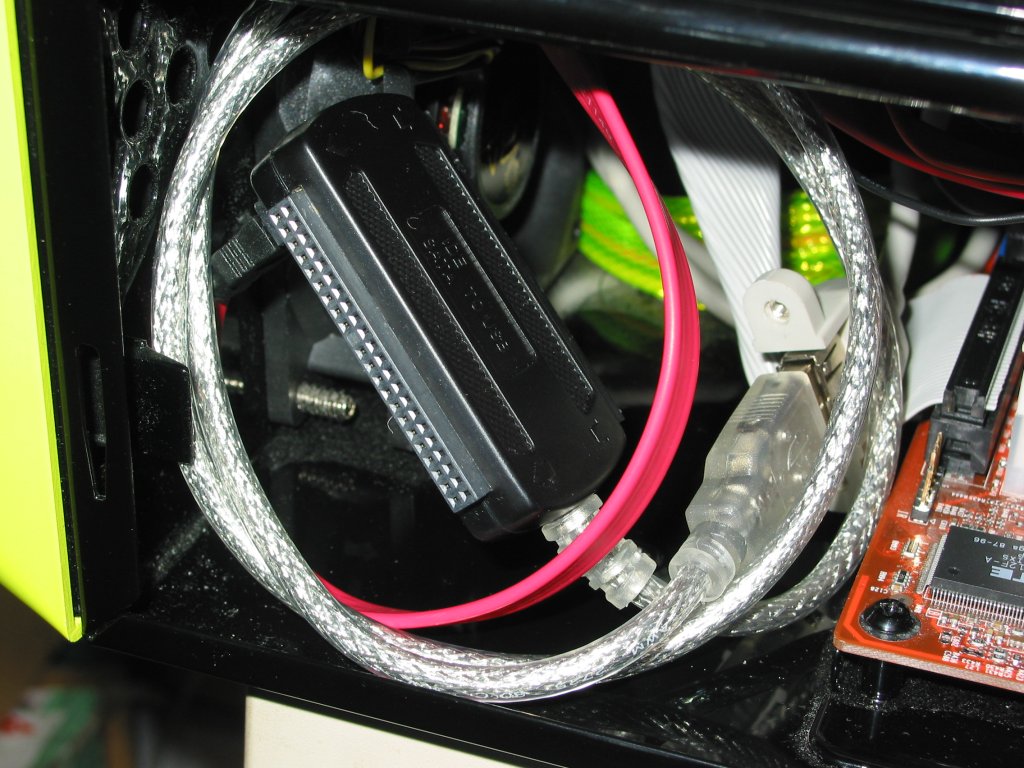
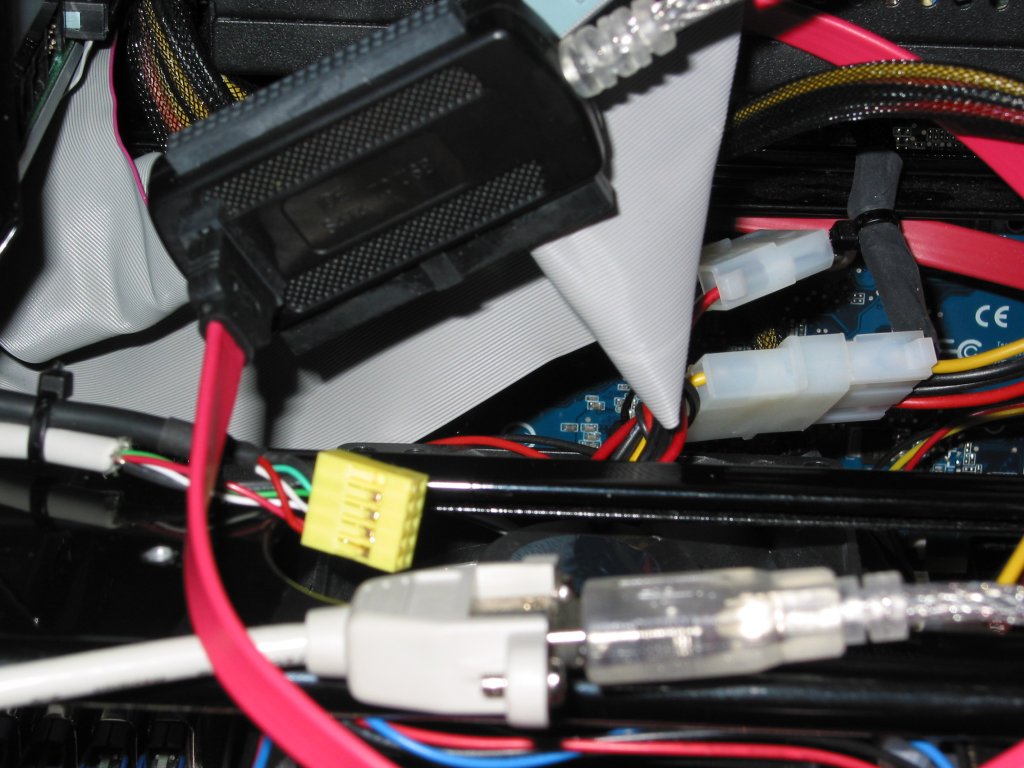
Been meaning to update this. I got the LG HD-DVD/Bluray drive working with a SATA/IDA/mini IDE to USB 2 adaptor.
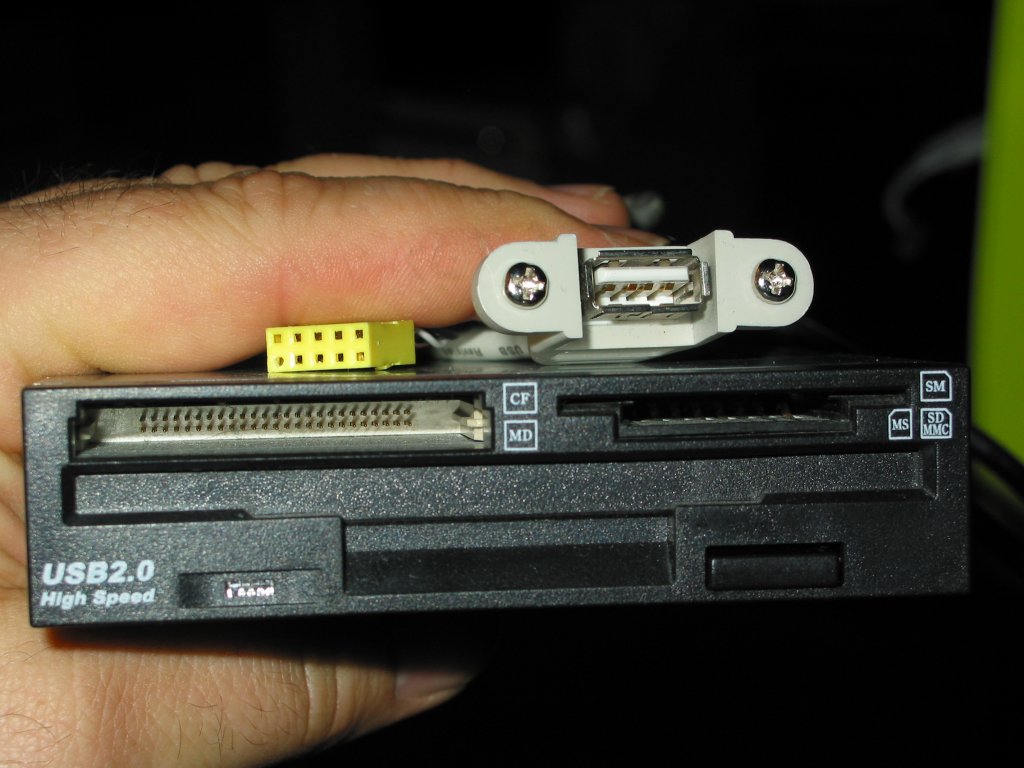
I conjoined an internal to external USB port to the pulg for my card reader. Then I plugged the SATA to USB adaptor into this and kept all the wires internal
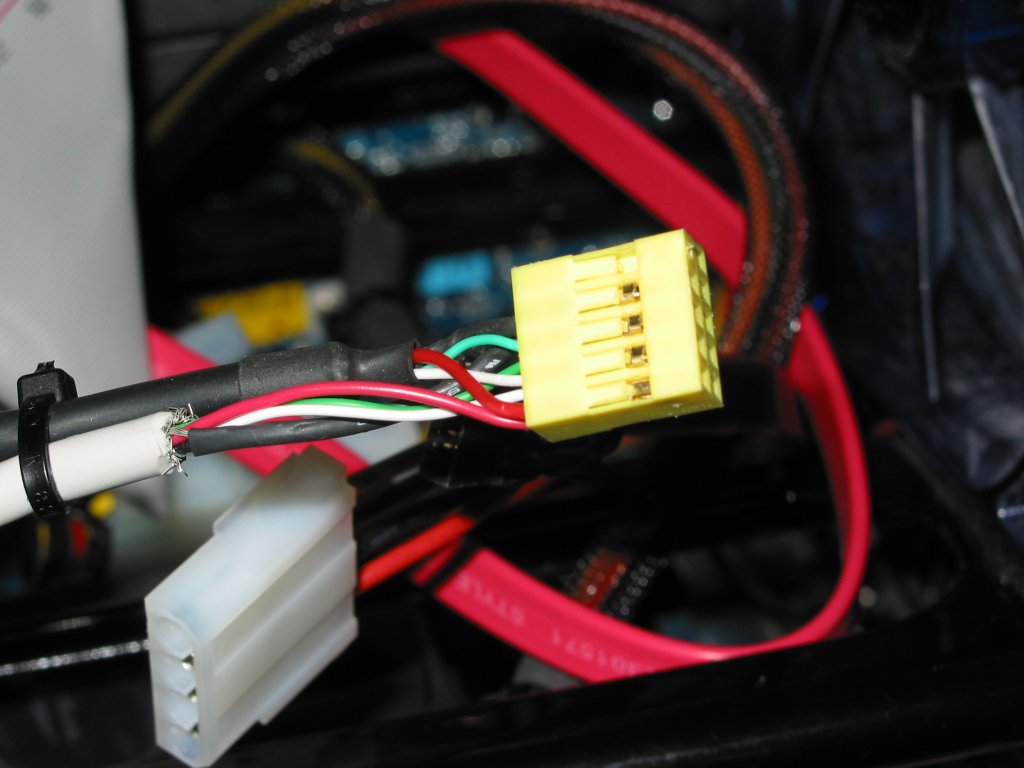
The RED cable is SATA from the LG HD-DVD/Bluray drive.
The SILVER cable is SATA/IDE adaptor to USB male external cable.
The TAN cable is female USB jack to female motherboard plug (Yellow).
The BLACK cable if from my USB memory card reader.
Here's a couple of pictures:
| Description: |
| SATA,IDE & MiniIDE to USB 2.0 cable |
|
| Filesize: |
136.41 KB |
| Viewed: |
13170 Time(s) |
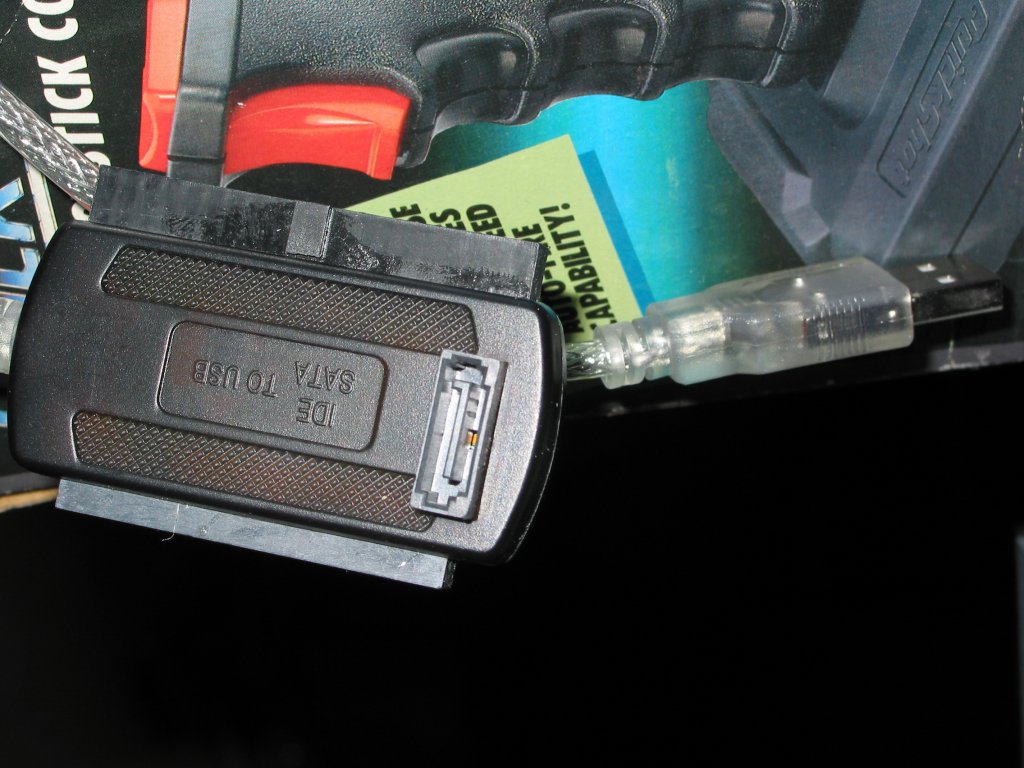
|
| Description: |
| Plugged the SAT to USB cable into here. |
|
| Filesize: |
69.11 KB |
| Viewed: |
13170 Time(s) |
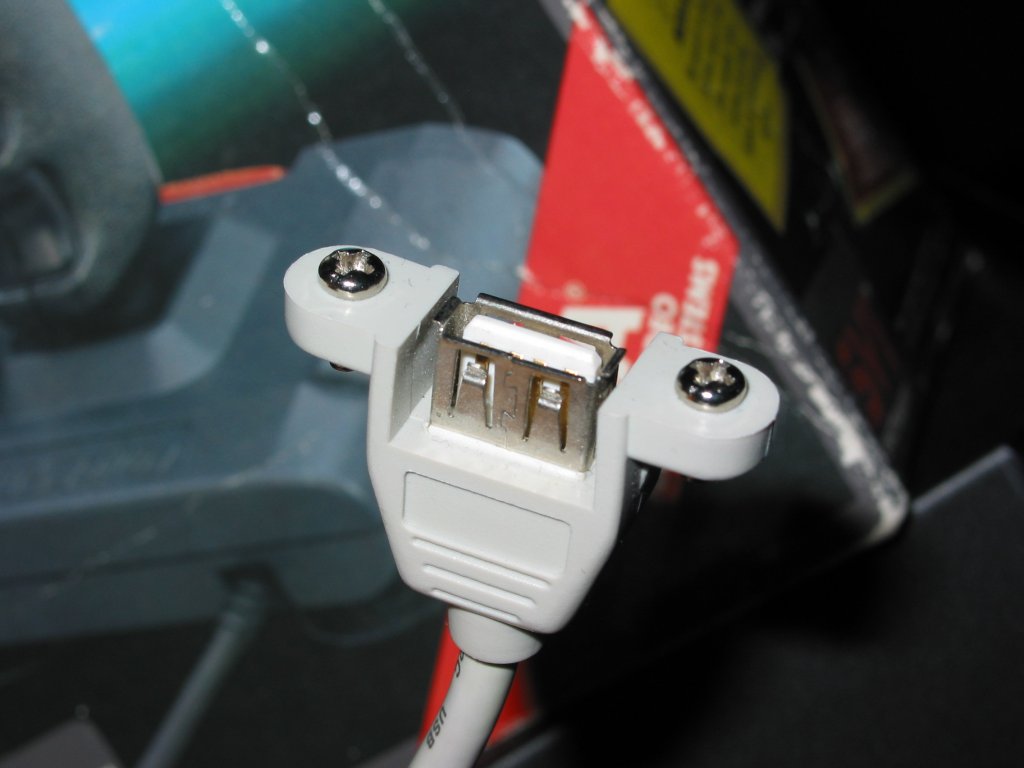
|
| Description: |
|
| Filesize: |
113.5 KB |
| Viewed: |
13170 Time(s) |
|
| Description: |
|
| Filesize: |
83.3 KB |
| Viewed: |
13170 Time(s) |
|
| Description: |
|
| Filesize: |
171.25 KB |
| Viewed: |
13170 Time(s) |
|
| Description: |
SATA to Black box - Silver cable to USB 2 male external plug, Female xternal jack to motherboard plug.
Easy no? |
|
| Filesize: |
136.64 KB |
| Viewed: |
13170 Time(s) |
|
_________________
Tech support for nothing
CRT.
HD done right!
|
|
| Back to top |
|
|
AnalogRocks
Forum Moderator
Joined: 08 Mar 2006
Posts: 26706
Location: Toronto, Ontario, Canada
TV/Projector: Sony 1252Q, AMPRO 4000G
|
| Posted: Tue Jan 15, 2008 2:32 am Post subject: |
|
|
Nvidia 8600 GTS OC 256mb
After trying to get 1080i output for almost an hour on Sunday night while trying to demo HD to another forum member on his 1272 I had to give up and run 720P instead. The thing is I had 3 resolutions set up the night before while using my G520P monitor. I had 1080i/30 1080i/72 and 1080i/96 setup. Of course the custom timings to reduce overscan wound't work. but at least I could have used 1080i.
When I booted up at Ken's place ALL my custom resolutions were gone! On top of that no matter what I did it wound't give them back to me. Everytime I tried it gave me 1080P! TO my surprise the Sony 1272 synced to it. Lets say it was somewhat 'blurry' lol. The line overlap was crazy. I changed the resolution out of that ASAP.
End result, 720P on a 5300 hour ES set looked really nice.
NOW for the question.
No matter how much it pains me I think I have to contaminate my Green Machine with an ATi card.
I'm thinking the
EDIT:
correction: NOT MSI
it's the
HIS HD3850 512mg DDR3 H385F512N would fit the bill. It only takes up one slot ( very important in a small box ) and although I need the overall length to see if it will psyically fit, It seems to be the best ATi choice for gaming/HTPC.
Does anyone here run one?
I'll post the model number just as soon as I can find that page again 
_________________
Tech support for nothing
CRT.
HD done right!
Last edited by AnalogRocks on Wed Jan 16, 2008 3:20 am; edited 2 times in total
|
|
| Back to top |
|
|
AnalogRocks
Forum Moderator
Joined: 08 Mar 2006
Posts: 26706
Location: Toronto, Ontario, Canada
TV/Projector: Sony 1252Q, AMPRO 4000G
|
| Posted: Tue Jan 15, 2008 2:59 am Post subject: |
|
|
H385F512N
_________________
Tech support for nothing
CRT.
HD done right!
|
|
| Back to top |
|
|
GREG1292

Joined: 10 Oct 2006
Posts: 417
Location: indiana
|
|
| Back to top |
|
|
AnalogRocks
Forum Moderator
Joined: 08 Mar 2006
Posts: 26706
Location: Toronto, Ontario, Canada
TV/Projector: Sony 1252Q, AMPRO 4000G
|
| Posted: Tue Jan 15, 2008 5:27 pm Post subject: Re: Analog |
|
|
| GREG1292 wrote: | I have a 3870 in the mail right now and will report back my findings. I would PM ED FOWLER on Avs forum
he has a great crt set up and likes this ATI card over his 8800gts. Hope this helps.
Greg |
Thanks Greg. I'll look into doing just that.
_________________
Tech support for nothing
CRT.
HD done right!
|
|
| Back to top |
|
|
AnalogRocks
Forum Moderator
Joined: 08 Mar 2006
Posts: 26706
Location: Toronto, Ontario, Canada
TV/Projector: Sony 1252Q, AMPRO 4000G
|
| Posted: Wed Jan 16, 2008 2:59 am Post subject: |
|
|
This installed but won't play anything. Not sure I did things right just 'cause it's all in Japaneese ( mostly ).
Hope there's an English version soon.
_________________
Tech support for nothing
CRT.
HD done right!
|
|
| Back to top |
|
|
|
|
|
|
|
You cannot post new topics in this forum
You cannot reply to topics in this forum
You cannot edit your posts in this forum
You cannot delete your posts in this forum
You cannot vote in polls in this forum
You cannot attach files in this forum
You can download files in this forum
|
Forum powered by phpBB © phpBB Group
|
|




