| Author |
Message |
Frostbite
Joined: 22 Apr 2007
Posts: 24
|
| Posted: Tue Jul 01, 2008 12:26 pm Post subject: BR 909 vertical shift problem |
|
|
Hello all,
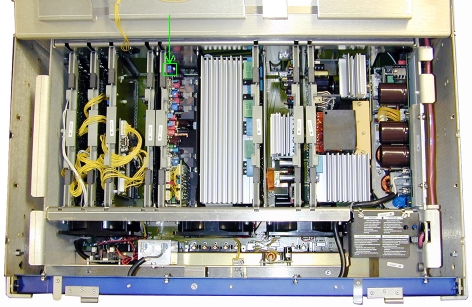
Since I don't really know myself, I thought I should inquire as to where the vertical shift pots are on the BG 909. I've run out of range using the electronic adjustments for red vertical shift, so I believe this pot must be adjusted, since red doesn't line up with green. Resetting values to midposition doesn't help. Could anyone point out where I can locate it? I'm not too sure which boards are which, so descibing the board in question (which would be the vertical board, I suppose) would really help as well.
Also, does anyone know of a reason why the green tube cannot focus as well as the red? I've checked optical and electronic focus as well as electronic astig but the green tube still isn't near the red in terms of focusing ability. The green isn't unsharp but it isn't quite as sharp as the red. I'd say the red tube is 50 % sharper than the green. Adjusting contrast and brightness doesn't affect the situation. Gain for the green tube is 60. All tubes are P19 LUG tubes (~800 hrs of usage) and the lenses are stock HQF 900. I have the compact "box model" of the 909 and it is installed parallell to the screen (0 degree angle).
Thanks!
|
|
| Back to top |
|
 |
Ile

Joined: 09 Mar 2006
Posts: 1491
Location: Jyväskylä, Finland
|
| Posted: Tue Jul 01, 2008 1:13 pm Post subject: |
|
|
See if sift pots are in vdef board like in other Barco models. Board layout is probably similar what other models have and pots have markings in pcb...
http://www.curtpalme.com/Barco808_Layout3.shtm
Maybe green focus yoke position (along neck) and astig need tweaking? Two last pages cover procedure for 808s, procedure should be pretty similar also for Cine9.
Newer played with Cine9, so I can't give better advices...
|
|
| Back to top |
|
|
Frostbite
Joined: 22 Apr 2007
Posts: 24
|
| Posted: Tue Jul 01, 2008 1:32 pm Post subject: |
|
|
I have seen pots with red an blue markings on them. I'll take a closer look.
That could be it. I'll try moving the focus yoke.
Thanks!
|
|
| Back to top |
|
|
Hulio
Joined: 15 Apr 2006
Posts: 494
Location: Belgium
|
| Posted: Tue Jul 01, 2008 10:00 pm Post subject: |
|
|
Here ya go.If you zoom in you will see the green arrow.
Stan
| Description: |
|
| Filesize: |
159.15 KB |
| Viewed: |
3645 Time(s) |
|
|
|
| Back to top |
|
|
Frostbite
Joined: 22 Apr 2007
Posts: 24
|
| Posted: Wed Jul 02, 2008 7:04 am Post subject: |
|
|
That's it! I have now been able to set the shift values to mid-position and at the same time get the red and the blue patterns to line up properly with the green one. Since I'll have to turn over the projector to access the compartment where the tubes are, I'll take a look at green focusing the next time I'll feel like optimizing the image. Green focus is actually quite alright right now but it should definitely be possible to get it even better (CRT 101). I have a feeling that the focus yoke could be positioned wrongly, as astig adjustments made on the green tube doesn't have an effect of the same amplitude as it does on the blue and the red ones (the effect when applying astig adjustments to the different zones is much smaller).
Thanks a bunch for your input, guys! Much appreciated. The pictures really helped a lot.
|
|
| Back to top |
|
|
Frostbite
Joined: 22 Apr 2007
Posts: 24
|
| Posted: Wed Jul 02, 2008 11:58 pm Post subject: |
|
|
|
Does anyone know of a pot for adjusting H width on the projector?
|
|
| Back to top |
|
|
Ile
Joined: 09 Mar 2006
Posts: 1491
Location: Jyväskylä, Finland
|
| Posted: Thu Jul 03, 2008 8:24 am Post subject: |
|
|
| Frostbite wrote: | | Does anyone know of a pot for adjusting H width on the projector? |
See if it's P2 pot where red arrow point...
|
|
| Back to top |
|
|
Frostbite
Joined: 22 Apr 2007
Posts: 24
|
| Posted: Thu Jul 03, 2008 11:24 am Post subject: |
|
|
|
Thanks! I'll get right on it after work. Sorry for the all the questions, but I'm still something of a novice.
|
|
| Back to top |
|
|
Frostbite
Joined: 22 Apr 2007
Posts: 24
|
| Posted: Fri Jul 04, 2008 2:30 am Post subject: |
|
|
I was able to adjust H width using the pot you pointed out. Thanks! You know your stuff, Ile.
After a long while of adjusting the projector today, I suddenly saw that the blue and the red tube had lost focus (electronic focus, it seems) in a small part of the left part of the raster, near the edge. Trying to adjust it with astig didn't help. I tried setting astig and convergence in the area to 49 but that didn't help either. I'll try removing and reinserting the convergence board before I go to sleep today.
Oh, and I was able to adjust focus on the green tube by moving the focus yoke forward a bit. Much better focus after this. Most welcome! Not quite up to the level of the red tube, but still, it looks a lot better. Thanks for the tip.
|
|
| Back to top |
|
|
Frostbite
Joined: 22 Apr 2007
Posts: 24
|
| Posted: Fri Jul 04, 2008 7:11 am Post subject: |
|
|
Hello,
I pulled the convergence board last night and went to bed and today things were back to normal. Earlier I was afraid I had fried some electronic component or something like that. You see, I have been setting the thing up for the last couple of days, working to get things as good as possible in my free time. I'm about to demonstrate the CRT to some of my friends and family and I wouldn't want to shame the good name of CRT, so... Anyway, things are now looking well and good! Support on this forum has been nothing short of fantastic. Amazing, really. Thank you all for your very insightful advice! Take care!
|
|
| Back to top |
|
|
|
|




