| Author |
Message |
sj64
Joined: 02 Jan 2008
Posts: 34
Location: Sydney, Australia
|
| Posted: Thu Jun 19, 2008 1:53 pm Post subject: NEC XG110: Distortion line at bottom of image |
|
|
Hi guys,
been a few months since looking through these forums. Been really busy. Though last weekend I finally got myself a dedicated HTPC.
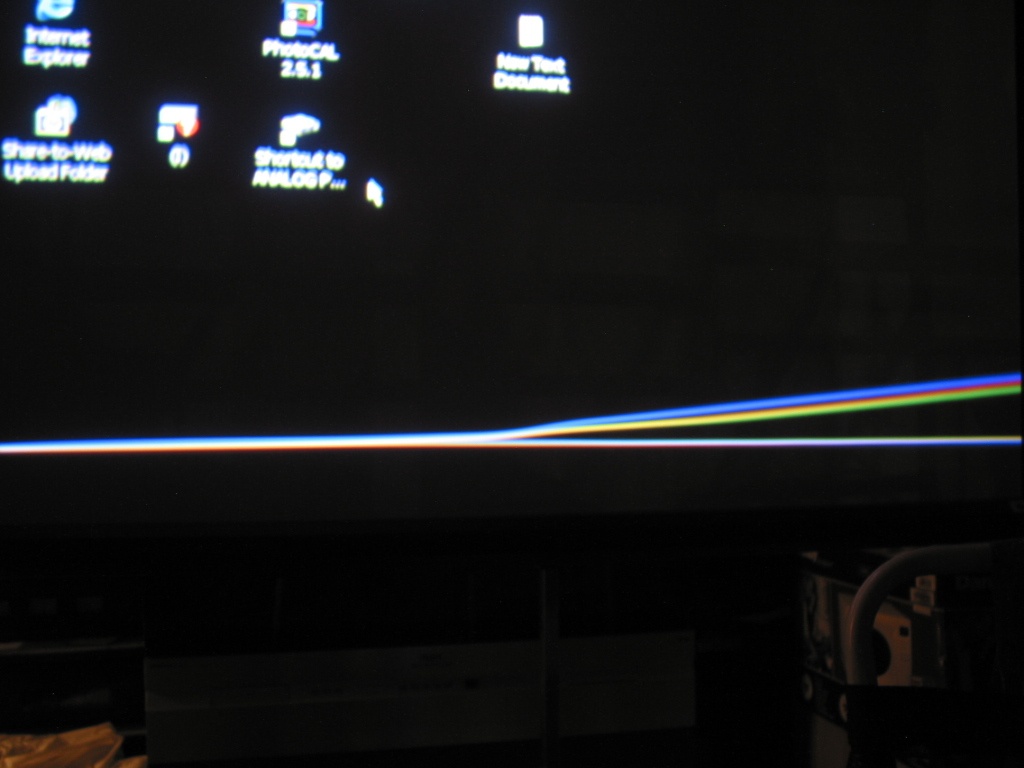
And now, with my new pc I 'm getting this strange distortion line at the bottom of the image?
The very bottom of the image is distorted into a wavy line, bit like a tilde '~' running from left to right across the bottom of the image. The r,g,b all slightly separated. Additionally on-screen displays from the pj would be slightly jumpy. All these problems disappear when I switched to internal test patterns.


http://members.iinet.net.au/~staylor64/images/StrangePattern1.jpg
http://members.iinet.net.au/~staylor64/images/StrangePattern2.jpg
(If clicking on the link doesn't work, try right-clicking and 'save link as')
Does anyone recognise this and know how I can fix it?
I'm pretty sure this problem is related to the fact that I'm using a new computer. Last week with my regular desktop pc I was getting a great problem free image. On the weekend, I bought a new pc, set it up, and tonight was the first time I hooked it up to the projector. The three things I tried to no avail was:
-shifting the image around in the pj
-adjusting the Phase in the pj
-trying different size porches in Powerstrip.
Something that surprised me, was that on my old pc I'd saved Powerstrip shortcuts with the settings for my fav' resolutions. I'd copied these shortcuts over to the new pc but when I activated them, the projector kept coming up with 'Unregistered Signal'. I always thought those shortcuts contained absolutely everything that defines a signal?
The only differences I can think of is that my older pc had a 7900 Nvidia card that I'd attached a DVI-> VGA adapter for running to the projector. Whereas the new pc has onboard video with a VGA out. Maybe I could try putting my 7900 into the new pc., and see what effect that has.
'cheers
Sim.
|
|
| Back to top |
|
 |
rickycleung
Joined: 09 Apr 2008
Posts: 55
|
| Posted: Thu Jun 19, 2008 2:17 pm Post subject: |
|
|
|
Have you center the raster of RGB tubes? If the raster of RGB are center within the tubes, use shift function to bring the image to the center of the raster should solve this issue. I have seen this wavy lines. I shift the image back to raster and the picture back to normal.
|
|
| Back to top |
|
|
AnalogRocks
Forum Moderator

Joined: 08 Mar 2006
Posts: 26706
Location: Toronto, Ontario, Canada
TV/Projector: Sony 1252Q, AMPRO 4000G
|
| Posted: Thu Jun 19, 2008 3:37 pm Post subject: |
|
|
My Ampro looked like that when I had the blanking opened up all the way. Try adding a little bottom blanking to see if that clears up.
| Description: |
|
| Filesize: |
129.42 KB |
| Viewed: |
4348 Time(s) |
|
_________________
Tech support for nothing
CRT.
HD done right!
|
|
| Back to top |
|
|
dropzone7

Joined: 12 Jun 2007
Posts: 1069
Location: Charlotte, NC
|
| Posted: Thu Jun 19, 2008 5:45 pm Post subject: |
|
|
What Ricky said and you also might need to tilt the projector slightly to compensate for image shift.
_________________
"Coffee is for Closers."
|
|
| Back to top |
|
|
jask

Joined: 17 Mar 2006
Posts: 10187
Location: kamloops BC
|
| Posted: Thu Jun 19, 2008 9:06 pm Post subject: |
|
|
the easy fix would be to swap the video card  I think the pj is seeing this as a close enough match to the existing block to lock to the block, however there is enough difference in the signal to warrant redoing the convergence etc..why don't you copy the existing block and modify it to better match the new source. I think the pj is seeing this as a close enough match to the existing block to lock to the block, however there is enough difference in the signal to warrant redoing the convergence etc..why don't you copy the existing block and modify it to better match the new source.
|
|
| Back to top |
|
|
Mark_A_W
Joined: 15 Mar 2006
Posts: 3068
Location: Sunny Melbourne Australia
|
| Posted: Thu Jun 19, 2008 10:10 pm Post subject: |
|
|
Move the image up, and raster down.
Your image is off your raster, that's all.
|
|
| Back to top |
|
|
greg_mitch
Joined: 03 May 2006
Posts: 5320
|
| Posted: Fri Jun 20, 2008 2:27 am Post subject: |
|
|
Man...mine has been doing that since I owned it...guess I should have asked. 
Now...moving image up is with shift, right? And raster down is with...
|
|
| Back to top |
|
|
Mark_A_W
Joined: 15 Mar 2006
Posts: 3068
Location: Sunny Melbourne Australia
|
| Posted: Fri Jun 20, 2008 2:51 am Post subject: |
|
|
Raster Centering.
CTRL+POSITION.
If the common raster centering is not enough, enter Service Mode and then you get individual Raster Centering.
|
|
| Back to top |
|
|
greg_mitch
Joined: 03 May 2006
Posts: 5320
|
| Posted: Fri Jun 20, 2008 2:56 am Post subject: |
|
|
|
Ah yes...I knew that. Thanks.
|
|
| Back to top |
|
|
sj64
Joined: 02 Jan 2008
Posts: 34
Location: Sydney, Australia
|
| Posted: Fri Jun 20, 2008 3:40 am Post subject: |
|
|
Thanks for all the suggestions guys. I'll have a go this weekend. Tonight hopefully, and let you know how it goes.
'cheers
Sim
|
|
| Back to top |
|
|
sj64
Joined: 02 Jan 2008
Posts: 34
Location: Sydney, Australia
|
| Posted: Mon Jun 23, 2008 2:51 am Post subject: |
|
|
Yep, it was the porches. Looking fine now.
Powerstrip had them at 1 and 3 for the vertical I think. I did play with them before but only up to say 9 and 30. When I went over my old settings, it turns out I was using closer to 40 and 104. So really this is a powerstrip issue - those desktop shortcuts define the porches, and had them quite large, but when I go to 'advanced configuration' the porches are at 1 and 3?
It's under control now.
thanks everyone for their help.
'cheers
Sim.
|
|
| Back to top |
|
|
|
|




