| Author |
Message |
richardc
Joined: 13 Feb 2008
Posts: 32
Location: Australia
|
| Posted: Mon Jun 09, 2008 7:48 am Post subject: G90 Raster maximization |
|
|
Hi Guys
I need some expert help with my G90, I want to install this thing right.
Finally got my G90 ceiling mounted, boy is that thing heavy. 
Decided about 118 inches from the screen would be about right for maximizing raster, with about 6mm from edge of tube.
Then I saw a post that said 115 inches for my sceen size which is 92 wide and 52 high.
PJcalc said 124 inches.
So what I did was move the screen closer to the projector, 115 inches.
All the while checking to see into the green lens how far the test pattern (cross hairs) were from the edge.
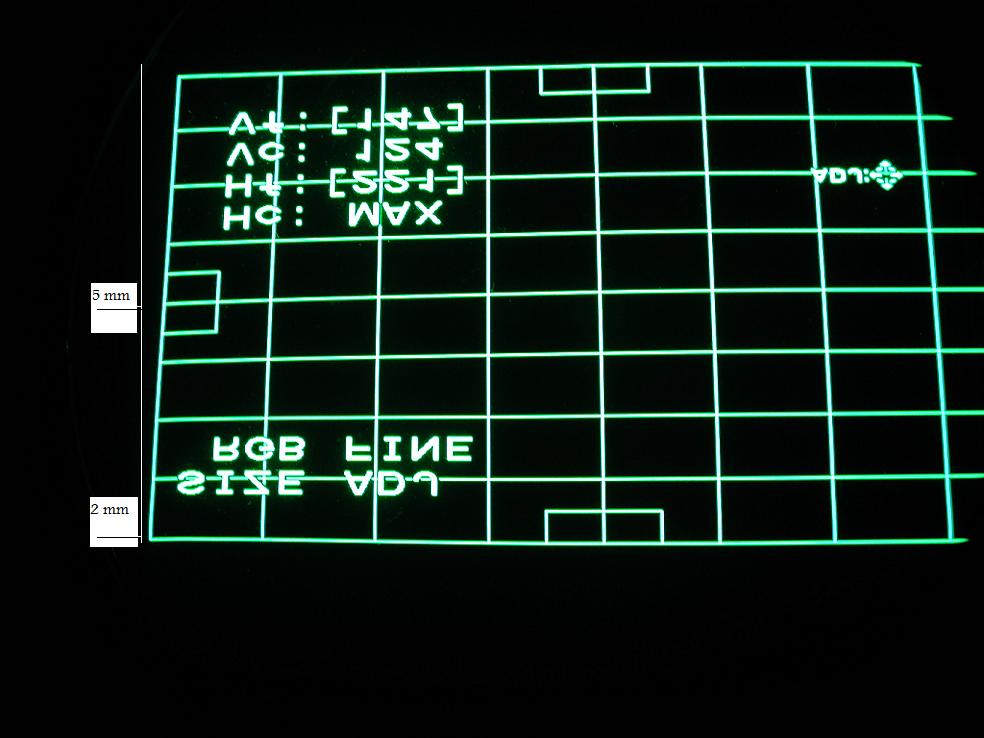
But I think this is where I have gone wrong, because when I display a full test pattern, yes it is about 6mm from the edge in the center of the tube, but because the pattern is keystoned at the top it is only about 2mm to the edge. (see attachment)
The G90 base is mounted parallel to the ceilng so I assume the angle of the lenses is -13.6 degrees.
I guess the question is do I adjust it for 6mm at the top edge.
Regards
Richard
| Description: |
|
| Filesize: |
80.15 KB |
| Viewed: |
2456 Time(s) |
|
|
|
| Back to top |
|
 |
richardc
Joined: 13 Feb 2008
Posts: 32
Location: Australia
|
| Posted: Mon Jun 09, 2008 9:38 am Post subject: |
|
|
Been seaching the forums, still learning how to use these dam search engines.
There is a lot of info if one knows where to look.
Some think its ok to go just inside the phosphor edge, which I am at the moment as long as there is glycol there to keep it cool.
Others say stay in about 1/4 inch approx 5mm. from the closest point on the tube face.
Rule of thumb for throw distance, 7% less than what PJCALC says, 7% of 124 inches is 8.68 subtracted from 124 = 115.32 inches.
Just rambling
Richard
|
|
| Back to top |
|
|
overclkr

Joined: 08 Mar 2006
Posts: 4227
|
| Posted: Mon Jun 09, 2008 11:22 am Post subject: |
|
|
if you were to ask me, I would tell you that is too much posphor usage. Is that what the picture area uses as well or just the test pattern?
Getting that close to the edge of the tube will degrade your corner focus.
Cliff
|
|
| Back to top |
|
|
richardc
Joined: 13 Feb 2008
Posts: 32
Location: Australia
|
| Posted: Mon Jun 09, 2008 10:33 pm Post subject: |
|
|
Cliff
This is just the test pattern, I have not put a picture to it yet.
But your right I will increase the throw distance, its very hard when your by yourself trying to measure the throw distance. I think I'm just under 115", I will increase it by 1".
Regards
Richard
|
|
| Back to top |
|
|
overclkr
Joined: 08 Mar 2006
Posts: 4227
|
| Posted: Mon Jun 09, 2008 10:52 pm Post subject: |
|
|
Show us some screenshots when you geter' setup!!!!!!!
Cliff
|
|
| Back to top |
|
|
richardc
Joined: 13 Feb 2008
Posts: 32
Location: Australia
|
| Posted: Tue Jun 10, 2008 8:14 am Post subject: |
|
|
Cliff
Will do
Richard
|
|
| Back to top |
|
|
|
|





