| Author |
Message |
comm
Joined: 09 Mar 2006
Posts: 46
|
| Posted: Mon Jun 02, 2008 4:19 am Post subject: Spot Burn? |
|
|
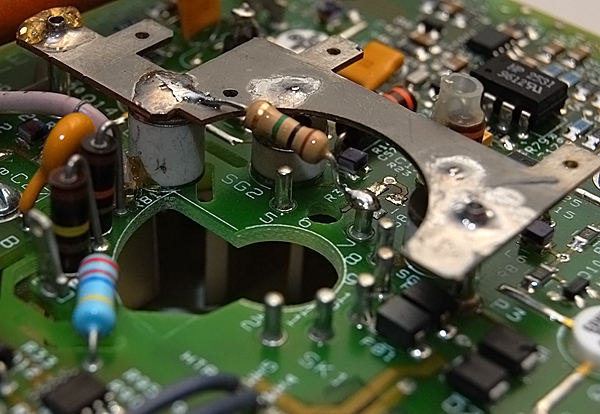
I finally got the new LUG installed in my Marquee 9500. I moded the neck board for the LUG (Tied a 1M Ohm resister from pin 7 to ground and drilled out 6 for the G2). I just powered it up for the first time and I think the damn thing burned a small line on the phosphor. Once it powered up it seemed to work fine. Any idea what happened????
| Description: |
|
| Filesize: |
84.1 KB |
| Viewed: |
11820 Time(s) |

|
|
|
| Back to top |
|
 |
draganm

Joined: 08 Mar 2006
Posts: 8990
Location: Colorado
|
| Posted: Mon Jun 02, 2008 4:00 pm Post subject: |
|
|
|
I don't see a line burned into the Phosphor? I see a normal wear pattern from previous usage and some peices of debris which isn't uncommon in Lc chambers. Can you take a better pic maybe?
|
|
| Back to top |
|
|
PaulB
Joined: 26 Oct 2007
Posts: 359
Location: Bonnie (but rainy) Scotland
|
| Posted: Mon Jun 02, 2008 4:05 pm Post subject: |
|
|
These 'floaters' usually cast a shadow, look closely into the face and see if thats what it is, a torch can help. Hopefully thats all it is.
I had a couple from when I removed the Bellows on one of my tubes. It will float up to the top and outta the way eventually but if you can't wait or like me just want nice clean LC Chambers you can do what I did, open up the marquee again, open up the bleed/filler hole, get a syringe with a piece of heatshrink on the end of it and suck that sucker out!
Was the tube sold to you as a brand new tube? It does look like you have some wear there. A brand new tube should have no wear.
_________________
Paul
|
|
| Back to top |
|
|
comm
Joined: 09 Mar 2006
Posts: 46
|
| Posted: Mon Jun 02, 2008 9:21 pm Post subject: |
|
|
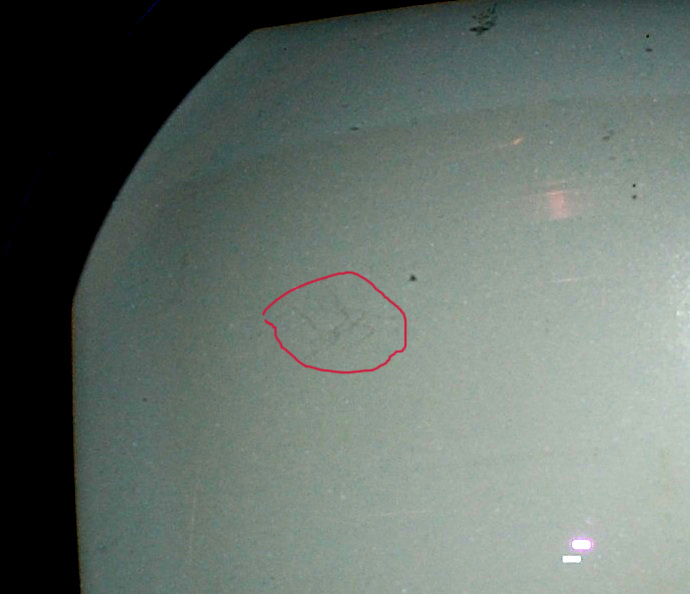
Yes, the tube is not new, it has some wear. I changed the levels in photoshop and circled the area in which I am concerned. I am pretty sure I did not see that before I turned the unit on and the image was defiantly dimmed there. Of course something in the way would cause a shadow. Hopefully I am just being paranoid, but it sure looks like its on the phosphor and not in-front of it.
| Description: |
|
| Filesize: |
91.76 KB |
| Viewed: |
11722 Time(s) |
|
|
|
| Back to top |
|
|
PaulB
Joined: 26 Oct 2007
Posts: 359
Location: Bonnie (but rainy) Scotland
|
| Posted: Tue Jun 03, 2008 8:28 am Post subject: |
|
|
Difficult to tell what it is. I don't think spot burn looks like that though. Could be marks on the tube face from when the tube was removed from whatever pj it was in before of maybe just some hairs or something. Again, I'd suggest trying to simply suck it out and see if that works. If that doesn't work well, maybe it needs a closer inspection.....!
_________________
Paul
|
|
| Back to top |
|
|
JustGreg

Joined: 07 Mar 2006
Posts: 3098
Location: Kenosha, WI
|
| Posted: Tue Jun 03, 2008 4:53 pm Post subject: |
|
|
The not knowing for sure would drive me nuts. I'd have to drain it, break it down, flush and rinse, and do a good tube face to eyeball inspection.
Now for my related ig-nant question....is it possible for something like a piece of a heater, or whatever, to have broken loose and floated around inside while the tube was transported face down, and it left that mark al la EtchaSketch? 
_________________
Greg
"Is it ignorance or apathy? Hey, I don't know and I don't care!" --Jimmy Buffett
|
|
| Back to top |
|
|
comm
Joined: 09 Mar 2006
Posts: 46
|
| Posted: Wed Jun 04, 2008 12:01 am Post subject: |
|
|
It is driving me nuts for sure. I used a flash light and it does not seem to cast a shadow like the rest of the floating stuff does. I would just take it apart but the silicon on a Marquee is a PITA. I guess I could take the c element out?
I guess maybe I should ask this question, because I really don't want to power it back up without knowing. Is burn even possible as it is pictured? I know it wasn't there when I filled the chamber and am 99% sure it wasn't there when I installed the tube. The edge of the two lines touches where the edge of the raster was. Would it be possible for it to burn the tube on the edge like that and then power on OK?
Thanks for the help everyone.
David
|
|
| Back to top |
|
|
JustGreg
Joined: 07 Mar 2006
Posts: 3098
Location: Kenosha, WI
|
| Posted: Wed Jun 04, 2008 12:57 am Post subject: |
|
|
I personally wouldn't know but I want to know, so I'm posting more right now as a way to keep this thread near the top while waiting for an answer than I am offering an answer. From what LITTLE experience I have in relation to repair of a pj, I'm going to guess the answer is no; it isn't a spot burn. I suppose it could be a random bit of cathode or such that as soon as HV was supplied did a little lightning bolt dance and left that mark. It really does look like doodling or something random (chaos theory anyone?) If you followed the LUG conversion correctly I don't see that as a consideration however, 'things' happen. (more chaos theory)
I suppose you could remove the fill plug and poke a thin piece of insulated wire down there and see if it moves. If it does that's great. You can pour out the glycol and filter it through a coffee filter and reuse it after cleaning the chamber. If it doesn't move then something has marred the phosphor. Sooner or later you're going to have to turn the thing on and throw up an all white and all black field to see if it's visible. If it isn't, I personally would 'drive it 'til it drops'.
_________________
Greg
"Is it ignorance or apathy? Hey, I don't know and I don't care!" --Jimmy Buffett
|
|
| Back to top |
|
|
Saeid01
Joined: 05 Oct 2006
Posts: 74
Location: Canada
|
| Posted: Wed Jun 04, 2008 1:05 am Post subject: |
|
|
I would post a white screen and if those scratches come up as yellow, then they are burns from arcing could have been caused be loose video feed to the neck card. that happened to me on the blue tube, if yours is not the blue tube then it may show as a different color.
If it does not show on a white screen then it is not a burn and just some scratches on the exterior of the tube face
Saeid
|
|
| Back to top |
|
|
comm
Joined: 09 Mar 2006
Posts: 46
|
| Posted: Wed Jun 04, 2008 3:40 am Post subject: |
|
|
I tried some wire to see if I could move anything around and had no luck. I am hesitant to turn it back on as I don't want to make it any worse. The mark was definitely there while the tube was on, it did not happen on power off. Is there something I should check before powering back on? I was noticing the mark almost looks like two small sine waves didn't know if that was significant or not.
Here is a picture of the neck card mod, I don't think I messed that up:
| Description: |
|
| Filesize: |
218 KB |
| Viewed: |
11564 Time(s) |
|
|
|
| Back to top |
|
|
voodoo7869

Joined: 19 Oct 2007
Posts: 193
Location: Chicago, IL USA
|
| Posted: Wed Jun 04, 2008 4:18 pm Post subject: |
|
|
the mod looks fine that is not your problem I would definately check if it is a floater it might be stuck on the glass use something plastic or insulated bell wire just stir it up it does not look like spot burn
_________________
Marquee 8000 modded, Marquee 9500lc with LUGs, Frankenyokes, and Moome. My avatar is not just a black box. CRT Is KING!!!!
|
|
| Back to top |
|
|
comm
Joined: 09 Mar 2006
Posts: 46
|
| Posted: Wed Jun 04, 2008 7:11 pm Post subject: |
|
|
Thanks for the help everyone.
I got some much better pictures today. I tried to move/scrap it off the tube face with large paper clip but had no luck. I noticed that the paper clip cast a shadow onto the phosphor when touching the tube face glass where the lines do not. I tried to show this in the first picture. As much as I still want to be wrong, I am pretty sure that the mark is in the phosphor.
| Description: |
|
| Filesize: |
152.75 KB |
| Viewed: |
11502 Time(s) |

|
| Description: |
|
| Filesize: |
105.88 KB |
| Viewed: |
11502 Time(s) |

|
|
|
| Back to top |
|
|
Nashou66

Joined: 12 Jan 2007
Posts: 16171
Location: West Seneca NY
|
|
| Back to top |
|
|
km987654

Joined: 25 Jul 2007
Posts: 2874
Location: Australia
TV/Projector: Barco BG809s
|
| Posted: Wed Jun 04, 2008 10:26 pm Post subject: |
|
|
|
From direct personal experience that is not spot burn!!
|
|
| Back to top |
|
|
ecrabb
Forum Moderator

Joined: 13 Mar 2006
Posts: 15909
Location: Utah
TV/Projector: JVC RS40, Epson 5010
|
| Posted: Wed Jun 04, 2008 10:54 pm Post subject: |
|
|
Maybe not typical spot burn, but it sure looks like V and H deflection might have gone whacko at one point. I didn't see it the first couple of times I glanced at it, but it sure looks like four similar events. Based on the description and the photos, it looks like a beam burnt the phosphor. As for how it happened, that's another mystery.
Here's another theory. Is it possible a piece of debris came loose inside the tube during shipping, fell on the phosphor on the table while you were installing the magnetics, and scratched the phosphor when it fell off. I know. Not likely, Just trying to come up with an alternative. I'm still guess it was some sort of deflection problem that's way beyond my ability to diagnose or understand.
SC
Last edited by ecrabb on Thu Jun 05, 2008 7:56 pm; edited 1 time in total
|
|
| Back to top |
|
|
perisoft

Joined: 29 Aug 2007
Posts: 2920
Location: Ithaca, NY
|
| Posted: Thu Jun 05, 2008 7:38 pm Post subject: |
|
|
When I saw that picture, this is what I thought:

May god have mercy on my soul.
_________________

|
|
| Back to top |
|
|
MikeEby

Joined: 24 Jun 2007
Posts: 5237
Location: Osceola, Indiana
|
| Posted: Thu Jun 05, 2008 8:55 pm Post subject: |
|
|
| perisoft wrote: | When I saw that picture, this is what I thought:
May god have mercy on my soul. |
Please God take away his Photoshop?  
_________________
Doing HD since the last century!
|
|
| Back to top |
|
|
km987654
Joined: 25 Jul 2007
Posts: 2874
Location: Australia
TV/Projector: Barco BG809s
|
| Posted: Thu Jun 05, 2008 9:59 pm Post subject: |
|
|
|
I have seen phosphor fall away from a tube also but usually it doesn't look like some has draw on it with a pencil. Does this mark show up on the projected image?
|
|
| Back to top |
|
|
ecrabb
Forum Moderator
Joined: 13 Mar 2006
Posts: 15909
Location: Utah
TV/Projector: JVC RS40, Epson 5010
|
| Posted: Thu Jun 05, 2008 10:05 pm Post subject: |
|
|
I agree. That's why I still think it was some sort of weird deflection failure.
Perisoft... Dude, that was weird... even for you.
SC
|
|
| Back to top |
|
|
perisoft
Joined: 29 Aug 2007
Posts: 2920
Location: Ithaca, NY
|
| Posted: Thu Jun 05, 2008 11:01 pm Post subject: |
|
|
| ecrabb wrote: |
Perisoft... Dude, that was weird... even for you.
SC |
You don't know me very well yet.
It actually is kinda too dark. I drew it on a Calcomp 12x12" drawing pad, with the image projected onto it, synchronized with the pen. It's awesome. But if you've ever made a 1200 lumen LCD projector throw a 14" diagonal image, you can guess the black levels involved. So I tend to draw with a bit too much contrast. I oughta fix that.
_________________
|
|
| Back to top |
|
|
|
|





