|
As this forum is rarely used anymore, we've locked it. Feel free to browse and read. Questions? Please reach out to us directly. Cheers! |

|
 |
|
|
| Author |
Message |
alanxray
Joined: 01 Jun 2008
Posts: 11
Location: Goergia
|
| Posted: Mon Jun 02, 2008 7:45 pm Post subject: |
|
|
....and even though I devotedly followed those jumps, I still missed things like switch status to "ON" in order to access the service functions, and press centering as your first action upon entering the "Service Control" mode.
I think I'm gonna be asking you guys about that kind of stuff, for a long time to come.
Thanks,
Alan
|
|
| Back to top |
|
 |
ecrabb
Forum Moderator

Joined: 13 Mar 2006
Posts: 15909
Location: Utah
TV/Projector: JVC RS40, Epson 5010
|
| Posted: Mon Jun 02, 2008 8:11 pm Post subject: |
|
|
Dragan, the manual isn't quite that bad, but it's certainly not good. It was clearly written for technical people, and preferably people who have already used Sony CRT projectors. It actually does have a good step-by-step methodology from physical alignment, to toe-in, to focus, and finally to convergence and input fine-tuning, but there are some waypoints along the way that are extremely confusing and don't make a lot of sense. Or, the projector doesn't do what the manual says it should. That's where the forum comes in. You are right about the penlight in the dark with the manual on your lap thing - that's exactly what I did until I learned the process.
The G70 also has the additional steps of pin balance, and key balance (I think). I had a REALLY hard time getting good geometry the first time a did a setup. The second was better - which is the setup I'm still running on. I'm sure a couple more setups, I can get it to where I want it.
Alan, if it's in nice shape and the tube phosphor isn't too worn, $500 is an excellent buy for a G70. Know how many hours are on it? Have you taken any pics? Snap a few and post them here! If you're comfortable with tools and mechanical stuff (I sure hope so!  ), pop the lenses off and look at the phosphor to see what it looks like. ), pop the lenses off and look at the phosphor to see what it looks like.
Oh, and fear not on your purchase. Even if the machine had fried tubes, you could get most or all of your $500 back parting the machine out to Curt and other guys here.
SC
|
|
| Back to top |
|
|
alanxray
Joined: 01 Jun 2008
Posts: 11
Location: Goergia
|
| Posted: Mon Jun 02, 2008 9:10 pm Post subject: |
|
|
The 'full story' on the G70 ( I really don't know how much to believe ). The original owner was allegedly a private user who upgraded to G90.
If that is true, it wasn't used in a church or any kind of commercial setting, like a sports bar or corporate conference room ( who really knows).
The software guy further alleges to have purchased it from the original owner, and watched one hockey game, (with the blue out of line) against a drywall wall, painted flat white. With the unit in its current condition, I know he didn't use it very much, because it isn't very much fun to watch, like this.
I'm so much more pleased with the purchase, now that I've 'spoken' with you guys.
As far as popping the lens off, where's that glycol located again ?
|
|
| Back to top |
|
|
ecrabb
Forum Moderator
Joined: 13 Mar 2006
Posts: 15909
Location: Utah
TV/Projector: JVC RS40, Epson 5010
|
| Posted: Mon Jun 02, 2008 9:44 pm Post subject: |
|
|
Look at this page:
http://www.curtpalme.com/SonyG70_Layout2.shtm
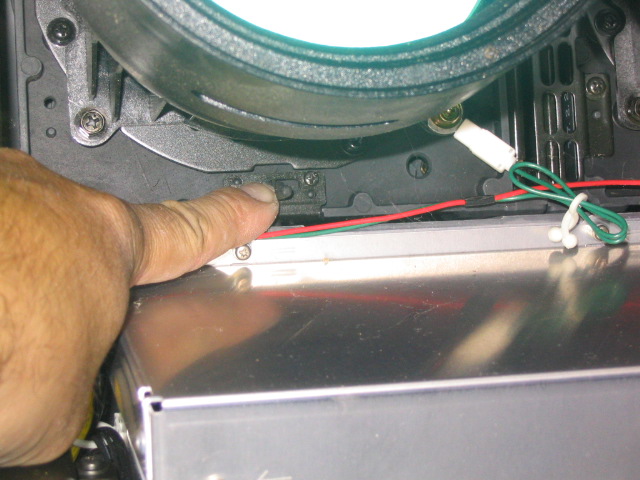
In this pic, you can see the hex-head burnished Philips lens mounting screws on the lens flanges. Ignore Curt's finger. That's the lens mounting screw.
In the upper-left of the photo, you can also see the black pan-head Philips screw in the metal ring (with a cutout around it in the lens flange). Do NOT loosen any of those screws, or you will break the seal on the C-element and spill glycol.
If you're confused at all, just remember that the screw holding the electrical connector is the lens mount sense wire. If you unscrew that connector, the connector won't be grounded anymore and the projector will know the lens is removed. There are three more identical screws on each lens.
You can also see the mounting screw holes in this pic (at 45, 135, 225, and 315 degrees) :

SC
|
|
| Back to top |
|
|
|
|
|
|
|
You cannot post new topics in this forum
You cannot reply to topics in this forum
You cannot edit your posts in this forum
You cannot delete your posts in this forum
You cannot vote in polls in this forum
You cannot attach files in this forum
You can download files in this forum
|
Forum powered by phpBB © phpBB Group
|
|




