| Author |
Message |
Nashou66

Joined: 12 Jan 2007
Posts: 16171
Location: West Seneca NY
|
|
| Back to top |
|
 |
PaulB
Joined: 26 Oct 2007
Posts: 359
Location: Bonnie (but rainy) Scotland
|
| Posted: Thu May 29, 2008 7:36 pm Post subject: |
|
|
| Nashou66 wrote: | Paul, is the first time you tried to use the electronic Astig control? I wonder if the connector on the heat sink isnt put on right, like maybe off a pin or backwards. check the color order of the connectors you know work on the heatsink board and make sure the red is the same.
Athanasios |
Not the first time, it worked fine up until today, curse the thing.
Just done a search on the 'A' site and not coming up with anything but there was a comment that set me thinking. I'm going to have a look at the two grey cable connectors that come from the heatsink boards to the main chassis and see if they are the culprit, doubt it but worth a try.
_________________
Paul
|
|
| Back to top |
|
|
Nashou66
Joined: 12 Jan 2007
Posts: 16171
Location: West Seneca NY
|
|
| Back to top |
|
|
PaulB
Joined: 26 Oct 2007
Posts: 359
Location: Bonnie (but rainy) Scotland
|
| Posted: Thu May 29, 2008 8:28 pm Post subject: |
|
|
Solved it!!!
I took out the Stigmator Amplifier Board (the one on the heatsink) for a closer inspection and the moment I got it out, I could see what was wrong (the caps had cast shadows over the offending parts which is why I didn't spot it first time around).

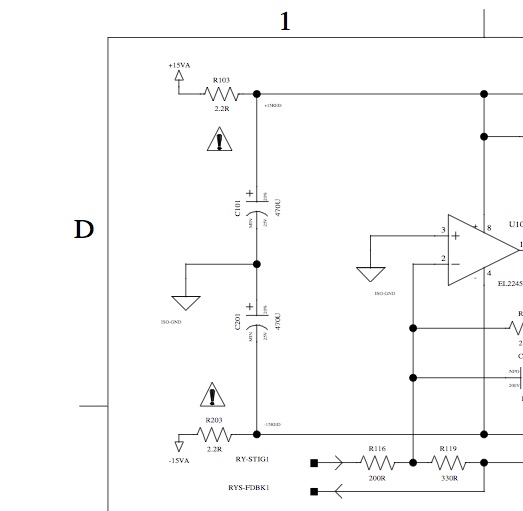
R203 and possibly R103 are blown  Slight damage to the Cap as well, looks superficial but I'll replace it just in case. Slight damage to the Cap as well, looks superficial but I'll replace it just in case.
Any idea what type of resistors I'll need to replace the blown ones Athanasios? Schematics say its a 2.2R but 2.2R what. (checking elsewhere at the moment - here https://www.curtpalme.com/forum_archived/viewtopic.php@t=2769.html , Jousts Resistor guide ) Red Red, Gold Gold = 2, 2, 0.1, +/-5% OK, so what does that mean? 2.2k ohm 5% but what wattage?
Phew, relief 
_________________
Paul
|
|
| Back to top |
|
|
Nashou66
Joined: 12 Jan 2007
Posts: 16171
Location: West Seneca NY
|
|
| Back to top |
|
|
PaulB
Joined: 26 Oct 2007
Posts: 359
Location: Bonnie (but rainy) Scotland
|
| Posted: Thu May 29, 2008 9:00 pm Post subject: |
|
|
| Nashou66 wrote: | those are 2.2ohm and are a part of the protection circuit, something must have caused them to blow, like maybe connecting the connector backwards?
Athanasios |
Many thanks for that Athanasios. 2.2ohm 5% but how can you tell the wattage? Small wattage I guess, 1/2 watt metal fusible?
Something caused it to blow? Well, one of the four leads going into the red tube connector (the white connector that comes from the focus coil) on the Stig board did come out at some point (third one in from the outside edge of the board looking from the rear of the pj). I pushed it back in so likely thats exactly when it happened (can't recall when I did this but certainly in the last 24 hours)!
I am continually surprised at how you can figure these things out - spot on Athanasios, spot on indeed!
_________________
Paul
|
|
| Back to top |
|
|
Nashou66
Joined: 12 Jan 2007
Posts: 16171
Location: West Seneca NY
|
|
| Back to top |
|
|
tse
Joined: 03 May 2006
Posts: 1014
Location: Sweatbucket, Fl.
|
| Posted: Fri May 30, 2008 1:00 am Post subject: |
|
|
The resistors:
http://www.newark.com/97K9580/passives/product.us0?sku=PHOENIX-PASSIVE-COMPONENTS-SFR16S-2R2-5&_requestid=86231
They are 1/2W, but are a special small size, flameproof, with specified overload characteristics. They are used as fuses. If you use some other type be sure to mount elevated off the PCB so it won't burn the board if an overload happens.
There are also 1 and 10 ohm parts in various places used as fuses in the Marquee.
Scott
_________________
"Were we directed from Washington when to sow and when to reap, we would soon want bread."
Thomas Jefferson
|
|
| Back to top |
|
|
PaulB
Joined: 26 Oct 2007
Posts: 359
Location: Bonnie (but rainy) Scotland
|
| Posted: Fri May 30, 2008 6:24 am Post subject: |
|
|
Thanks Scott, thats excellent information
I've ordered a few of each just in case I blow up something else
_________________
Paul
|
|
| Back to top |
|
|
PaulB
Joined: 26 Oct 2007
Posts: 359
Location: Bonnie (but rainy) Scotland
|
| Posted: Sun Jun 01, 2008 4:39 pm Post subject: |
|
|
OK, progressing nicely, or rather I'm building my experience up. I potter with the pj then reset it at the end of the day. I'm getting a lot better at the magnets but still far, far from ideal. Can just barely read text at 1080p but considering that I couldn't even see the text a few days ago I'm quite pleased! Slow but steady progress, better each time I do it.
Anyway, one issue that did crop up, looking at Scott's SMPTE pattern, fed from an HTPC at 60hz, the top left box has now totally disappeared for some reason on all three colors 
Not entirely sure why, I do have taken the Stig Amp board out for repair but I wouldn't have thought that that would have caused this disappearance. I know (think) that the top left box is related to bandwidth so maybe thats the problem but if so, why was it there before? Possibly somethings failed maybe?
http://www.curtpalme.com/forum/files/tse1_728.jpg
Thanks guys
_________________
Paul
|
|
| Back to top |
|
|
Nashou66
Joined: 12 Jan 2007
Posts: 16171
Location: West Seneca NY
|
| Posted: Sun Jun 01, 2008 6:19 pm Post subject: |
|
|
The vertical lines i learned today from Scott are very high frequency, maybe try it at 48hz out from the HTPC. see how it looks. Adjust focus then using that refresh rate then go higher than what you will actually use and adjust there then go down to the rez you plan on using. So say you plan on using 60hz as the scan rate. set it up at 48 do your magnetics and focus, then scan to 72hz and touch up some more, then go down to 60 and do the final touch up. I did this and liked my results allthough i rushed through it. Next time I plan a full day for it.
Athanasios
_________________
Don't blame your underwear for your crooked ass~ unknown Greek philosopher
"Republicans believe every day is the Fourth of July, but the Democrats believe every day is April 15." --- President Reagan
One Smart Dog!!!
Marquee High Performance Bellows now shipping!!
Marquee Modifications and Performance Enhancement
Marquee C-element and Bellow removal
|
|
| Back to top |
|
|
PaulB
Joined: 26 Oct 2007
Posts: 359
Location: Bonnie (but rainy) Scotland
|
| Posted: Sun Jun 01, 2008 7:05 pm Post subject: |
|
|
I think I'll give that a go Athanasios. I had been inputting at 60hz 1080p but maybe thats too high for a first run at the magnets. I'll drop the frequency as suggested (and maybe the resolution ) and work my way back up.
Great pointer, many thanks!
_________________
Paul
|
|
| Back to top |
|
|
garyfritz

Joined: 08 Apr 2006
Posts: 12088
Location: Fort Collins, CO
|
| Posted: Sun Jun 01, 2008 9:12 pm Post subject: |
|
|
|
The trouble with 1080p is that it runs very high freqs through the circuitry -- the torture-test of which is vertical on/off lines like in that test pattern -- and the circuitry in most unmodified Marquees can't pass that high-freq a signal. It chops off some of the highest freqs, which "smooths off" the on/off transitions in the pattern. Which means you have a much "softer" signal to use for your magnetic adjustment. Back it off as Athanasios suggests -- maybe even go to 1080i, since the magnets won't care -- and make sure you're well within the limits of your circuitry. With that well-rendered signal coming out of the circuits, use THAT to adjust your magnets to the best performance. Once you've maxed out what you can do at the lower-freq signal, ramp it back up to 1080p@60 and see how it looks. The magnetic setup is, I'm pretty sure, largely unaffected by frequency / resolution / etc.
|
|
| Back to top |
|
|
tse
Joined: 03 May 2006
Posts: 1014
Location: Sweatbucket, Fl.
|
| Posted: Sun Jun 01, 2008 11:45 pm Post subject: |
|
|
Magnets can be set at lower resolution, makes it easier. Just run the projector with internal patterns without external sync. The projector will run at essentially VGA resolution then. One trick for getting best focus is after getting best round dots with stig adjustments and centered core with beam centering adjustments is to move static focus away from max (or min) more toward focus and make slight adjustments as needed. The ultimate would be to adjust at focus but things need to be a little defocussed to see what you are doing. Remember too, the magnet adjustments are for the center only. Ignore the edges and corners when adjusting magnets.
Scott
_________________
"Were we directed from Washington when to sow and when to reap, we would soon want bread."
Thomas Jefferson
|
|
| Back to top |
|
|
PaulB
Joined: 26 Oct 2007
Posts: 359
Location: Bonnie (but rainy) Scotland
|
| Posted: Mon Jun 02, 2008 4:35 pm Post subject: |
|
|
Great advice guys, thanks for that.
I guess its a case of yet again setting my sights too high (nothing wrong with that I suppose but one step at a time rather than trying to run about blindly!).
I know the stock Marquee can't really do 1080p, I know the choke points are most the VNB's and the VIM but just couldn't help myself from trying 
Too much drooling over MP's screenshots
_________________
Paul
|
|
| Back to top |
|
|
PaulB
Joined: 26 Oct 2007
Posts: 359
Location: Bonnie (but rainy) Scotland
|
| Posted: Sun Jun 08, 2008 11:33 am Post subject: |
|
|
Well, I'm having a big problem with the stig board. I repaired it with the correct parts only to find that it still didn't work. I went to swap the red and green connector on the stig board and realised that the capacitors for the red were very, very hot (the others were cold to touch or at least a lot less hot).
I took out the board and had a look. I could'nt see any problems but decided to again replace the resistors and the capacitors with fresh ones as I was wary the heat may have damaged the caps and resistors.
I installed the fresh parts, I fired up the pj again and low and behold, the red stig adjustment worked......... for a few seconds anyway. I actually saw the failure happen on screen this time, one second the dot was nice and round and then the shape suddenly changed to an oblong and the adjustments no longer worked! Arrrrgghhhh! 
Looking at the Stig Amp, I'm not seeing any evidence of a failure (burnt fuse or whatever), although I didn't have the pj switched on for as long this time and the capacitors were not at all hot but did feel slightly warmer than the others (could be my imagination though).
Any ideas guys, given that the Stig looks ok, as does the connector wiring and the waveform board on the CLM ? I've no idea where else to look for even a hint as to whats wrong. Could it be one of the chips or transistors? (Blue and green stig are working perfectly). Had a look at connect
Thanks fellas
_________________
Paul
|
|
| Back to top |
|
|
Nashou66
Joined: 12 Jan 2007
Posts: 16171
Location: West Seneca NY
|
| Posted: Sun Jun 08, 2008 12:51 pm Post subject: |
|
|
it could be the wave form board on the CLM, the amp board,or the focus coil itself. One way would be to swap over all the wiring from one tube that works to the red tube, well at least the focus wires and the astig cables then go into green and try to to the astig on the red using the green controls since they are now on the red tube. if it works and nothing blows then I'd look to the SWB, or the amp board as the fault , if it losses astig again and the resistors on the green blow or the caps then its the red coil. its up to you if you want to do this as you might damage the amp board some more. I would need to look at the schematics of the amp board before i can help more, TSE should help a lot more than I can.
Athanasios
_________________
Don't blame your underwear for your crooked ass~ unknown Greek philosopher
"Republicans believe every day is the Fourth of July, but the Democrats believe every day is April 15." --- President Reagan
One Smart Dog!!!
Marquee High Performance Bellows now shipping!!
Marquee Modifications and Performance Enhancement
Marquee C-element and Bellow removal
|
|
| Back to top |
|
|
PaulB
Joined: 26 Oct 2007
Posts: 359
Location: Bonnie (but rainy) Scotland
|
| Posted: Sun Jun 08, 2008 2:22 pm Post subject: |
|
|
Swapping the Focus coils over now, I tried just the connectors but I think I need to actually do a physical swap to get the right answer easily.
EDIT 16:00 Ok, its not the focus coil, the red coil works perfectly when swapped to the green tube. Looing closely, I'm not seeing anything odd on the Stig Amp, Stig Waveform or Focus boards.
Update 19:20 I decided (for no reason other than not knowing what else I could do) to check the resistors on the Stig Amp with a multimeter, I found that R203 wasn't giving a beep for continuity even though it appeared totally undamaged. I replaced it just a few minutes ago and the Stig is back working again!?
This is the THIRD resistor I've put in R203 today, whilst I can understand that you may get the odd duff resistor I find it hard to believe that two of them in a row could be faulty (maybe a bad batch I suppose). The worry is of course that this isn't a fix, rather the problem still exists eleswhere and all I'm doing is patching up the symptoms rather than sorting out the cause.
I'll see if the red stig manages to last more than a minute or so (I only had the pj on long enough to check whether it worked or not, the caps remained cool this time). Wish me luck!
_________________
Paul
Last edited by PaulB on Sun Jun 08, 2008 6:22 pm; edited 3 times in total
|
|
| Back to top |
|
|
Nashou66
Joined: 12 Jan 2007
Posts: 16171
Location: West Seneca NY
|
|
| Back to top |
|
|
PaulB
Joined: 26 Oct 2007
Posts: 359
Location: Bonnie (but rainy) Scotland
|
| Posted: Sun Jun 08, 2008 6:24 pm Post subject: |
|
|
We've both posted at the same time, I think I've solved it. Off to double-check now - fingers crossed!
Yep, red Stig Amp still working fine and cool caps. Strange and worrying but if it holds then I'm back on track, well, at least back where I started grrrrrrrr! Bloody magnets!
Thanks for your suggestions Athanasios, it narrowed the fault down even if it wasn't what was expected (at least by me). Again, a learning experience both in stripping the tubes and in the falability of even new parts.
_________________
Paul
|
|
| Back to top |
|
|
|
|