|
As this forum is rarely used anymore, we've locked it. Feel free to browse and read. Questions? Please reach out to us directly. Cheers! |

|
 |
|
|
| Author |
Message |
ecrabb
Forum Moderator

Joined: 13 Mar 2006
Posts: 15909
Location: Utah
TV/Projector: JVC RS40, Epson 5010
|
| Posted: Thu May 22, 2008 8:33 pm Post subject: |
|
|
| Brian Hampton wrote: | | Couldn't live with variable brightness. I don't really like AKB anyway I don't think the greyscale has to be maintained and adjusted each and every second. |
No $hit. I wonder why they didn't implement it as in some of the desktop graphics displays where you could just initiate it on command. That way, installers could do it at maintenance time, users could do it before "big presentations", monthly, whatever. I can't imagine why it would have to be on all the time. Hopefully I can find the "missing menu".
SC
|
|
| Back to top |
|
 |
Clarence

Joined: 08 Mar 2006
Posts: 3827
Location: Smith Mtn Lake, VA
|
| Posted: Thu May 22, 2008 8:34 pm Post subject: |
|
|
| ecrabb wrote: | Brian,
I'll look again, but I've gone through the damn menus 20 times looking for an ABG function. If it's there, it's F'ing invisible. I know ABG is built into every G70, but is the ability to TURN IT OFF in all machines? I thought I read somewhere that older versions of the firmware didn't have the ability to disable it. I'll check it out again and if I can't find it |
http://www.avsforum.com/avs-vb/showthread.php?t=769188
|
|
| Back to top |
|
|
ecrabb
Forum Moderator
Joined: 13 Mar 2006
Posts: 15909
Location: Utah
TV/Projector: JVC RS40, Epson 5010
|
| Posted: Thu May 22, 2008 10:27 pm Post subject: |
|
|
AAARRRRGGGGGHHHHHHHH.... I found it. It was right there in the menu. Apparently, the 31st time I looked at the menu, it magically appeared, because I'm certain it wasn't there the other 30 times I was in there. 
Thanks, "Searchmaster" Clarence. I looked for hours one night and never stumbled onto that thread. Good to know. Now, I know I don't need the newer firmware. The only thing I think I'm missing from the newer firmware is the better memory management with block copying (which would be nice).
But, PROBLEM SOLVED. ABG off, and the Dave Matthews BD that flickered like hell is now perfect. No sh*t, greyscale has to be redone. I had to jack up G2 because until I did, I had no light on the screen even with brightness jacked to MAX. Regardless, I have no more AKB line and I'm happy as a pig in...
Brian, I got the News doodad turned off on the PS3. I was suffering from the same "can't see sh*t" syndrom that I had looking at the G70 service menu. I kept looking in system preferences (imagine that) instead of that damn "network" item on the XMB.
Thanks Brian, Clarence, and everybody. God, I love this forum... Oh, and my G70, too. 
Sorry to highjack your thread, Rob. Now, back to your regularly scheduled programming.
SC
|
|
| Back to top |
|
|
Bitwize
Joined: 09 May 2008
Posts: 83
|
| Posted: Thu May 22, 2008 11:22 pm Post subject: |
|
|
| ecrabb wrote: | AAARRRRGGGGGHHHHHHHH.... I found it. It was right there in the menu. Apparently, the 31st time I looked at the menu, it magically appeared, because I'm certain it wasn't there the other 30 times I was in there.
Thanks, "Searchmaster" Clarence. I looked for hours one night and never stumbled onto that thread. Good to know. Now, I know I don't need the newer firmware. The only thing I think I'm missing from the newer firmware is the better memory management with block copying (which would be nice).
But, PROBLEM SOLVED. ABG off, and the Dave Matthews BD that flickered like hell is now perfect. No sh*t, greyscale has to be redone. I had to jack up G2 because until I did, I had no light on the screen even with brightness jacked to MAX. Regardless, I have no more AKB line and I'm happy as a pig in...
Brian, I got the News doodad turned off on the PS3. I was suffering from the same "can't see sh*t" syndrom that I had looking at the G70 service menu. I kept looking in system preferences (imagine that) instead of that damn "network" item on the XMB.
Thanks Brian, Clarence, and everybody. God, I love this forum... Oh, and my G70, too.
Sorry to highjack your thread, Rob. Now, back to your regularly scheduled programming.
SC |
Hey, no sweat, I'm happy to hear you got that dang ABG turned off! It drove me nuts in less than 5 minutes. Enough to agressively pursue it Cool that it solved the AKB line as well. I noticed that disappeared, BUT as soon as ABG was turned off I started getting a freakin' line on the left side. Do you not have a line on the left? Are you using a Moome card? I'm going VGA to BNC right now, until my Moome card arrives (~3 weeks). But I noticed the line even with the Sencore pattern generator. Frustrating when you fix one problem and have another crop up in it's place How is your uniformity??
|
|
| Back to top |
|
|
ecrabb
Forum Moderator
Joined: 13 Mar 2006
Posts: 15909
Location: Utah
TV/Projector: JVC RS40, Epson 5010
|
| Posted: Fri May 23, 2008 5:26 am Post subject: |
|
|
I don't have a line on the left, but I do have some ringing in brighter content on about the left 10% of the screen. There's a little geometric distortion I need to take out of that area, too. I can't remember who it is here that I got the recommendation from, but setting up with the internal test pattern hanging way off the screen. I'll see if I can snap a pic so you can see where my test pattern lands... Once I set it up that way, I didn' have any trouble with the line or wrapping on the left.
I'm using an HD Fury, not the Moome card, so there could be a difference there.
I'm using a WilsonArt screen (96x54), and uniformity is pretty good. I don't notice the hot-spotting much except on primarily solid and high APL material, so uniformity is pretty good. I'll see if I can take a pic of the hotspotting and subtle color shift.
SC
PS - I have the stock lense, just like everybody else... except for YOU!!!
|
|
| Back to top |
|
|
Bitwize
Joined: 09 May 2008
Posts: 83
|
| Posted: Fri May 23, 2008 12:09 pm Post subject: |
|
|
| ecrabb wrote: | I don't have a line on the left, but I do have some ringing in brighter content on about the left 10% of the screen. There's a little geometric distortion I need to take out of that area, too. I can't remember who it is here that I got the recommendation from, but setting up with the internal test pattern hanging way off the screen. I'll see if I can snap a pic so you can see where my test pattern lands... Once I set it up that way, I didn' have any trouble with the line or wrapping on the left.
I'm using an HD Fury, not the Moome card, so there could be a difference there.
I'm using a WilsonArt screen (96x54), and uniformity is pretty good. I don't notice the hot-spotting much except on primarily solid and high APL material, so uniformity is pretty good. I'll see if I can take a pic of the hotspotting and subtle color shift.
SC
PS - I have the stock lense, just like everybody else... except for YOU!!! |
hey, that would be fantastic! a pic would definitely help me that. can't wait to rid myself of this silly line.
i don't really notice any distracting hotspotting with my Carada 1.4 brilliant white screen. the color shift on the right third of the screen is the most noticeable. it definitely has a red tint to it. makes the image look gradually darker as you go out to the far right edge. it's not dark, dark...but has this dirty white look to it, for lack of a better description. to my eyes it's not subtle but can be lived with. my friend said it's on par with most CRT projectors so that's somewhat reassuring.
yes, i'm fortunate to have the 134 lenses. they really do make a difference. my buddy has calibrated several G90s and G70s and he commented that my VR has the best focus he's ever seen on a CRT. i think the Moome HDMI card will result in an even sharper image, not to mention the gamma benefits. the wait continues...
|
|
| Back to top |
|
|
ecrabb
Forum Moderator
Joined: 13 Mar 2006
Posts: 15909
Location: Utah
TV/Projector: JVC RS40, Epson 5010
|
| Posted: Fri May 23, 2008 7:12 pm Post subject: |
|
|
Oh, you have a Carada 1.4. Dave (person99) made me aware of some tests that showed that screen to be closer to 1.1 - which is probably why you're not getting any hot-spotting. That's probably pretty close the same gain as my laminate. What size screen are you running? I rarely see any color shift - obviously only on whites or neutral colors, and it isn't bad. Uniformity could be better, but CRT will never be "good digital" good in that department. There's just too much fall-off with these lenses - the lenses would have to be massive to eliminate it. In fact, now that I think about it, the VR lenses on your machine may sacrifice some uniformity in favor of more sharpness, possibly by way of a slightly smaller overall aperture. Not sure about that, hough.
I'm just running an HD Fury right now. I'd love to try a new Moome card, but I just can't bring myself to drop the coin right now. Maybe this fall or something. I'm sure it will be a step up in image quality from the HD Fury, matrix switcher, and 25 feet of analog cable I'm using.
I'll try to snap a few pics this weekend and we can compare notes.
Cheers,
SC
|
|
| Back to top |
|
|
r.bauer
Joined: 08 Apr 2006
Posts: 280
Location: The Netherlands
|
| Posted: Fri May 23, 2008 7:39 pm Post subject: |
|
|
The ABG should really be turned on when using a G70, or else you will have te recalibrate every other night. Also sometimes you are not able to achive maximum lightoutput. ABG should only be turned off when adjusting G2. (If your G70 has that option available. And set bias and gain to factory settings prior to adjusting the G2)
Brightness fluctuations during movies are often related a to wrong vertical shift position. In such a case the internal blacklevel is set to a wrong level. Ever so slightly adjusting Vertical shift solves this problem instantly.
Although the control of brightness- and colorpurity seems to be very rudimental, they do a very good job! Read the proper manual to find the proper setting. Also the screen selection in the G70 has a huge effect on this, this must also be properly set, see manual for the right choice. These three settings can really throw off a G70.
Check your screen for color-shift. Stand 1 meter behind the projector and move 1-1.5 meter to the left from the center and move 1-1.5 meters to the right from center. Does the color-shift move with you? If so, the screen is the cause of it.
If you still think the tubes are your main cause, check them individually with a full Red, Green or Blue.
You can check if it is either a mis-setting of brightness- or colorpurity or screen selection by reversing the H- and V-scan swithces/cables. See if the color shift is the same or it has moved with the switches/connectors.
The G70 is a VERY, VERY nice projector and throws an outstanding image. Enjoy it a lot!
|
|
| Back to top |
|
|
Brian Hampton

Joined: 22 Apr 2006
Posts: 1173
|
| Posted: Fri May 23, 2008 8:05 pm Post subject: |
|
|
Whenever I tried to adjust the uniformity seemed like nothing happened as I went through the entire range.
??
I can sort of see your point about having AKB on because to a certain extent AKB seems to work really well. I can mask the line up top with ease but then there is a u shaped line that always dips down into the image area and I can't live with that.
Many popular projectors like the Marquee have no such function as AKB and don't seem to be re-calibrated every other night.
Still... I went back and forth quite a bit with AKB both on my early 1271 and my G70.
=Brian
|
|
| Back to top |
|
|
ecrabb
Forum Moderator
Joined: 13 Mar 2006
Posts: 15909
Location: Utah
TV/Projector: JVC RS40, Epson 5010
|
| Posted: Fri May 23, 2008 8:15 pm Post subject: |
|
|
Thanks, r.bauer. But, what about the obnoxious AKB line? It's REALLY distracting, and kind of destroys what is otherwise a really nice artifact-free image. A big, green, dim, ovular line hanging a couple inches down into the screen and splashing on the wall behind doesn't really trip my trigger so to speak. Bleh.
As for the brightness fluctuation, I'd read about the V-shift, and did try that to no avail (perhaps it was like my ABG menu option, though!). I'll have to see what another (different) setup does for the situation. I do know it's only a problem with 1080p - I don't have the issue any other res, and it doesn't even happen with all source material (though all on the PS3 as the source) - which is interesting to me.
I'm wondering, though. Why would turning off ABG require any more frequent calibration than any other projector? You're kind of implying that the G70's G2 settings aren't stable without ABG enabled... which would kind of surprise me. From the little reading I've done, it seems the ABG circuit is to make G2 (and in effect grayscale) even more stable via its ability to counteract environmental conditions and aging CRTs. Given how we use these machines (temp controlled, light-duty, low hours), it doesn't seem necessary. The G70 brochure says this:
| Quote: | | To ensure that white balance is not affected by aging of CRTs or temperature drift, the VPH-G70Q/G70QM has an ABG circuitry individually controlling each CRT. |
It then goes on to say that the circuit can be disabled for multi-projector or planetarium installations. Why would you need to disable it for multi-projector installations if it weren't actually LESS stable in the short-term? Maybe if you were doing a top/bottom blend or something, the AKB line could fall right into the middle of the image. I don't know.
You're right, though - the G70 is incredible. I've had a few video types over who have just drooled over the image - and I don't even have it properly calibrated, yet. BD at 1080p on this projector is nothing short of gorgeous. I've seen some awesome (reference) displays, and I'm very happy with mine - especially when I get the kinks worked out. That I was able to build a system like I have for such a little amount of money (relatively speaking) is truly amazing.
SC
|
|
| Back to top |
|
|
r.bauer
Joined: 08 Apr 2006
Posts: 280
Location: The Netherlands
|
| Posted: Fri May 23, 2008 10:59 pm Post subject: |
|
|
The ABG line usually falls on the black (velvet or something similar) border of the screen and so it is practically invisible. If you find it disturbing, you have to make a choice, but only if you can and wil calibrate regularly (and properly!)
How quickly the greyscale changes, I don't know exactly, but a projector that that has no stabilized G2 can dritft easily and quickly out of calibration as each tube will drift differently! And the human eye is far more sensistive to minute color changes as compared to brightness (read: contrast) changes. Also remember that these projectors were designed and built to go on and on and on whithout any service and still give a wonderfull picture after 10.000 hours. This is simply not possible whithout an ABG circuit.
I will not comment to much on the marquee projectors having no ABG, but a G70 is a far, far more complex projector compared to a Marquee. Lets just say I like the G70 a lot more. 8)
In planetariums absolute black is a must have, so no compromise there. (I have seen an 8 CRT-projector planetarium using a 20 meter diameter dome, and it was awesome thanks to its absolute blacklevel.)
Are you using a HDfury on 1080p? It requires a (hefty) power supply, as it quite power hungry at these high resolutions! Feel how hot a HDfury gets at these resolutions. Maybe this has something to do with the fluctuating brightness.
Unfortunately not all CRT-projectors are used in climate controlled HT's, so drift is really an issue out there with end-users.
|
|
| Back to top |
|
|
overclkr

Joined: 08 Mar 2006
Posts: 4227
|
| Posted: Sat May 24, 2008 3:46 am Post subject: |
|
|
Just so you guys know, the ABG/AKB line SHOULD NOT protrude into your used raster. If it does, the projector is not set up properly.
I did turn this feature off in my original G70 because Ken had access to G2. If your tubes have been changed, I STRONGLY advise you leave it on.
Also, I suspect this "flickering" is due to poor setup IE the ABG/AKB line is protruding into the used raster. If you can see it on your screen, your setup is not right.
Cliff
|
|
| Back to top |
|
|
ecrabb
Forum Moderator
Joined: 13 Mar 2006
Posts: 15909
Location: Utah
TV/Projector: JVC RS40, Epson 5010
|
| Posted: Sat May 24, 2008 4:32 am Post subject: |
|
|
OK, that's good to know, Cliff. Because, after I turned off ABG, and cranked up G2 to get good shadow detail back, now the ABG line is showing up again (although not nearly as bright as when ABG is on. That tells me you're right about bad setup. I think I'll do full setup again, then.
Assuming what you say is true about ABG not being in the active image area (I trust you, big dog!!!), then that means you have to do geometry on the internal pattern with the borders extending WAY beyond the 16:9 screen, yes? As in, a foot above and below - at least?
The first time I did it, I set it up so the internal pattern (raster, yes?) went to the edges of the screen. That was totally unusable with 1080p. Totally. All sorts of trouble - raster wrap, ringing, distortion, etc. So, the second time, I set it up with the second grid line hitting the edge of the screen on top/bottom, and the first box about half off the sides. That gives almost acceptable 1080p performance. Set up like that, I just have a little ringing on the left side and some wavy geometry.
Obviously, I need to do it again, but with way more off the sides of the screen. What a pain, though - won't all my outside zones be completely off the screen? How do you even set it up right with the image hanging a foot off the screen - on a black wall, no less. Maybe I don't get something. I'll take any advice I can get at this point. I'm learning.
I do have optical focus and scheimpflug NAILED, though. Using the Guy Kuo 'index card' method, I think the focus plane might be slightly in front of the screen. It's so close it's REALLY hard to tell. The phosphor grain is sharper than the image, which means I probably have some EM work to do - maybe. It's damn good, though. It just completely DESTROYS the image I used to get out of the old 1271. I'm so excited. It already looks AWESOME and I have quite a ways to go.
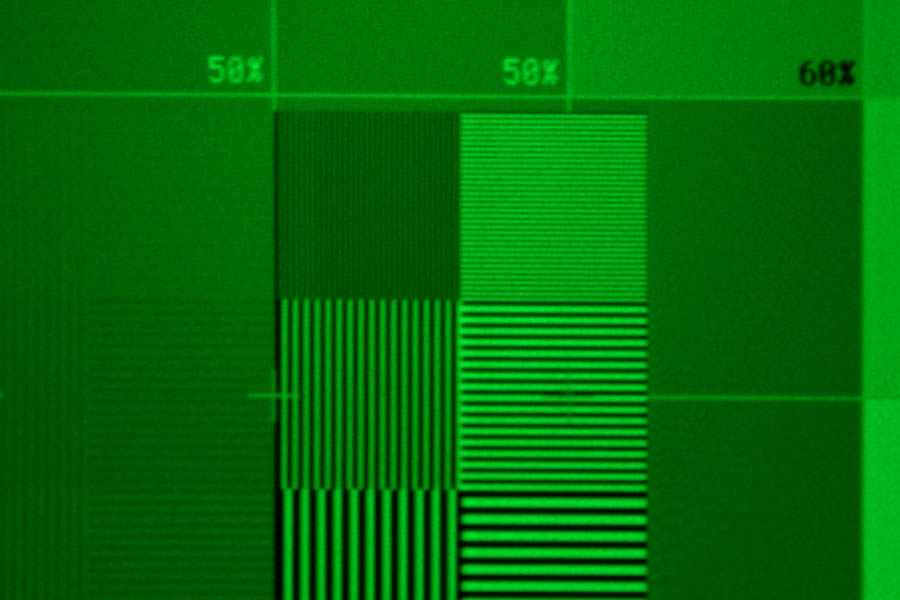
I attached a pic of the center of the SMPTE pattern I said I'd snap.
SC
| Description: |
| SMPTE pattern, screen center, 1080/60p from PS3. |
|
| Filesize: |
90.04 KB |
| Viewed: |
11490 Time(s) |
|
|
|
| Back to top |
|
|
overclkr
Joined: 08 Mar 2006
Posts: 4227
|
| Posted: Sat May 24, 2008 2:27 pm Post subject: |
|
|
| ecrabb wrote: | OK, that's good to know, Cliff. Because, after I turned off ABG, and cranked up G2 to get good shadow detail back, now the ABG line is showing up again (although not nearly as bright as when ABG is on. That tells me you're right about bad setup. I think I'll do full setup again, then.
SC |
Sorry, I mean the line (bow) should not go into the used "picture" area. My bad. 
That shot looks great!!!!!!
Cliff
|
|
| Back to top |
|
|
Brian Hampton
Joined: 22 Apr 2006
Posts: 1173
|
| Posted: Sat May 24, 2008 2:38 pm Post subject: |
|
|
I went a experimented with ABG or AKB or whatever this AM.
I must say the ABG function does seem to work very well. It certainly seems to change the gamma curve or overall contrast ratio. But,.. I don't think having it on works for me.
With Bias, Gain, Brightness, and Contrast I've got all the controls I need to make the picture great and I don't have the AKB line or the bowing U shaped line or anything like that.
My screen is small and my room is pitch black. I don't think I'm significantly "age-ing" my tubes over the course of watching a movie.
I have been flippant about AKB in the past as I see it does have certain perceived advantages but for now I'm leaving mine off.
(I'll be interested to read about other G70's and results per usual.)
-Brian
|
|
| Back to top |
|
|
Bitwize
Joined: 09 May 2008
Posts: 83
|
| Posted: Sat May 24, 2008 3:15 pm Post subject: |
|
|
| Brian Hampton wrote: | I went a experimented with ABG or AKB or whatever this AM.
I must say the ABG function does seem to work very well. It certainly seems to change the gamma curve or overall contrast ratio. But,.. I don't think having it on works for me.
With Bias, Gain, Brightness, and Contrast I've got all the controls I need to make the picture great and I don't have the AKB line or the bowing U shaped line or anything like that.
My screen is small and my room is pitch black. I don't think I'm significantly "age-ing" my tubes over the course of watching a movie.
I have been flippant about AKB in the past as I see it does have certain perceived advantages but for now I'm leaving mine off.
(I'll be interested to read about other G70's and results per usual.)
-Brian |
Brian,
I too have ABG turned off and believe it or not, the gamma curve is better. Also, i don't have the annoying AKB line at the top. The grayscale even tracked better with ABG = OFF. The light output went up 1 foot lambert and I don't have any flashing like I did with it ON. The blacks are noticeably darker but I adjust the brightness up a bit for shadow detail. Hopefully with the Moome HDMI card I won't need to do that as Gamma will be better.
-Rob
|
|
| Back to top |
|
|
overclkr
Joined: 08 Mar 2006
Posts: 4227
|
| Posted: Sat May 24, 2008 6:49 pm Post subject: |
|
|
what you guys will notice over time if you leave it off, that your G2 will not automatically adjust as your tubes age.
The cool thing about ABG for me on the G90 is it turns off (the line and bow) 15 minutes after you start the projector.
Leaving it off for 6 months and then turning it on for a session of about 5 minutes will then cause the projector to automatically feed your tubes the right G2 values. Then simply turn it back off, recalibrate, and your good for another 6 months.
This is how I've been doing it for years now. Even on an XG it is useful.
Cliff
|
|
| Back to top |
|
|
Brian Hampton
Joined: 22 Apr 2006
Posts: 1173
|
| Posted: Sat May 24, 2008 8:29 pm Post subject: |
|
|
Hey,
The G90 certainly has the prime way of doing it.
Just another reason to long for a G90. 
=Brian
|
|
| Back to top |
|
|
ecrabb
Forum Moderator
Joined: 13 Mar 2006
Posts: 15909
Location: Utah
TV/Projector: JVC RS40, Epson 5010
|
| Posted: Sat May 24, 2008 10:12 pm Post subject: |
|
|
| overclkr wrote: | | what you guys will notice over time if you leave it off, that your G2 will not automatically adjust as your tubes age. |
...which would be a problem if you had to pay a pro $500 or more every 6 months to recalibrate. But, if you're a DIY'er as some of us are, then you can whip out the Eye-One twice a year (or whenever you please) and recalibrate (or more likely tweak slightly)... then, no big deal, right? I can handle that.
I did notice that after turning off ABG, I had to run brightness to MAX and it still wasn't where it should be. I had to go in and bump G2 from the 120's into the 170's to be able to run brightness back in the 50 range where it had been. For fun, I turned ABG back on, and the rasters were super-bright on a black - probably IRE 20 or 30, with retrace lines and all.
So, is the ABG control some sort of closed loop system? Is there some mechanism by which the CPU can tell how much beam is hitting the phosphor at a given G2 input voltage? How does it work? I know in Trinitron monitors, they have the timing wires, which can also be used to read beam strength and calibrate output. But, these tubes don't have anything like that, do they?
SC
|
|
| Back to top |
|
|
overclkr
Joined: 08 Mar 2006
Posts: 4227
|
| Posted: Sat May 24, 2008 11:58 pm Post subject: |
|
|
| ecrabb wrote: | | overclkr wrote: | | what you guys will notice over time if you leave it off, that your G2 will not automatically adjust as your tubes age. |
...which would be a problem if you had to pay a pro $500 or more every 6 months to recalibrate. But, if you're a DIY'er as some of us are, then you can whip out the Eye-One twice a year (or whenever you please) and recalibrate (or more likely tweak slightly)... then, no big deal, right? I can handle that.
I did notice that after turning off ABG, I had to run brightness to MAX and it still wasn't where it should be. I had to go in and bump G2 from the 120's into the 170's to be able to run brightness back in the 50 range where it had been. For fun, I turned ABG back on, and the rasters were super-bright on a black - probably IRE 20 or 30, with retrace lines and all.
So, is the ABG control some sort of closed loop system? Is there some mechanism by which the CPU can tell how much beam is hitting the phosphor at a given G2 input voltage? How does it work? I know in Trinitron monitors, they have the timing wires, which can also be used to read beam strength and calibrate output. But, these tubes don't have anything like that, do they?
SC |
I'm not sure exactly how it's monitored but I recently did a retube on my G90 (had to put two tubes in from the loaner), and they were super dim (my original tubes had much less hours hence G2 voltage being way down compared to the loaner's). Once I turned on ABG BAM, they got great light output. The rasters were a bit elevated but everything calibrated out perfectly.
When I put my original tubes back in, the opposite happened. I had retrace lines all over the raster at first fire up.
Once again, turned off ABG, turned it back on and all was normal so it's sensing it somehow.
Cliff
|
|
| Back to top |
|
|
|
|
|
|
|
You cannot post new topics in this forum
You cannot reply to topics in this forum
You cannot edit your posts in this forum
You cannot delete your posts in this forum
You cannot vote in polls in this forum
You cannot attach files in this forum
You can download files in this forum
|
Forum powered by phpBB © phpBB Group
|
|




