| Author |
Message |
rajdude
Joined: 10 Mar 2006
Posts: 65
|
| Posted: Sat Jul 19, 2008 5:42 pm Post subject: |
|
|
yes, but for SD I could not find anything other than the GetGray DVD download.
You know what .....its interface is 10 times better than DVE-HD or SD................simple and straightforward
| LastButNotLeast wrote: | | rajdude wrote: | For HD, the DVE - HD blu-ray version is fine.
For SD, get the GetGray DVD. The SD version of DVE does not have all the test patterns needed for greyscale calibration.
From what I understand you will have to calibrate for both SD and HD sources.....seperately.
|
Or start with the free ones, here:
http://www.avsforum.com/avs-vb/showthread.php?t=948496 |
_________________
-Rajiv
|
|
| Back to top |
|
 |
garyfritz

Joined: 08 Apr 2006
Posts: 12088
Location: Fort Collins, CO
|
| Posted: Sat Jul 19, 2008 6:52 pm Post subject: |
|
|
| rajdude wrote: | | From what I understand you will have to calibrate for both SD and HD sources.....seperately. |
For many projectors & direct-view displays, there is ONE global setting of the bias/drive controls. You set it once and that's what you have for all sources. Set it for the one you watch the most and hope the others are similar. If you have an external processor you might be able to tune it to bring the other sources into line with the main one.
If your display has separate bias/drive settings for each source, then yes, you would calibrate for each source.
|
|
| Back to top |
|
|
kal
Forum Administrator

Joined: 06 Mar 2006
Posts: 18114
Location: Ottawa, Canada
TV/Projector: JVC DLA-NZ7
|
| Posted: Sun Jul 20, 2008 2:48 am Post subject: |
|
|
| JTT wrote: | Thanks,
I'm a bit new to this calibration lark. Once I''ve done the calibration for Sd and HD, this will have calibrated SD and HD sources from my PS3 correct? But what about my Sky HD box, which is 75% of my viewing, will these settings be right for Sky source (through the same HMDI cable from receiver) |
They'll likely be close enough that it won't matter. Set your greyscale using something for which you have test patterns you can use (usuallly on disk), and then use the same settings on satellite/cable. The levels on satellite/cable are all over the place anyway that frankly it doesn't even matter that much. You'll be close enough.
Kal
_________________

Support our site by using our affiliate links. We thank you!
My basement/HT/bar/brewery build 2.0
|
|
| Back to top |
|
|
JTT
Joined: 19 Jul 2008
Posts: 5
|
| Posted: Sun Jul 20, 2008 8:36 am Post subject: |
|
|
| kal wrote: | | JTT wrote: | Thanks,
I'm a bit new to this calibration lark. Once I''ve done the calibration for Sd and HD, this will have calibrated SD and HD sources from my PS3 correct? But what about my Sky HD box, which is 75% of my viewing, will these settings be right for Sky source (through the same HMDI cable from receiver) |
They'll likely be close enough that it won't matter. Set your greyscale using something for which you have test patterns you can use (usuallly on disk), and then use the same settings on satellite/cable. The levels on satellite/cable are all over the place anyway that frankly it doesn't even matter that much. You'll be close enough.
Kal |
Ok understand what your saying about satellite, channels seem to vary quite alot.
Thanks, 
|
|
| Back to top |
|
|
rajdude
Joined: 10 Mar 2006
Posts: 65
|
| Posted: Mon Jul 21, 2008 12:37 pm Post subject: two questions |
|
|
Ok,
I finally got to get my hands dirty with my G70, HCFR and a 1one LT. I have two questions and issues:
(1.) To get rid of the blue hump I am defocussing (as the guide says). I still have not eliminated the blue hump totally (delta is still around 14 at the max) but I see that the image is not as sharp anymore. For example, earlier (before starting calibration) I could see individual hair on people's face closeups (in HD content) ..........now that detail is no more there.
Is there another way to get rid of the blue hump?
(2.) This is more of a HTPC calibration question so please point me to the right forum if not appropriate here.
I am using Vista Media Center (VMC). I notice VMC has a huge black crush. even +4 is not visible.
If I use Power DVD it shows BTB easily (without changing anything else). Similarly if I view the test DVD in Windows Media Player....I can see BTB too.
So what is VMC using? I thought it was using the same decoder as Windows Media Player, but in my testing (between the two HTPCs I have) it is not!
I have tried this tool
Even tried changing the decoder to PowerDVD's but VMC still crushes black.
How to get VMC display BTB or at least NOT crush black?[/url]
_________________
-Rajiv
|
|
| Back to top |
|
|
rajdude
Joined: 10 Mar 2006
Posts: 65
|
| Posted: Tue Jul 22, 2008 4:43 pm Post subject: |
|
|
no replies for my questions.........I guess very little people read this thread.
_________________
-Rajiv
|
|
| Back to top |
|
|
rajdude
Joined: 10 Mar 2006
Posts: 65
|
| Posted: Tue Jul 22, 2008 4:47 pm Post subject: CIE |
|
|
I have a question:
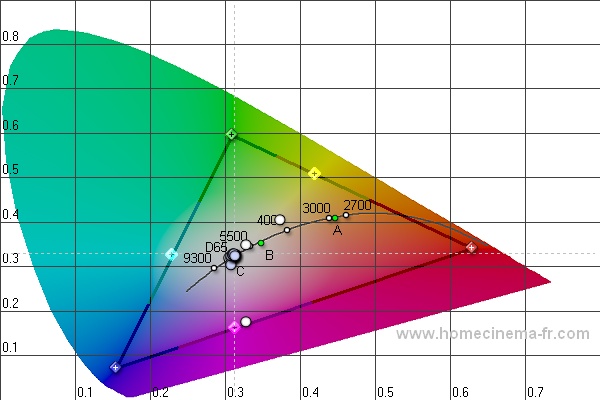
in HCFR can I get it to show the reference Triangle in the CIE chart along with my own measured triangle ?
Here is what my G70's CIE looks like after the first round of tweaking............I can't see any "reference triangle" or ideal triangle.......even though right click and "display references" is checked.
Oh! I just found out (by looking at other people's files) that this image has ONLY the reference triangle!
Where is my white triangle ?
How do I enable it?
Any tips?
| Description: |
|
| Filesize: |
65.49 KB |
| Viewed: |
215 Time(s) |
|
_________________
-Rajiv
Last edited by rajdude on Tue Jul 22, 2008 4:59 pm; edited 1 time in total
|
|
| Back to top |
|
|
Nashou66

Joined: 12 Jan 2007
Posts: 16171
Location: West Seneca NY
|
| Posted: Tue Jul 22, 2008 4:52 pm Post subject: |
|
|
Some times yu need to go back and forth a lot to get rid of the hump with other clors too, i know it says not to touch green but you may need to. but wright down yur currebt setting incase you want to go back. Focus the blue abit more till your happy with how much defocus you want. then just keep hacking away at it till you get close, its almost impossible to rid of it completely with out the use d software or a VP. Some times gamma boost helps too for the lower end.
Athanasios
_________________
Don't blame your underwear for your crooked ass~ unknown Greek philosopher
"Republicans believe every day is the Fourth of July, but the Democrats believe every day is April 15." --- President Reagan
One Smart Dog!!!
Marquee High Performance Bellows now shipping!!
Marquee Modifications and Performance Enhancement
Marquee C-element and Bellow removal
|
|
| Back to top |
|
|
kal
Forum Administrator
Joined: 06 Mar 2006
Posts: 18114
Location: Ottawa, Canada
TV/Projector: JVC DLA-NZ7
|
| Posted: Tue Jul 22, 2008 5:42 pm Post subject: Re: two questions |
|
|
| rajdude wrote: | | (1.) To get rid of the blue hump I am defocussing (as the guide says). I still have not eliminated the blue hump totally (delta is still around 14 at the max) but I see that the image is not as sharp anymore. For example, earlier (before starting calibration) I could see individual hair on people's face closeups (in HD content) ..........now that detail is no more there. |
This is a CRT projector right? If the picture's softer then your astig is probably not right and defocussing moves blue around too much causing it to look soft.
On my Barco Cine 8 Onyx clone, blue is sharpest at 42 (on a 0-100 scale). I actually defocus blue all the way down to ZERO (0). There difference is not noticeable from the seating position (approx 12 feet back on a 8 foot wide screen).
| Quote: | | Is there another way to get rid of the blue hump? |
Some sort of scaler or video processor that allows for parametric tweaking of the individual red/blue/blue curves is another solution.
| Quote: | Where is my white triangle ?
How do I enable it? |
The white triangle is the primaries. You need to measure your primaries. See part 8 of the guide.
Kal
_________________
Support our site by using our affiliate links. We thank you!
My basement/HT/bar/brewery build 2.0
|
|
| Back to top |
|
|
rajdude
Joined: 10 Mar 2006
Posts: 65
|
| Posted: Tue Jul 22, 2008 7:17 pm Post subject: |
|
|
Thanks Kal!
1. Yes this is a G70..........but I am pretty sure the astig is set right. The defocussing of blue does NOT move the blue dots..........they just become big round blobs.......that causes the image to be a little soft. I will look more into this and report back.....but there is another thread here which describes the same issue.
2. I am using a HTPC to feed the G70.......I think the HTPC should have some controls (inside the video driver settings)
3. OMG ! I am soooo stupid! Sorry I did not read the whole guide and stopped after the greyscale. No wonder I have no readings in the CIE chart. I did not take any pri/sec readings ! HA HA
_________________
-Rajiv
|
|
| Back to top |
|
|
JTT
Joined: 19 Jul 2008
Posts: 5
|
| Posted: Wed Jul 23, 2008 7:54 pm Post subject: |
|
|
I am just about to commence calibrating my Panasonic 50PZ70 plasma. I have a question about this TV.
The closest default settings to start from seem to be Cinema\warm.
To do the RGB drv and cut settings etc you need to go into the service menu, but when in the service menu and set to cinema\warm, its much brighter and more colourful than when not in the service menu?
Therefore where do I do the calibration with my eye-one? In normal viewing mode, or in the service menu (where its brighter and more colourful)? If in normal viewing mode I will keep having to switch to service menu making settings changes then coming out and checking with eye-one, not ideal.
Can someone with experience of this set please help. 
|
|
| Back to top |
|
|
rajdude
Joined: 10 Mar 2006
Posts: 65
|
| Posted: Thu Jul 24, 2008 11:49 am Post subject: Re: two questions |
|
|
| rajdude wrote: |
(2.) This is more of a HTPC calibration question so please point me to the right forum if not appropriate here.
I am using Vista Media Center (VMC). I notice VMC has a huge black crush. even +4 is not visible.
If I use Power DVD it shows BTB easily (without changing anything else). Similarly if I view the test DVD in Windows Media Player....I can see BTB too.
So what is VMC using? I thought it was using the same decoder as Windows Media Player, but in my testing (between the two HTPCs I have) it is not!
I have tried this tool
Even tried changing the decoder to PowerDVD's but VMC still crushes black.
How to get VMC display BTB or at least NOT crush black?[/url] |
Ok I fixed this problem and I am posting this as a FYI.
After my research on this problem, I found that VMC has this issue cant do much about it inside VMC.
The easy way to fix this is to use your video card's settings. My nVidia card has a beta driver which gives an option of changing ALL video levels to 16-235 OR 0-255.
I installed this on both HTPCs and the problem is solved!
For me the 16-235 option works best on both the plasma and the Sony G70 PJ.
more info here
http://www.avsforum.com/avs-vb/showthread.php?t=1049346
_________________
-Rajiv
|
|
| Back to top |
|
|
rajdude
Joined: 10 Mar 2006
Posts: 65
|
| Posted: Fri Jul 25, 2008 3:14 pm Post subject: |
|
|
Hi Kal,
You mention in the guide:
| Kal wrote: | Graph 5 - CIE Diagram:
Below is our CIE diagram showing the "after" results. (For whatever reason, ColorHCFR doesn't display the "before" and "after" readings at the same time on the CIE chart). |
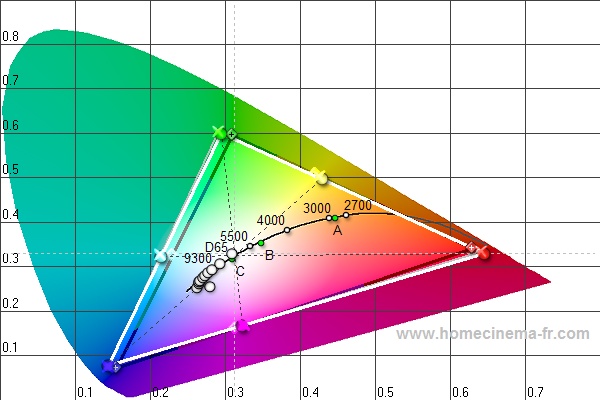
Well, this is not true anymore. I can see the reference measure in HCFR's CIE diagram. Take a peek:
Notice there are three triangles...the grey one is the reference measure, the white one is the current measure and the dark, one with colored corners is the REC601.
You may want to update the guide.
Awesome work, BTW !
| Description: |
|
| Filesize: |
73.05 KB |
| Viewed: |
169 Time(s) |
|
_________________
-Rajiv
|
|
| Back to top |
|
|
kal
Forum Administrator
Joined: 06 Mar 2006
Posts: 18114
Location: Ottawa, Canada
TV/Projector: JVC DLA-NZ7
|
| Posted: Fri Jul 25, 2008 6:56 pm Post subject: |
|
|
Rajdude: You're talking about showing the before/after primary measurements. Yes, that can be done. But I don't get into primaries until part 8 of the guide and you're quoting something I wrote in part 7. I was talking about how ColorHCFR doesn't display the before/after greyscale readings (not primary/secondary readings) on the CIE chart.
That part is still true: ColorHCFR doesn't display two sets of greyscale dots. Likely because it would be a mess to distinguish between them and know which old dot matches up to which new dot.
In your picture too it only shows one set (10) of greyscale reading dots. Not 20.
Kal
_________________
Support our site by using our affiliate links. We thank you!
My basement/HT/bar/brewery build 2.0
|
|
| Back to top |
|
|
rajdude
Joined: 10 Mar 2006
Posts: 65
|
| Posted: Fri Jul 25, 2008 7:42 pm Post subject: |
|
|
Oh ! You were talking about the greyscale dots and not about the primaries/secondaries!
sorry.......My bad!
But IMHO the greyscale is best viewed in the RGB graph.
| kal wrote: | Rajdude: You're talking about showing the before/after primary measurements. Yes, that can be done. But I don't get into primaries until part 8 of the guide and you're quoting something I wrote in part 7. I was talking about how ColorHCFR doesn't display the before/after greyscale readings (not primary/secondary readings) on the CIE chart.
That part is still true: ColorHCFR doesn't display two sets of greyscale dots. Likely because it would be a mess to distinguish between them and know which old dot matches up to which new dot.
In your picture too it only shows one set (10) of greyscale reading dots. Not 20.
Kal |
_________________
-Rajiv
|
|
| Back to top |
|
|
dropzone7

Joined: 12 Jun 2007
Posts: 1069
Location: Charlotte, NC
|
| Posted: Tue Aug 05, 2008 1:34 pm Post subject: |
|
|
Well, after much debate and talking myself in and out of this purchase I finally ordered an Eye One LT sensor. I followed the link from this site and opted for one day shipping so I should be playing around with this thing by tomorrow night! Get ready for some questions Kal! Now I need to print a new copy of your guide as it's changed a bit since my last attempt with the Spyder II.
_________________
"Coffee is for Closers."
|
|
| Back to top |
|
|
dropzone7
Joined: 12 Jun 2007
Posts: 1069
Location: Charlotte, NC
|
| Posted: Wed Aug 06, 2008 3:46 pm Post subject: |
|
|
Ha, just got some dirty looks at the printer while printing out the latest version of the guide! 
_________________
"Coffee is for Closers."
|
|
| Back to top |
|
|
ddddave
Joined: 07 Aug 2008
Posts: 2
|
| Posted: Thu Aug 07, 2008 6:20 pm Post subject: |
|
|
Hi, I have a Samsung PN42A450 (plasma), and i'm just trying to figure out if it's capable of the Primary/Secondary color calibration.
In the Menu, i have controls called simply Red, Green, and Blue. Here are the descriptions according to the manual:
• Red : Adjusts the red saturation level of the selected color.
• Green : Adjusts the green saturation level of the selected color.
• Blue : Adjusts the blue saturation level of the selected color.
Does anybody know what these would correspond to in the guide? Do I need more controls to properly set these colors?
|
|
| Back to top |
|
|
kal
Forum Administrator
Joined: 06 Mar 2006
Posts: 18114
Location: Ottawa, Canada
TV/Projector: JVC DLA-NZ7
|
| Posted: Thu Aug 07, 2008 7:57 pm Post subject: |
|
|
| ddddave wrote: | Hi, I have a Samsung PN42A450 (plasma), and i'm just trying to figure out if it's capable of the Primary/Secondary color calibration.
In the Menu, i have controls called simply Red, Green, and Blue. Here are the descriptions according to the manual:
• Red : Adjusts the red saturation level of the selected color.
• Green : Adjusts the green saturation level of the selected color.
• Blue : Adjusts the blue saturation level of the selected color.
Does anybody know what these would correspond to in the guide? Do I need more controls to properly set these colors? |
Sounds to me like it just adjusts the overall drive of each of the colours at all IRE levels. Sort of like they combined the RGBlowEnd and RGBhighEnd. Definitely not as good as having separate high and low controls but will most certainly help get you closer. I would go through the guide and adjust these controls at both 30 and 80 IRE points as if you had two sets of controls.
Kal
_________________
Support our site by using our affiliate links. We thank you!
My basement/HT/bar/brewery build 2.0
|
|
| Back to top |
|
|
ddddave
Joined: 07 Aug 2008
Posts: 2
|
| Posted: Fri Aug 08, 2008 2:06 pm Post subject: |
|
|
| kal wrote: | | ddddave wrote: | Hi, I have a Samsung PN42A450 (plasma), and i'm just trying to figure out if it's capable of the Primary/Secondary color calibration.
In the Menu, i have controls called simply Red, Green, and Blue. Here are the descriptions according to the manual:
• Red : Adjusts the red saturation level of the selected color.
• Green : Adjusts the green saturation level of the selected color.
• Blue : Adjusts the blue saturation level of the selected color.
Does anybody know what these would correspond to in the guide? Do I need more controls to properly set these colors? |
Sounds to me like it just adjusts the overall drive of each of the colours at all IRE levels. Sort of like they combined the RGBlowEnd and RGBhighEnd. Definitely not as good as having separate high and low controls but will most certainly help get you closer. I would go through the guide and adjust these controls at both 30 and 80 IRE points as if you had two sets of controls.
Kal |
Oh, this is in addition to the RGBLowEnd and RGBHighEnd (which are labeled almost exactly as such). I was curious if these controls might help me calibrate the Primary/Secondary Colors as opposed to the Grayscale where I will use the Low/High. If not, I'm uncertain as to where those controls might be... Service menu perhaps?
|
|
| Back to top |
|
|
|
|




