|
As this forum is rarely used anymore, we've locked it. Feel free to browse and read. Questions? Please reach out to us directly. Cheers! |

|
 |
|
|
| Author |
Message |
Baard
Joined: 06 Nov 2006
Posts: 45
Location: Norway / Oslo
|
| Posted: Tue Apr 08, 2008 11:47 am Post subject: EXT-HD and 50Hz on SD-DVD's |
|
|
I’m stuck in “ in-compatibility” problems with SD-DVD and Moome ETX-HD. Until Easter I have used HTPC with no problems, switch too more family friendly setup with Toshiba XE1 and Moome ETX-HD too Barco. Mostly due too SD-DVD scaling in XE1 vs HTPC is good enough.
Internal scaling in XE1 on SD material through Moome EXT-HD is a problem. 720-1080i/p@50Hz – is obviously not a CRT friendly setup, with great reduction in picture wide. Front/back porch settings?
Picture on BG 1208s is a bit too soft at 1080p – as expected though. I only use 720p or 1080i on HD, I achieve great picture size at 1080i, but I am a bit bothered with scanned lines in this mode. 720p gives also reduced picture size vs HTPC. Contrast ratio is better in p vs i mode – much more light.
As is: I am not happy with Moome and XE1 on SD-DVD. This was note as excepted – maybe I should see this coming?
Baard
|
|
| Back to top |
|
 |
kal
Forum Administrator

Joined: 06 Mar 2006
Posts: 18114
Location: Ottawa, Canada
TV/Projector: JVC DLA-NZ7
|
| Posted: Wed Apr 09, 2008 12:57 am Post subject: |
|
|
Sorry, I don't understand what the problem is that you are having. You mention that 720p/50 and 1080i/50 and 1080i/50 are too narrow. That has nothing to do with the EXT-HD - the EXT-HD simply passes through the information from the source. It doesn't change the porches at all.
I used an EXT-HD at all those resolutions (60Hz though) and th EXT-HD looked fantastic and did exactly what I expected.
Kal
_________________

Support our site by using our affiliate links. We thank you!
My basement/HT/bar/brewery build 2.0
|
|
| Back to top |
|
|
drudozucker
Joined: 04 Jan 2008
Posts: 38
Location: Portugal
|
| Posted: Wed Apr 09, 2008 9:54 am Post subject: |
|
|
| kal wrote: | Sorry, I don't understand what the problem is that you are having. You mention that 720p/50 and 1080i/50 and 1080i/50 are too narrow. That has nothing to do with the EXT-HD - the EXT-HD simply passes through the information from the source. It doesn't change the porches at all.
I used an EXT-HD at all those resolutions (60Hz though) and th EXT-HD looked fantastic and did exactly what I expected.
Kal |
Hi Kal, I believe your description isn’t completely accurate. Please let me explain why:
The EXT-HD receives picture information in the digital domain via HDMI and it is then down to the EXT-HD how to interpret this information in the analog domain. Unfortunately, as it stands, the EXT-HD applies the same timing for R,G, B be it 50Hz aor 60Hz. This means, because the sync pulses are -time wise - in 50Hz further apart, the active video signal comes too early and is approx. 20% shorter than expected. Whilst CRTs have an ability to SHIFT and SIZE the picture, these controls are (in many or all cases?) unable to correct this large deviation. Therefore, as it stands the EXT-HD is unsuitable for 720 and 1080 at 50Hz. I have sent Moome exact details about this and Moome has promised to look into it as a matter of priority.
Furthermore, the EXT-HD generates a picture which can be considered “soft” when compared with one using edge enhancement. Maybe because of issues with the first batch, the second batch of EXT-HD is presenting an analog output which has, relatively speaking, “round” edges compared with edge enhanced ones, usually offered by a scaler. This prevents “ringing” but it might also look soft in comparison with other products. Unfortunately, it isn't technically easy to provide edge enhancement without visible ringing, hence the devices inside the EXT-HD (which I cannot identify as they have their product codes removed) might not be able to do this.
(Things are made a little worse by the fact that the unit comes ex-factory with severe gamma correction which blurs the picture (for more details see below). It would be more logical, in my opinion, to ship it with gamma correction “off”. )
I have compared in depth the EXT-HD with the TAG McLaren Audio video scaler VSM2048 (inside the AV192R), albeit at 60Hz, because I cannot use at present 50Hz because of the issue described above. Source was a Toshiba HD-XE1, whilst the display was a Barco Cine 9. The VSM2048 was fed with DVI @ 1080p, the output was set to horizontal= max, vertical 1080p (please note the VSM2048 will during processing reduce the horizontal resolution to approx. 1300 due to buffer limitations, a disadvantage compared to the EXT-HD and the reason I have invested in the EXT-HD. The picture is then scaled again at the output, but “lost is lost”). I optimized the picture for both products, then I compared them using test pattern from DVE (HD-DVD) and HD-DVD movies. What I found was this:
a) The EXT-HD can reproduce, as expected, the full resolution, but the picture looks soft, because of the lack of edge enhancement. The VSM2048, using the PW181-30, allows the user to modify the filtering (edge enhancement) in 7 steps, providing different filters for still and moving images. A setting of 3/7 removed almost all ringing (you had to go close to the screen to see it), but made the picture perception to be still sharper and hence more pleasant to watch. In actual fact you needed to use an Interference Test Pattern to see the reduced vertical resolution. Result: I can now either watch a picture with reduced vertical resolution, but better looking, or a softer one at full resolution.
Looking at it a little more, I also believe that the picture created by the EXT-HD is a tiny fraction more noisy, something, I believe, I could verify when looking at the EXT-HDs analog output using a scope.
Much has been written about the EXT-HD’s gamma correction. Unfortunately, I believe the best would be if it wasn’t offered (well, one can switch it off). There are several reasons for this:
a) adjustments affect the full range, i.e. it is very time-consuming and in many instances impossible to set it correctly. I used a color meter to check Gamma and color tracking.
b) there is a poor user feed back when setting it using the remote. In many cases the remote isn’t recognized or worse the EXT-HD locks up completely (hence need to be power cycled). As a result in a rather short time, you will have lost the ability to know how many steps you have selected. I wish the display was used to show the setting, at least during power up.
c) the gamma correction is split in two parts, one inside the unit, with that part set to “high” when leaving the factory.
d) the gamma correction circuit isn’t allowing short tracks of the analog video signal, hence this might contribute to the observed noise.
Any gamma correction should rather be made in the digital domain, using a look-up table. This way it could be powerful whilst providing a good user interface. This is, in my opinion, outside the scope of the EXT-HD and should rather be implemented in a dedicated video processor (if they only offered a high resolution analog output!).
Summary: One should not forget that the EXT-HD should rather be seen as a 1:1 video converter from digital to analog domain. Additional functionality, such as gamma correction or component input make it (in my opinion) unnecessary complex and maybe even affect it’s performance.
As it stands, the EXT-HD is a decent product, considering its price, but there is definitely need for correction and room for improvement. Some of the described issues can improve performance, but others are essential for use.
As it stands the EXT-HD is unsuitable for countries relying on SD-DVD @ 50Hz and owners of high specification CRTs definitely would like a better ability to edge enhance the analog video output.
Regards
Udo
|
|
| Back to top |
|
|
Baard
Joined: 06 Nov 2006
Posts: 45
Location: Norway / Oslo
|
| Posted: Wed Apr 09, 2008 11:35 am Post subject: |
|
|
Sorry – I will do my best to rephrase. (Different language and uncertain technical skills)
- it’s not about picture quality
- Problem is picture size on SD-DVD at 50Hz from Toshiba XE1 through EXT-HD.
Playing SD from Toshiba – up scaled to 720/1080p @50Hz the resulting picture is squeezed together, just like 4:3. (Format settings in Toshiba is 16:9)
HD-DVD@60Hz is very nice.
I thought is was a timing issue in EXT-HD @50Hz in combination with CRT.
A work around for SD-DVD is connecting HTPC 1280:720p@60Hz through DVI/HDMI too EXT-HD. And everything is fine.
But I want to simply my setup and do SD scaling through Toshiba HD player – this doesn’t turned out as expected due to 50Hz issue??
Summing up
Still have to use HTPC for SD in combination with Blu-ray/HD-DVD player.
It should have been 3 HDMI ports on EXT-HD, well well….
Baard
Last edited by Baard on Wed Apr 09, 2008 11:52 am; edited 1 time in total
|
|
| Back to top |
|
|
Baard
Joined: 06 Nov 2006
Posts: 45
Location: Norway / Oslo
|
| Posted: Wed Apr 09, 2008 11:51 am Post subject: |
|
|
| drudozucker wrote: |
As it stands the EXT-HD is unsuitable for countries relying on SD-DVD @ 50Hz
Regards
Udo |
Exactly my point too 
Regards
Baard
|
|
| Back to top |
|
|
WTS
Joined: 08 Mar 2006
Posts: 1276
Location: Calgary
|
| Posted: Wed Apr 09, 2008 1:16 pm Post subject: |
|
|
Edge enhancement? You've got to be joking, who would artificial edge enhancement, not on my cine.
_________________
Thanks
Walter
|
|
| Back to top |
|
|
kal
Forum Administrator
Joined: 06 Mar 2006
Posts: 18114
Location: Ottawa, Canada
TV/Projector: JVC DLA-NZ7
|
| Posted: Wed Apr 09, 2008 2:03 pm Post subject: |
|
|
Udo/Baard: This is good feedback. I'll make sure that Moome gets it.
| Quote: | | a) The EXT-HD can reproduce, as expected, the full resolution, but the picture looks soft, because of the lack of edge enhancement. The VSM2048, using the PW181-30, allows the user to modify the filtering (edge enhancement) in 7 steps, providing different filters for still and moving images. A setting of 3/7 removed almost all ringing (you had to go close to the screen to see it), but made the picture perception to be still sharper and hence more pleasant to watch. In actual fact you needed to use an Interference Test Pattern to see the reduced vertical resolution. Result: I can now either watch a picture with reduced vertical resolution, but better looking, or a softer one at full resolution. |
This really comes down to a matter of opinion: Does someone want to add artificial sharpening (and yes, it is artificial) to increase the perceived sharpness (and yes, it's perceived and not 'real' sharpness) or does someone want to pass the signal un-altered (as is).
Personally I prefer that the signal be passed "as is" as do many others but I understand why some may prefer a little bit of sharpening. A *little* bit of sharpening can actually be beneficial - years ago back in the HTPC days everyone was raving about using add-on software filters to do an "unsharp mask" (which adds sharpening even though the name may make you think the opposite).
| Quote: | Much has been written about the EXT-HD’s gamma correction. Unfortunately, I believe the best would be if it wasn’t offered (well, one can switch it off).
Any gamma correction should rather be made in the digital domain, using a look-up table. This way it could be powerful whilst providing a good user interface. This is, in my opinion, outside the scope of the EXT-HD and should rather be implemented in a dedicated video processor (if they only offered a high resolution analog output!). |
Users with high-end scalers ($2000-$4000) will do gamma in the digital domain using look up tables. As you mentioned however this is beyond the scope of the EXT-HD. It's my opinion that Gamma done in the way it's done in the EXT-HD (or RTC2200 for that matter) is still better than NO gamma. Those that can afford to spend that sort of money on a standalone scaler will use gamma that way and turn it off in the EXT-HD, others will use the EXT-HD. To not offer gamma at all in the EXT-HD to me doesn't make any sense.
| Quote: | | Summary: One should not forget that the EXT-HD should rather be seen as a 1:1 video converter from digital to analog domain. Additional functionality, such as gamma correction or component input make it (in my opinion) unnecessary complex and maybe even affect it’s performance. |
Moome's always looking for feedback on improving the current products and for future products as well. Keep your fingers crossed... you never know what might come out next. 
| Quote: | | As it stands the EXT-HD is unsuitable for countries relying on SD-DVD @ 50Hz and owners of high specification CRTs definitely would like a better ability to edge enhance the analog video output. |
This is an interesting point and I'm glad you've sent a note to Moome about it.
Kal
_________________
Support our site by using our affiliate links. We thank you!
My basement/HT/bar/brewery build 2.0
|
|
| Back to top |
|
|
drudozucker
Joined: 04 Jan 2008
Posts: 38
Location: Portugal
|
| Posted: Wed Apr 09, 2008 2:06 pm Post subject: |
|
|
| WTS wrote: | | Edge enhancement? You've got to be joking, who would artificial edge enhancement, not on my cine. |
Hi Walter, I definitely wasn't joking. And this is why: a digital display device can go from black to white within a pixel, assuming its native resolution is equal to the source and the source is high enough resolution to provide that information. Unfortunately a video DAC's and the CRT's bandwidth limitation cannot reproduce this, but intelligent edge enhancement. Please note that we are talking here about picture analysis and not high frequency enhancement! The result are cleaner transitions (where these exist) without ringing.
The process can best be seen when taking a a high resolution picture, photographed with a high quality digital SLR camera, equipped with first class lens and proper settings. Then take the unprocessed picture in RAW format. Adjust black and white level and color temperature. Look at it and then compare it with one which has local, intelligent sharpening applied. The result will look better.
The majority of movies are edge enhanced, although many have done a rather questionable job. Questionable when looked at a high bandwidth display device.
I am all in favor of purity, but purity should not limit us to those restriction we can technically challenge.
Regards
Udo
|
|
| Back to top |
|
|
kal
Forum Administrator
Joined: 06 Mar 2006
Posts: 18114
Location: Ottawa, Canada
TV/Projector: JVC DLA-NZ7
|
| Posted: Wed Apr 09, 2008 2:24 pm Post subject: |
|
|
| drudozucker wrote: | | The process can best be seen when taking a a high resolution picture, photographed with a high quality digital SLR camera, equipped with first class lens and proper settings. Then take the unprocessed picture in RAW format. Adjust black and white level and color temperature. Look at it and then compare it with one which has local, intelligent sharpening applied. The result will look better. |
Well yes, that's true. I own a good DSLR with high end lenses too (Canon L series) and shoot 100% in RAW and use Phase One Pro to develop my photos... but sharpening is needed in RAW mode for a completely different reason:
When DSLR cameras capture a RAW picture, they use an anti-alias filter to reduce the pixel grid effect (Moire patterns). This is common to digital photography and picture scanning. To counter the softness from the anti-alias filter, digital cameras have a built-in sharpening software to convert the RAW image into JPEG format and the level of sharpness can often be customized in the camera menu. Most professional photographers prefer to shoot in RAW format to have complete control of the 'development' including the level of sharpening because it allows precise control of the sharpness of the pictures.
Movies are *already* processed by the studios the moment they arrive on Blu-ray or other disc. To use your photography example, adding sharpening in something like the EXT-HD would be similar to taking a camera's JPEG picture (either developed by the camera or by the photographer) that has already been sharpened and then adding *extra* sharpening after.
So sorry, the example doesn't work.
Kal
_________________
Support our site by using our affiliate links. We thank you!
My basement/HT/bar/brewery build 2.0
|
|
| Back to top |
|
|
drudozucker
Joined: 04 Jan 2008
Posts: 38
Location: Portugal
|
| Posted: Wed Apr 09, 2008 2:46 pm Post subject: |
|
|
Hi Kal, you might have misinterpreted my statement. My example of the digital SLR wasn't to reason edge enhancement for HD but to simply explain how "intelligent" sharping can make things better. I also do not believe that the EXT-HD (at his price) could include a good (and user selectable!) edge enhancement, so I would not advocate for it, but consider it a great opportunity for a product at a higher price. I am a "fan" of the EXT-HD and believe, that it is a great product (as soon as it is fixed for 50Hz). Reason to explain the obsrvation about the "missing" edge enhancement was purely done to explain why a picture could look soft when compared with a dedicated scaler or HTPC.
Having said this, you might imply that the output of the EXT-HD is what is captured on the HD disk. This is unfortunately not true. Take a test pattern which raises from IRE 0 to IRE 100 (as fast as possible within the bandwidth limitations of the recording). Then look at the analog video signal and you can see that it has, after a fast raise time, round shoulders because of the bandwidth limitations or maybe simply the necessary (anti-aliasing) filtering. Using "intelligent" edge enhancement could make this better, but if "cheaply" done would results in ringing.
Regards
Udo
|
|
| Back to top |
|
|
kal
Forum Administrator
Joined: 06 Mar 2006
Posts: 18114
Location: Ottawa, Canada
TV/Projector: JVC DLA-NZ7
|
|
| Back to top |
|
|
WTS
Joined: 08 Mar 2006
Posts: 1276
Location: Calgary
|
| Posted: Wed Apr 09, 2008 6:25 pm Post subject: |
|
|
udo, have you tested the ext hd with such a test pattern and found the analog output to have rounding or slewing? The opamps in the lastest versions have a very high BW and slewrate where I don't see this as being a problem.
_________________
Thanks
Walter
|
|
| Back to top |
|
|
drudozucker
Joined: 04 Jan 2008
Posts: 38
Location: Portugal
|
| Posted: Thu Apr 10, 2008 4:15 pm Post subject: |
|
|
| WTS wrote: | | udo, have you tested the ext hd with such a test pattern and found the analog output to have rounding or slewing? The opamps in the lastest versions have a very high BW and slewrate where I don't see this as being a problem. |
Hi Walter, I don't believe there is an issue with the ability of the EXT-HD’s video DAC or video buffers (although I do not know which devices are actually used).
Allow me to expand on the edge enhancement a little: I like to point out that there is a less dramatic visual affect when watching a movie compared with looking at a still picture, particularly if it is a test pattern. Test pattern include maximum transitions, which are rarely observed in reality and if there are less sharp transitions then there is less the need or ability to enhance edges.
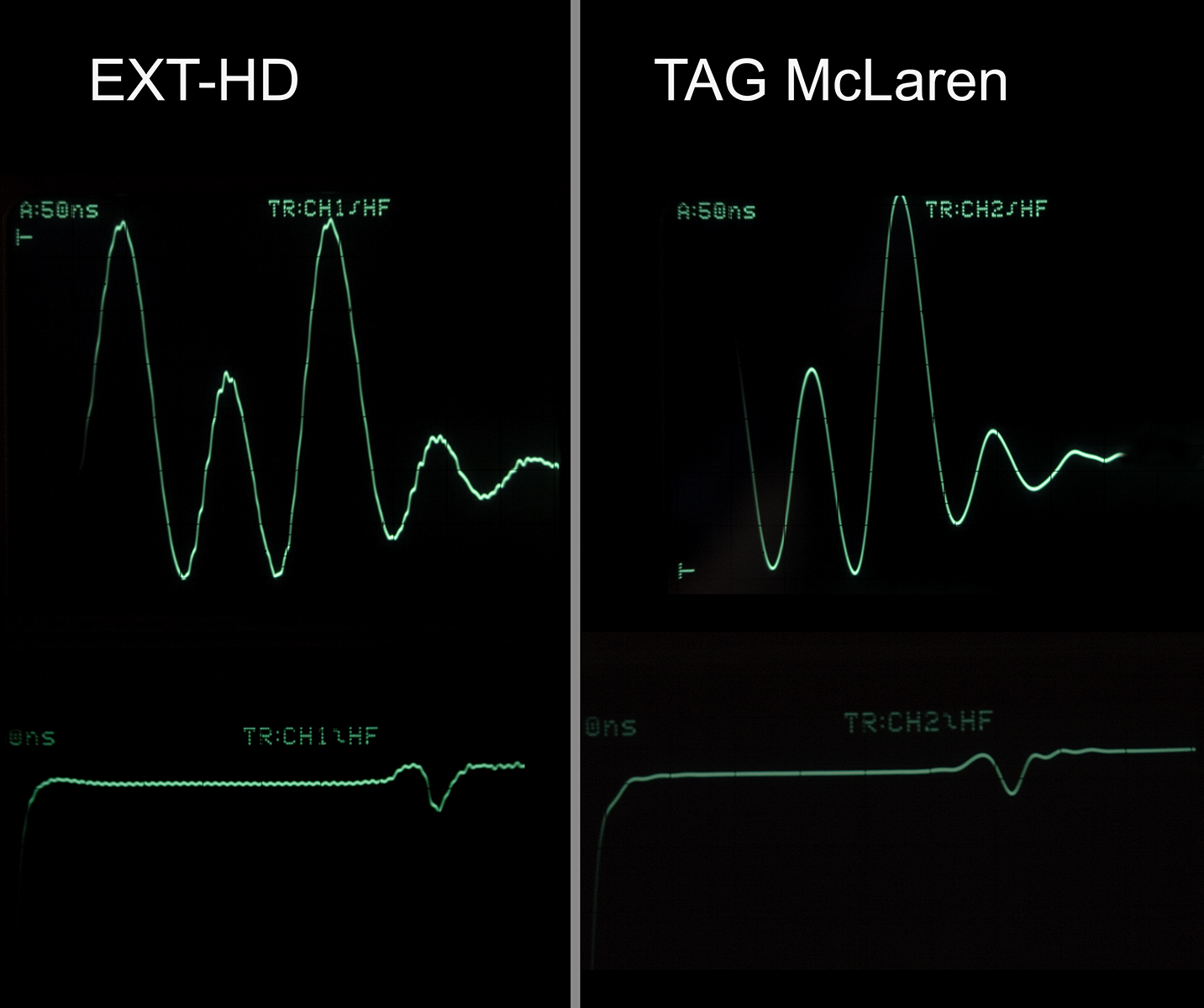
Having said this, I have used a test pattern, showing a 100IRE rectangle on a black background (DVE, recorded on HD-DVD - this test pattern includes also additionally PLUGE, 2 and 4% grey, but that part is not shown on picture_1). I have, in order to visualize the affect of edge enhancement better copied 4 diagrams (recorded using a scope and then being photographed) on top of each other. The traces have also be color converted for ease of visual separation. I had also to horizontally shifted them slightly because the trigger point was moving with the increasing slope.
If you look at picture_1, then you see the video output (G) of the EXT-HD compared with 3 outputs of the TAG McLaren’s VSM2048 (inside an AV192R), recorded at 3 out of 7 potential steps of edge enhancement.
Non of the traces increase suddenly from 0 to 100, how could they. I do not know the steepness of the recorded transition (I guess 3 pixels) recorded on the HD-DVD, but we can see interpret the differences between the traces:
The EXT-HD’s output is shown in light green, it is drawn above all. Let’s ignore for the moment the modulation on top of the trace which I will cover a little later. What we can see, is that the trace climbs initially approx. linearly (once again ignore the hi-frequence modulation) but then reduces its slope when it reaches about 90% of the required amplitude. It takes then approx. another 14ns to reach its required level.
The edge enhancement filters within the TAG McLaren allow to reach the maximum faster but that comes, at the highest setting, at a price: ringing. However, looking at the default = nominal = middle setting which was selected as the best compromise, it can improve on the signal shape, proving that careful edge enhancement can indeed be beneficial.
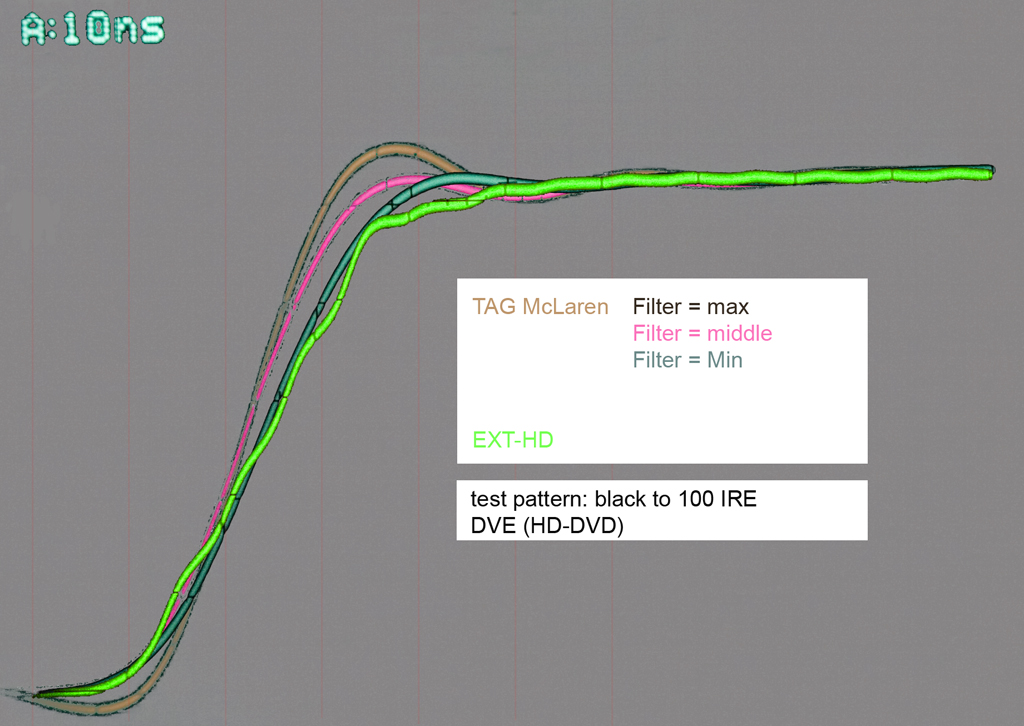
The shown slope is approx. 4.3IRE/ns but that isn’t the maximum achievable. There is a test pattern on DVE (HD-DVD) called DOTS. The description describes them as single pixel transition with 100% amplitude. Picture_2 shows them for the EXT-HD. The output increases within approx. 10ns (10IRE/ns) , the same time it requires to get it down again. A pixel width would be approx. 8ns. Please note there is a second, smaller peak, which most likely is real (but might be a measuring artefact - I doubt it). I guess it an artefact caused by insufficient output filtering (allowing higher frequencies than sample clock/2). This leads us back to the observed high frequency modulation.
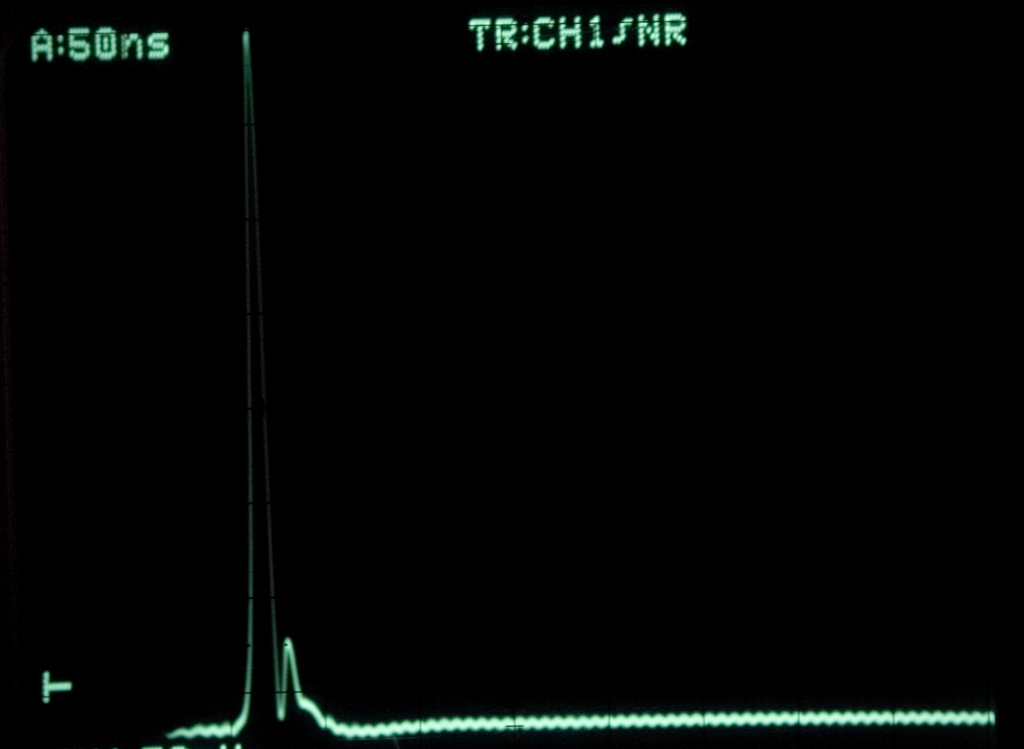
This modulation is, in my opinion, if it proves to be correctly identified, a problem as it affects the whole picture quality. Please look at picture_3 and you will see that this modulation is always there. I do not know the circuit diagram of the EXT-HD but I know that the TAG McLaren’s analog video outputs have 5th order Butterworth reconstruction filters with a pair of stop band zeroes for additional pixel clock suppression. The filter was added to remove image that occur above sample_clock/2 as they are not real. The additional stop band zeros are added to remove pixel clock artefacts. The result is a clean signal.
If my observation is indeed correct, then I believe additional output filtering is necessary and would improve the picture, but of course the “modulation” could also be caused by “imperfection” within the circuit layout. I remember that extreme care has been put in the TAG McLaren to separate analog and digital voltages and stabilize them locally. That might also be the case within the EXT-HD but I do not know, in the end the EXT-HD is a black box for me.
Summary: I think I have been able to show that the analog output of the EXT-HD isn’t limited by the capability of its video DACs or video buffers. However, I have also been able to show that edge enhancement can improve the video output, although its affect might be less beneficial when watching a movies (compared to looking at still test patterns). Finally I believe I might have identified a problem with the EXT-HD’s video output which might be caused by insufficient filtering, pixel clock artefact removal or basic layout.
Disclaimer: Everything I have measured is applicable to my EXT-HD and might therefore not be the case for other units. Great care has been taken to get the results but my technical tool are limited.
Regards
Udo
| Description: |
| Comparison of different waveforms |
|
| Filesize: |
476.98 KB |
| Viewed: |
15286 Time(s) |
|
| Description: |
|
| Filesize: |
412.06 KB |
| Viewed: |
19477 Time(s) |
|
| Description: |
|
| Filesize: |
237.27 KB |
| Viewed: |
19477 Time(s) |
|
|
|
| Back to top |
|
|
WTS
Joined: 08 Mar 2006
Posts: 1276
Location: Calgary
|
| Posted: Fri Apr 11, 2008 1:25 am Post subject: |
|
|
Hi Udo,
I'm not familiar with the Tag unit you are using, could you give some info on it? What EXT unit do you have?
Interesting scope shots. I would alomost bet that the video dac in the ext has no post filters which would probably explain the ripples that you see on the waveform. Interesting enough the manufacturer of the HDMI chip which also includes the dacs internally (if you have the unit I think you do) only recommends a ferrite bead/cap for a post filter. Hardly the 5th order butterworth filters the Tag uses, does it make a huge difference, I don't know, I know Tag equipment is very expensive.
It appears that the rise times of both signals initially the same but when they reach the top it almost seem like the EXT signal is either BW limited or the Tag is slightly peaked in the BW to get that overshoot. Again the rippling seen on the EXT waveform is probably the result of no post filter.
The 2 signals in the 3rd picture look similiar from what I can tell with the exception that the EXT waveform again has the unfiltered look to it. Don't forget that while filters do clean up the sampling artifacts like the ripples they also tend to soften the waveform (picture). What is the bottom trace in the 3rd picture?
Perhaps you should take your blackbox configuration a step futher and open it up and scope the dac output right at the 75ohm load before it goes through the other stages because the other stages include more than just a buffer. I'd like to see what the results show for that, you could also add a ferrite bead and a small cap (10pF, 27pF etc) and see what it does for the ripple.
Interesting artifact(2nd peak) in the second picture. Where's the picture of the Tag output for this input?
Newer units from Moome are using separate HDMI - dac chips and also a higher spec video buffer.
Walter
_________________
Thanks
Walter
|
|
| Back to top |
|
|
drudozucker
Joined: 04 Jan 2008
Posts: 38
Location: Portugal
|
| Posted: Fri Apr 11, 2008 1:52 pm Post subject: |
|
|
Hi Walter, I have an EXT-HD from the most recent batch, i.e. March 2008.
The video output of the TAG McLaren VSM2048 has been processed by a PW181-30, which also offers the edge enhancement option. I do not believe there is a bandwidth issue within the EXT-HD which I believe is verified by the 1 pixel wide test pattern [picture_2].
The ripples are, as you say, and as I think, caused be an insufficiently processed (not edge enhanced!) analog video output.
I could not produce picture_2 with the TAG McLaren VSM2048 as it cannot store 1920x1080p, it downsizes the input to approx. 1300x1080p. As a result the one pixel wide peaks are not reproduced with identical width; they vary by a small fraction. Not an issue as such but because I do not have access to an storage oscilloscope, I cannot make a steady screen shot. As soon as I have some time, I will try one using 1920x1080i as that can be processed and as the peaks are one pixel wide, it shouldn't matter, if I use 1080i or 1080p.
Picture_3 has been recored at 50ns/div.
I did open the EXT-HD but as I do not have a circuit diagram and important ICs having their product number removed, I did go further. I do not have the time to reverse engineer the EXT-HD. If you have additional details, then please share them with me. I would be most interested to learn more about the EXT-HD. Having said this, I might in the future add a filter, as used inside the TAG McLaren, to the output of the EXT-HD. However, I will only start this after the 50Hz issue is resolved (as that is necessary to make proper use of the EXT-HD in Europe).
Regards
Udo
|
|
| Back to top |
|
|
WTS
Joined: 08 Mar 2006
Posts: 1276
Location: Calgary
|
| Posted: Fri Apr 11, 2008 6:30 pm Post subject: |
|
|
Hi Udo,
The video outputs of the HDMI chip come out the left side of the chip(don't recall the pin #s) and double terminated into 2 75R, one at the output here the HDMI and one at the input of the buffer. It's not that difficlut to see this on the circuit board, there's no need for reverse eng.
_________________
Thanks
Walter
|
|
| Back to top |
|
|
VideoGrabber
Joined: 09 Apr 2006
Posts: 933
Location: Michigan
|
| Posted: Sun Apr 13, 2008 3:08 am Post subject: |
|
|
WTS commented:
> Again the rippling seen on the EXT waveform is probably the result of no post filter. <
That must be it, Walter, since the ripple frequency seen in the scope pix is at 149 MHz (4x 37.25 MHz), and is only ~40 dB down. At that point, spurious products should be at least 60 dB down, but you don't get that without any filtering.
_________________
- Tim
|
|
| Back to top |
|
|
VideoGrabber
Joined: 09 Apr 2006
Posts: 933
Location: Michigan
|
| Posted: Sun Apr 13, 2008 3:43 am Post subject: |
|
|
Udo,
really nice job on the edge enhancement graph.
If the EXT-HD were properly filtered, its output would closely approximate the Min filter setting, but with 0 enhancement. It would be hard to fault the Min filter setting from the TAG McLaren, unless the source material already had EE applied, which would then be amplified even further. On a big screen, problems like these become painfully obvious.
Completely clean source material may benefit from the Mid setting, but the Max setting would be significantly worse in most all cases. Note it exhibits both undershoot and overshoot, which result in both light and dark outlining of ~15 nS (several pixels wide @1080p) around object edges.
_________________
- Tim
|
|
| Back to top |
|
|
drudozucker
Joined: 04 Jan 2008
Posts: 38
Location: Portugal
|
| Posted: Sun Apr 13, 2008 11:06 am Post subject: |
|
|
| VideoGrabber wrote: | Udo,
really nice job on the edge enhancement graph.
If the EXT-HD were properly filtered, its output would closely approximate the Min filter setting, but with 0 enhancement. It would be hard to fault the Min filter setting from the TAG McLaren, unless the source material already had EE applied, which would then be amplified even further. On a big screen, problems like these become painfully obvious.
Completely clean source material may benefit from the Mid setting, but the Max setting would be significantly worse in most all cases. Note it exhibits both undershoot and overshoot, which result in both light and dark outlining of ~15 nS (several pixels wide @1080p) around object edges. |
Hi Tim, I fully agree (with this and the observation about the ripple frequency.
Regards
Udo
|
|
| Back to top |
|
|
WTS
Joined: 08 Mar 2006
Posts: 1276
Location: Calgary
|
| Posted: Mon Apr 14, 2008 12:33 am Post subject: |
|
|
It would be interesting to see a scope shot of the ext with the rcommended filter and see if it makes an improvement.
_________________
Thanks
Walter
|
|
| Back to top |
|
|
|
|
|
|
|
You cannot post new topics in this forum
You cannot reply to topics in this forum
You cannot edit your posts in this forum
You cannot delete your posts in this forum
You cannot vote in polls in this forum
You cannot attach files in this forum
You can download files in this forum
|
Forum powered by phpBB © phpBB Group
|
|




