| Author |
Message |
rod
Joined: 18 Mar 2006
Posts: 418
Location: Northern Ontario, Canada
|
| Posted: Sun Apr 06, 2008 12:34 am Post subject: Display area too small? |
|
|
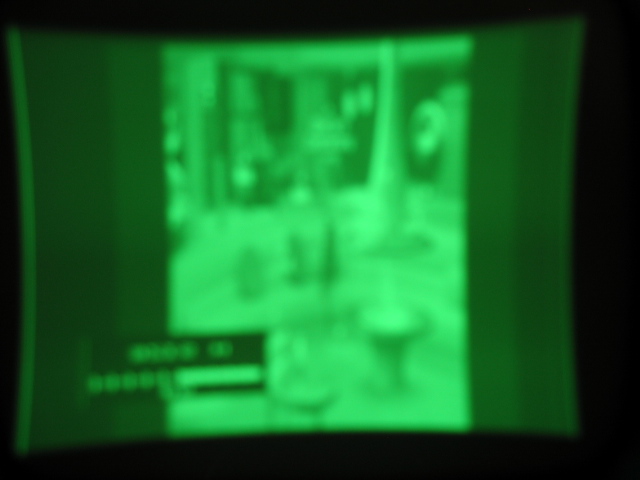
I am setting up my BG1208/2 from scratch wiht a new VP50. I now have the lenses off so that I can see easier the function between raster (for centering and sizing) and display area within the raster. As you can see from the pic with everything set to midpoint and all blocks deleted my initial image is extemely narrow.
Even if I try to increase Hsize I max it out before covering the phosphor area. Is there something else I can tweak to maximize my used phosphor area without maxing out Hsize.
Also I notice a wide vertical band on both sides of the actual picture, slightly brighter that the unused area and slightly dimmer that the actual image. What is that and could this be something I don't what pushing outside the edge of the tube and blow my tubes up.?
FYI, I'm using the HD fury in between VP50 and pj as well.
Any suggestions on what to try?
oh and the bluriness is just my camera.
| Description: |
|
| Filesize: |
78.4 KB |
| Viewed: |
5882 Time(s) |
|
_________________
Rod
|
|
| Back to top |
|
 |
macgyver655
Joined: 22 Aug 2007
Posts: 8508
|
| Posted: Sun Apr 06, 2008 1:46 am Post subject: |
|
|
|
Have you checked blanking?
|
|
| Back to top |
|
|
rod
Joined: 18 Mar 2006
Posts: 418
Location: Northern Ontario, Canada
|
| Posted: Sun Apr 06, 2008 1:41 pm Post subject: |
|
|
yes, all zero. the entire image is being displayed.
_________________
Rod
|
|
| Back to top |
|
|
macgyver655
Joined: 22 Aug 2007
Posts: 8508
|
| Posted: Sun Apr 06, 2008 3:56 pm Post subject: |
|
|
|
I see in your blurry image a bar graph of something and it appears to cover more of the raster then the image. What is the graph of? Is it from your source or the projector menu?
|
|
| Back to top |
|
|
rod
Joined: 18 Mar 2006
Posts: 418
Location: Northern Ontario, Canada
|
| Posted: Sun Apr 06, 2008 4:41 pm Post subject: |
|
|
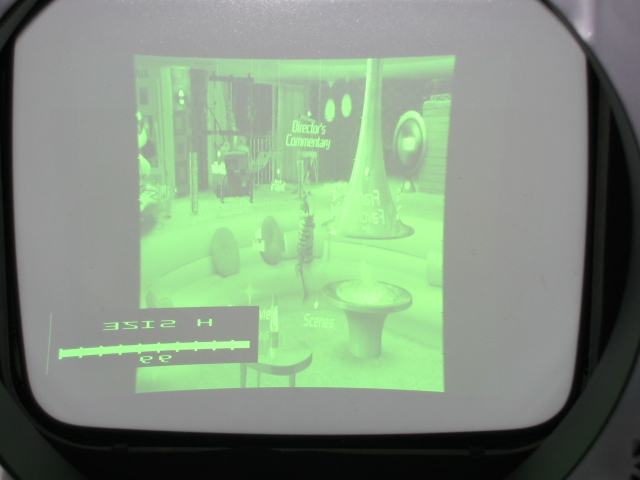
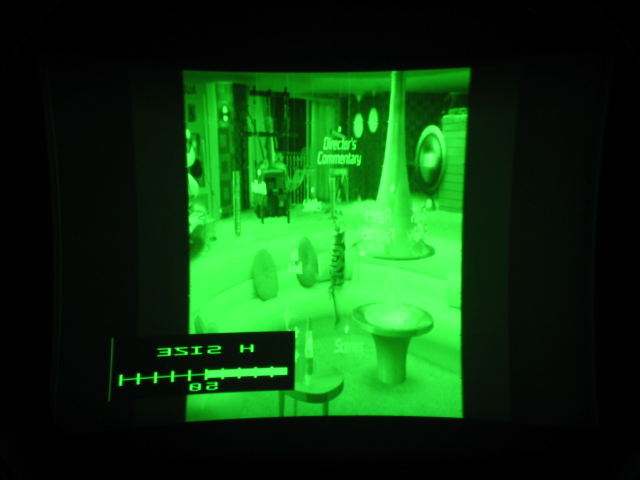
that's the HSize graph. Here I reshot pics, one at 50 and one maxed out (99). you can still see the shadow band on the left and right but it's clearer on the original pic I posted.
You an see in the HSized 99 there's a lot of unused phosphor. the rasters are almost at edge of tube face. I might be able to expand those but I think they are ok to avoid getting an active image too close to the tube edge.
| Description: |
|
| Filesize: |
98.98 KB |
| Viewed: |
5788 Time(s) |
|
| Description: |
|
| Filesize: |
88.44 KB |
| Viewed: |
5788 Time(s) |
|
_________________
Rod
|
|
| Back to top |
|
|
MikeEby

Joined: 24 Jun 2007
Posts: 5237
Location: Osceola, Indiana
|
| Posted: Sun Apr 06, 2008 4:56 pm Post subject: |
|
|
Does your scaler have some type of aspect ratio control? It could be set to narrow. That isn't a 4:3 movie your playing is it?
_________________
Doing HD since the last century!
|
|
| Back to top |
|
|
macgyver655
Joined: 22 Aug 2007
Posts: 8508
|
| Posted: Sun Apr 06, 2008 5:11 pm Post subject: |
|
|
|
I would have to assume that your internal test patterns fill the whole screen so its probably the resolution your sending or a setting like MikeEby is saying. If its not a projector issue and its more likely a source or processing issue then I'll let others respond. There are to many variables when there are more then one input device. Plus you haven't indicated what resolutions you are trying to send to it. Good Luck !!!!!
|
|
| Back to top |
|
|
rod
Joined: 18 Mar 2006
Posts: 418
Location: Northern Ontario, Canada
|
| Posted: Sun Apr 06, 2008 6:11 pm Post subject: |
|
|
| macgyver655 wrote: | | too many variables |
A-feakin-MEN to that brother!
this is definitely a learning process for me. I liken it to the first time I put a car in Drive.
BUT, BUT I'm getting closer as I experiment.
I since adjusted some newly discovered features of VP
Now have
Input Frame AR to 16:9 and Active AR to 1.85:1
Output settings are
Format 1080i-60
Display 16:9
Lens Mode 2 (no idea what this does)
Screen 16:9
Framerate 60hz unlocked
Output - Video (no idea what this is either)
the projector reports signal at 33.6Khz at 59hz . this seems low to me. I thought it should be in 50Khz area
Anyway, all of these adjustments get me a full active dispaly area!!!!!!!!! HSize is 88 
Any other parameters that may be important?
_________________
Rod
|
|
| Back to top |
|
|
macgyver655
Joined: 22 Aug 2007
Posts: 8508
|
| Posted: Sun Apr 06, 2008 6:21 pm Post subject: |
|
|
|
For that format, 33.6Khz at 59hz is just what you want. Congratulations !!!!
|
|
| Back to top |
|
|
rod
Joined: 18 Mar 2006
Posts: 418
Location: Northern Ontario, Canada
|
| Posted: Sun Apr 06, 2008 6:37 pm Post subject: |
|
|
ok then, I think it was higher when I w
many thanks for everyone's input. Now I can move on to other nagging issues but at least I can move forward.
_________________
Rod
|
|
| Back to top |
|
|
Ile

Joined: 09 Mar 2006
Posts: 1491
Location: Jyväskylä, Finland
|
| Posted: Mon Apr 07, 2008 9:23 am Post subject: |
|
|
If there is still too much unused raster in sides, you can lower back/front porch until you get raster ringing.
That will give sharper image and less stress to h-deflection circuit.
|
|
| Back to top |
|
|
rod
Joined: 18 Mar 2006
Posts: 418
Location: Northern Ontario, Canada
|
| Posted: Mon Apr 07, 2008 7:31 pm Post subject: |
|
|
I think I have it resolved. but for future reference what exactly is raster ringing?
_________________
Rod
|
|
| Back to top |
|
|
Ile
Joined: 09 Mar 2006
Posts: 1491
Location: Jyväskylä, Finland
|
| Posted: Mon Apr 07, 2008 8:26 pm Post subject: |
|
|
| rod wrote: | | I think I have it resolved. but for future reference what exactly is raster ringing? |
Kind of brighter vertical bars (waviness) in left edge of picture, caused by too small back porch setting. Horizontal line need some time to stabilize before actual picture...
|
|
| Back to top |
|
|
WD-40
Joined: 31 Mar 2008
Posts: 10
Location: Pacific Northwest
|
| Posted: Tue Apr 08, 2008 5:09 am Post subject: |
|
|
I was looking at this picture, and it struck me as odd.. not because of the aspect ratio, but because the text in the picture ("Director's Commentary") is correct for reading, but the "H Size" text is backwards??? How did you manage that one?
Perhaps it is a clue to the problem?

|
|
| Back to top |
|
|
AnalogRocks
Forum Moderator

Joined: 08 Mar 2006
Posts: 26706
Location: Toronto, Ontario, Canada
TV/Projector: Sony 1252Q, AMPRO 4000G
|
| Posted: Tue Apr 08, 2008 5:36 am Post subject: |
|
|
I just noticed that too. Scaler setting perhaps?
_________________
Tech support for nothing
CRT.
HD done right!
|
|
| Back to top |
|
|
rod
Joined: 18 Mar 2006
Posts: 418
Location: Northern Ontario, Canada
|
| Posted: Tue Apr 08, 2008 11:44 pm Post subject: |
|
|
haha. LOL! well something I can finally answer instead of asking. all the text blocks in the startup screen (movie is MIB) are rotating and I just happend to hit it when it was backwards!
I just grabbed any movie from my collection and this is what I grabbed. all weekend I had the startup screen of the movie running - over and over and over. I go around the house now telling my wife "ah shhhhudup!, nice peenakawangas!"
_________________
Rod
|
|
| Back to top |
|
|
rod
Joined: 18 Mar 2006
Posts: 418
Location: Northern Ontario, Canada
|
| Posted: Tue Apr 08, 2008 11:45 pm Post subject: |
|
|
does this count as a technical contribution? half-points?
_________________
Rod
|
|
| Back to top |
|
|
|
|





